Usage:
Success Rate:
Usage:
Success Rate:
 ## 2. Get a SKY API subscription key
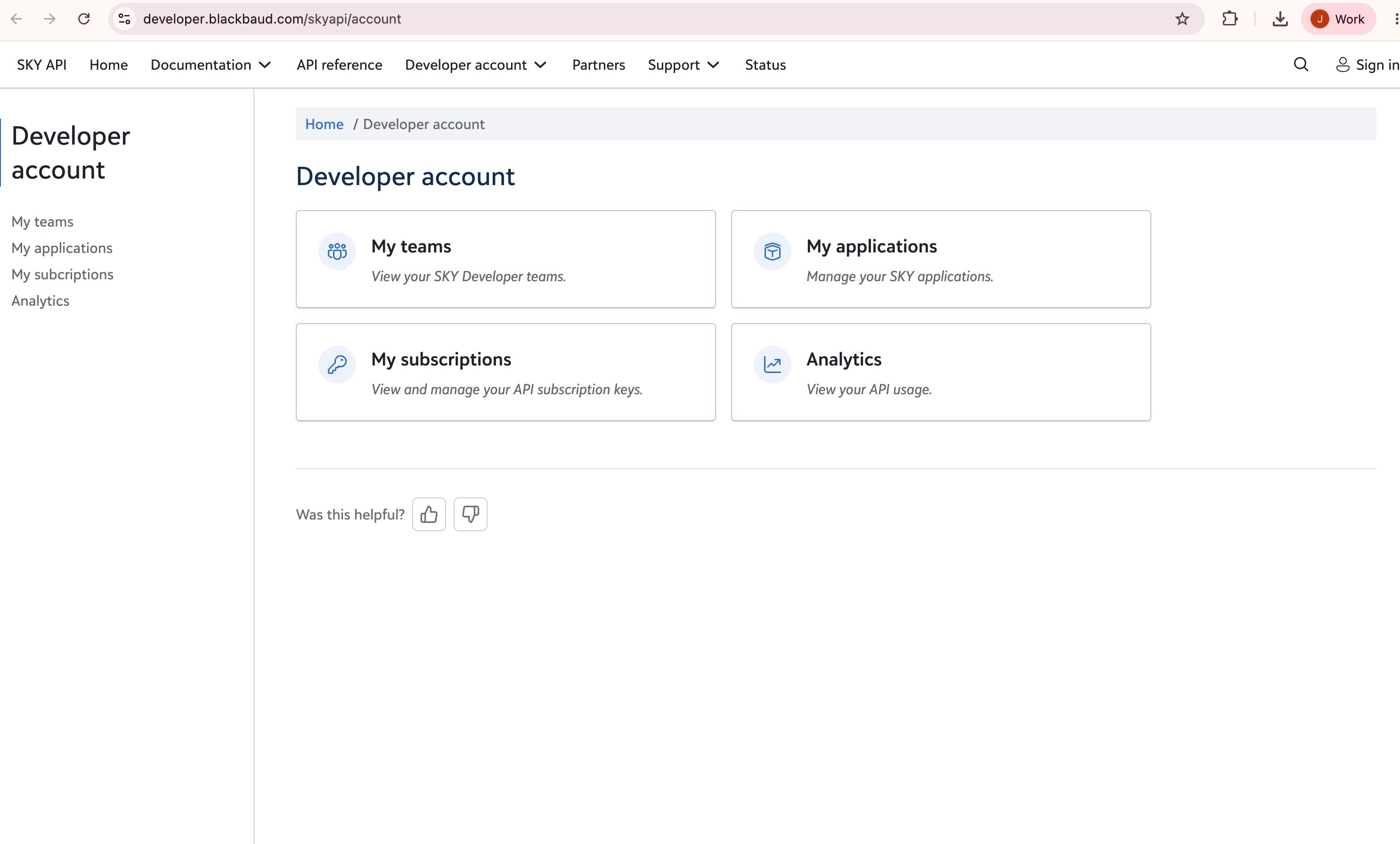
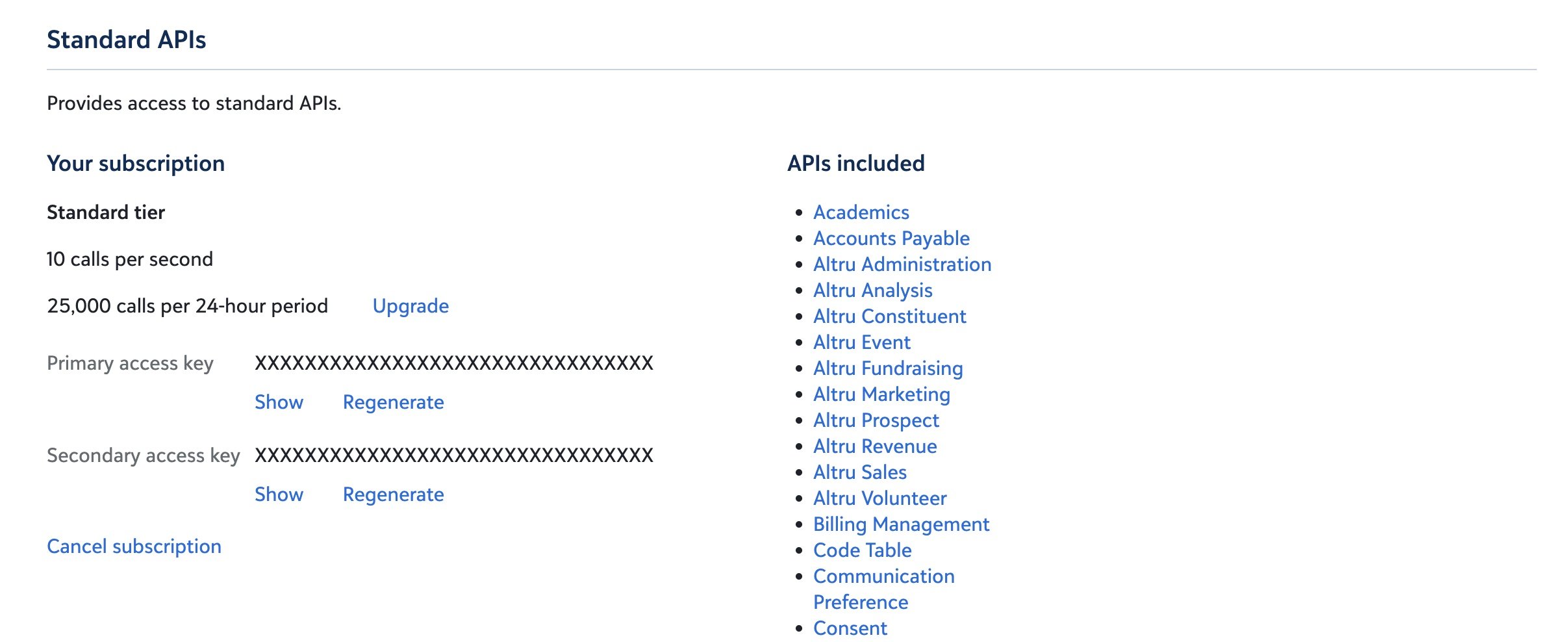
Blackbaud requires a subscription key on every SKY API request. In the developer portal, open **My subscriptions**, subscribe to the **Standard APIs** product (or the API product that covers the endpoints your integration uses), and copy either the primary or secondary key.
The tap expects this value as `subscription_key`, and Blackbaud sends it on requests as the `Bb-Api-Subscription-Key` header. See Blackbaud's [My subscriptions](https://webfiles-sc1.blackbaud.com/files/support/helpfiles/skydev/content/plat-skydev-subscriptions.html) docs for details on subscribing and finding your keys.
## 2. Get a SKY API subscription key
Blackbaud requires a subscription key on every SKY API request. In the developer portal, open **My subscriptions**, subscribe to the **Standard APIs** product (or the API product that covers the endpoints your integration uses), and copy either the primary or secondary key.
The tap expects this value as `subscription_key`, and Blackbaud sends it on requests as the `Bb-Api-Subscription-Key` header. See Blackbaud's [My subscriptions](https://webfiles-sc1.blackbaud.com/files/support/helpfiles/skydev/content/plat-skydev-subscriptions.html) docs for details on subscribing and finding your keys.
 ## 3. Create a SKY application
A [SKY application](https://developer.blackbaud.com/skyapi/docs/applications) represents your integration in Blackbaud and is required to make SKY API calls. Creating an application produces the OAuth credentials hotglue needs during authorization.
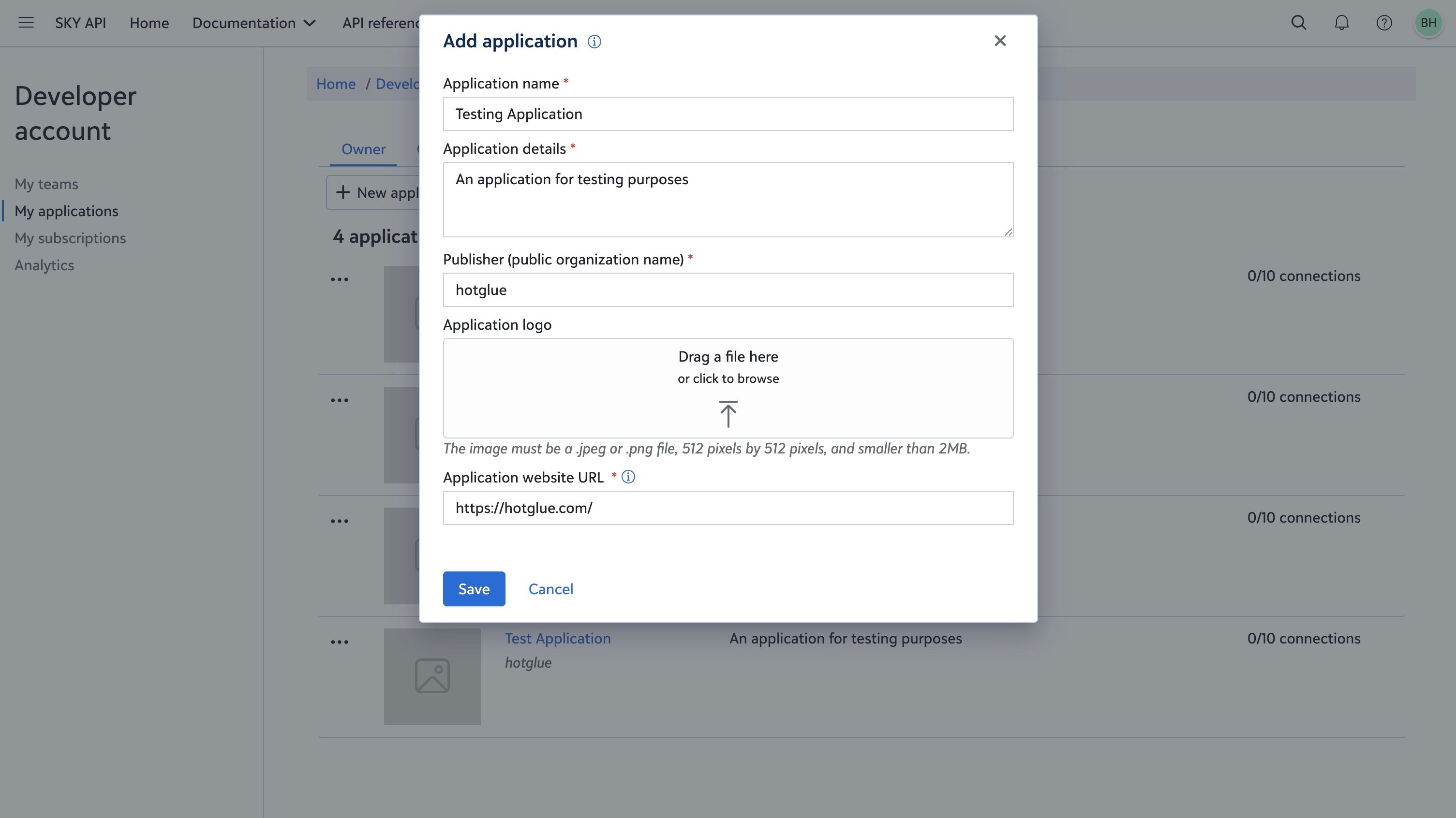
From **My applications**, click **+ New application** and fill out the required fields:
* **Application name**
* **Application details**
* **Publisher** (public organization name)
* **Application website URL**
An application logo is optional. Click **Save** when you are done.
## 3. Create a SKY application
A [SKY application](https://developer.blackbaud.com/skyapi/docs/applications) represents your integration in Blackbaud and is required to make SKY API calls. Creating an application produces the OAuth credentials hotglue needs during authorization.
From **My applications**, click **+ New application** and fill out the required fields:
* **Application name**
* **Application details**
* **Publisher** (public organization name)
* **Application website URL**
An application logo is optional. Click **Save** when you are done.
 ## 4. Copy OAuth credentials
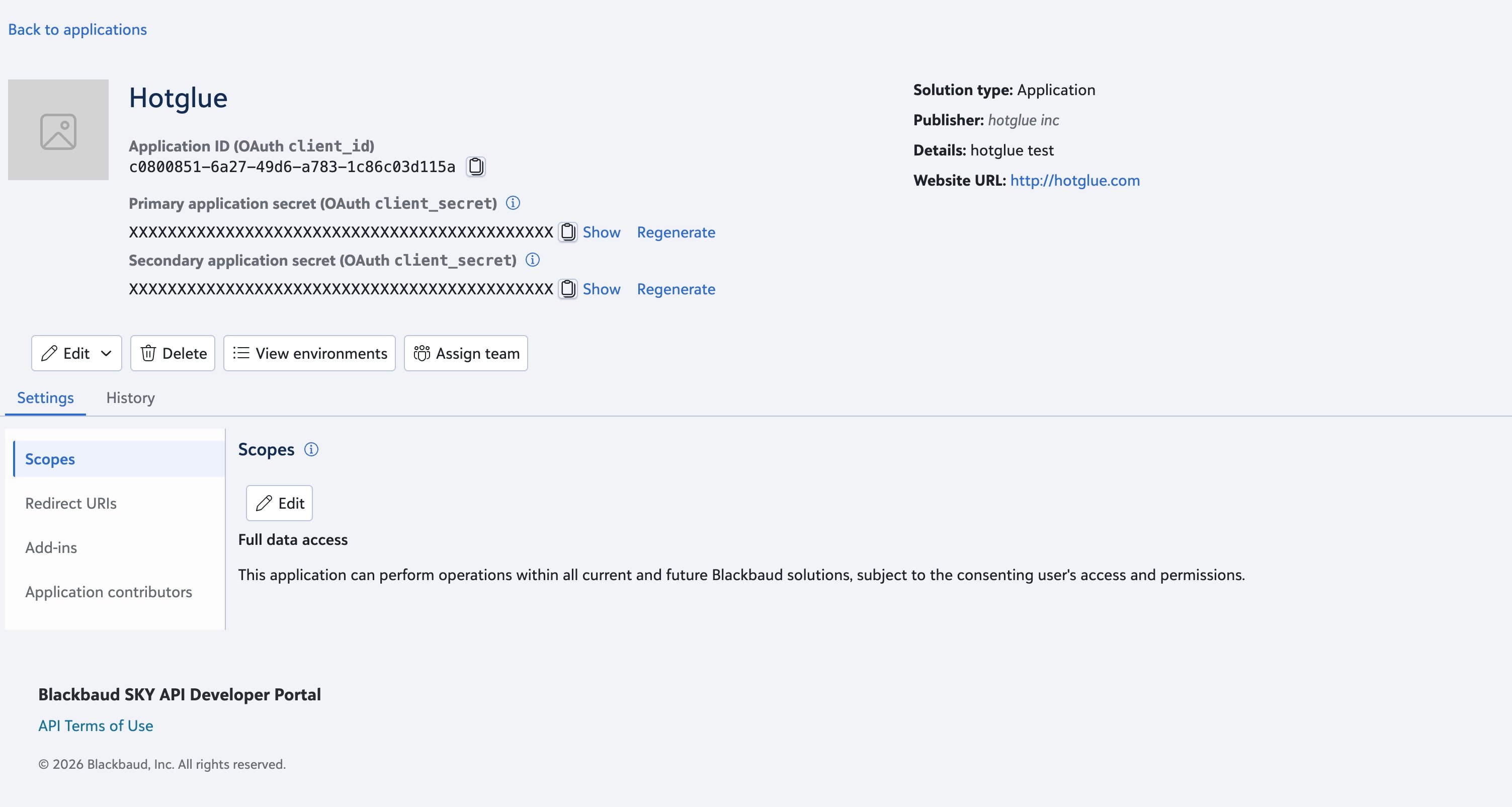
Open your application and copy the credentials from the application page:
* **Application ID** → hotglue `client_id`
* **Primary application secret** → hotglue `client_secret`
The Application ID is not sensitive and can be shared with Blackbaud admins who need to connect your app. The application secret is sensitive — treat it like a password and do not share it. Blackbaud provides primary and secondary secrets so you can rotate credentials; see [Application secrets](https://webfiles-sc1.blackbaud.com/files/support/helpfiles/skydev/content/plat-skydev-apps-secrets.html) for rotation guidance.
## 4. Copy OAuth credentials
Open your application and copy the credentials from the application page:
* **Application ID** → hotglue `client_id`
* **Primary application secret** → hotglue `client_secret`
The Application ID is not sensitive and can be shared with Blackbaud admins who need to connect your app. The application secret is sensitive — treat it like a password and do not share it. Blackbaud provides primary and secondary secrets so you can rotate credentials; see [Application secrets](https://webfiles-sc1.blackbaud.com/files/support/helpfiles/skydev/content/plat-skydev-apps-secrets.html) for rotation guidance.
 ## 5. Configure redirect URIs
In your application settings, open **Redirect URIs** and add the hotglue callback URL for your environment. Blackbaud requires the OAuth `redirect_uri` to match one of your registered URIs exactly, including trailing slashes. See the [Authorization](https://developer.blackbaud.com/skyapi/docs/authorization) and [Redirect URIs](https://help.blackbaud.com/docs/0/assets/skydev/content/plat-skydev-apps-settings-redirect-uris.html) documentation for details.
Add the callback URL that matches where your hotglue environment runs:
```text theme={null}
https://hotglue.xyz/callback
```
If you use a [custom OAuth callback domain](https://docs.hotglue.com/environment-settings/white-label) instead of `hotglue.xyz`, add that callback URL here as well.
## 5. Configure redirect URIs
In your application settings, open **Redirect URIs** and add the hotglue callback URL for your environment. Blackbaud requires the OAuth `redirect_uri` to match one of your registered URIs exactly, including trailing slashes. See the [Authorization](https://developer.blackbaud.com/skyapi/docs/authorization) and [Redirect URIs](https://help.blackbaud.com/docs/0/assets/skydev/content/plat-skydev-apps-settings-redirect-uris.html) documentation for details.
Add the callback URL that matches where your hotglue environment runs:
```text theme={null}
https://hotglue.xyz/callback
```
If you use a [custom OAuth callback domain](https://docs.hotglue.com/environment-settings/white-label) instead of `hotglue.xyz`, add that callback URL here as well.
 ## 6. Connect the application in Blackbaud
Before your application can access data in a Blackbaud environment, it must be connected to that environment. If you are integrating with a customer's Blackbaud organization, a user with Marketplace admin permissions must connect the app for you.
To connect the application:
1. Open the [Manage applications](https://help.blackbaud.com/docs/0/assets/marketplace/content/plat-market-manage-apps.html) page in the Blackbaud Marketplace.
2. Use **Connect app** and paste your application's ID.
3. Confirm the connection.
See [Connect an application](https://webfiles-sc1.blackbaud.com/files/support/helpfiles/marketplace/content/plat-market-connect-app.html) for step-by-step instructions. API access is further limited by the consenting user's security permissions within Blackbaud.
If you have access to the SKY Developer Cohort sandbox environment, your application may already be connected and you can skip this step.
## 7. Add Blackbaud to hotglue
Once you have your subscription key, OAuth credentials, and redirect URIs configured:
1. Go to **Settings** > **Connectors** in your hotglue environment.
1. Open **Bi-Directional Connectors** if you use bi-directional flows (`linkedConnectors`), then search for `Blackbaud`.
2. Open **Sources & Targets** if you use one-way source or target flows (`linkedSources` / `linkedTargets`), then search for `Blackbaud`.
2. Add your subscription key to the Blackbaud JSON definition:
* If modifying a **Connector** (v2), set `options.config.subscription_key` to your Blackbaud subscription\_key value.
* If modifying a **Source** or **Target** (v1), set `config.subscription_key` to your Blackbaud subscription\_key value.
3. Save the definition.
See [Connector management](https://docs.hotglue.com/key-concepts/connectors/v2-connectors/management), [Connector settings](https://docs.hotglue.com/key-concepts/connectors/v2-connectors/settings), [Source settings](https://docs.hotglue.com/key-concepts/connectors/v1-sources/settings), and [Target settings](https://docs.hotglue.com/key-concepts/connectors/v1-targets/settings) for details on configuring connectors in your environment.
## 8. Authorize and enable the connector
1. Add Blackbaud to your flow.
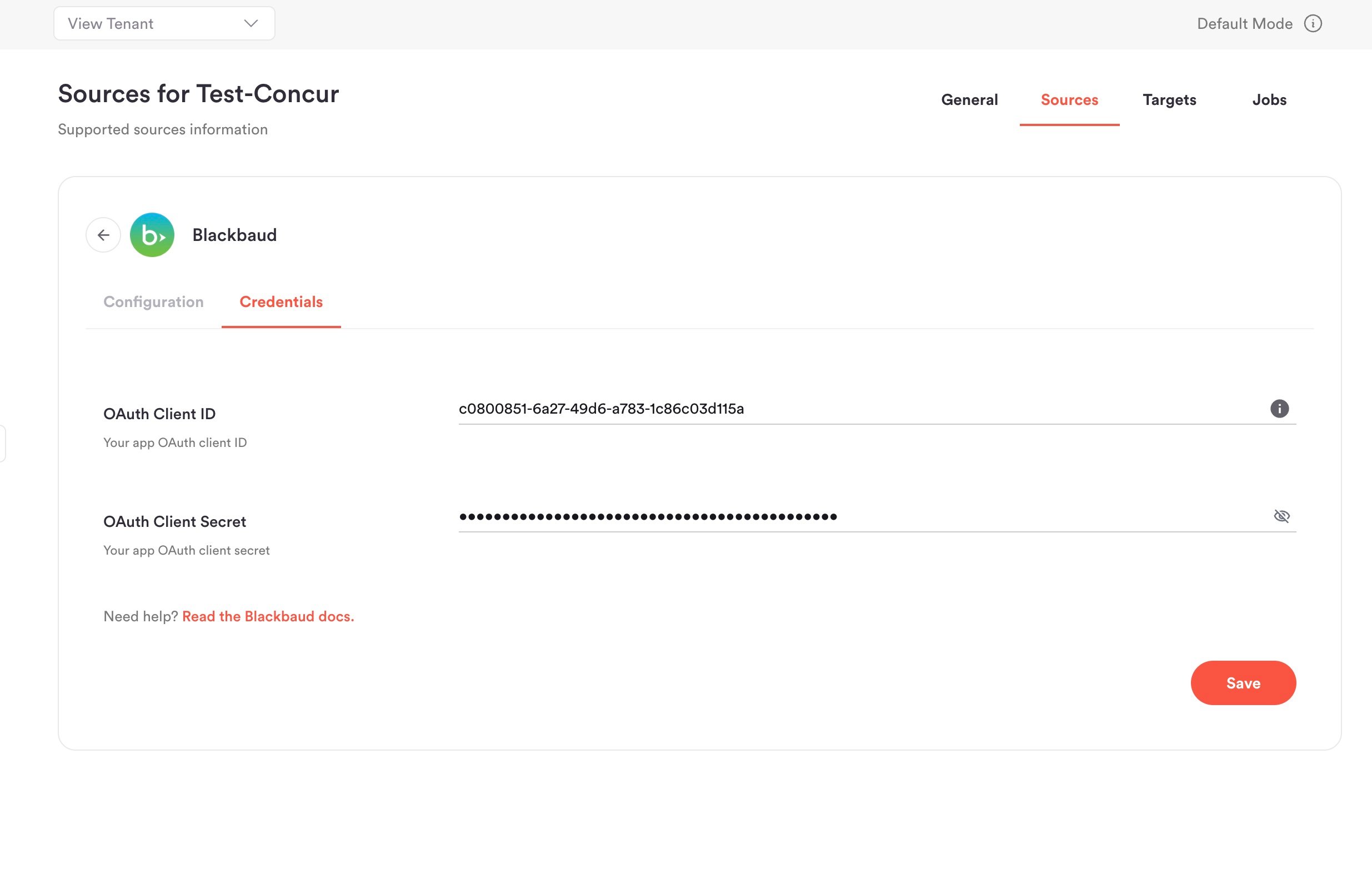
2. Enter your Blackbaud **Application ID** as the **OAuth Client ID** and your **Primary application secret** as the **OAuth Client Secret**.
3. Save and complete authorization with a test Blackbaud user. This enables the connector in your environment.
## 6. Connect the application in Blackbaud
Before your application can access data in a Blackbaud environment, it must be connected to that environment. If you are integrating with a customer's Blackbaud organization, a user with Marketplace admin permissions must connect the app for you.
To connect the application:
1. Open the [Manage applications](https://help.blackbaud.com/docs/0/assets/marketplace/content/plat-market-manage-apps.html) page in the Blackbaud Marketplace.
2. Use **Connect app** and paste your application's ID.
3. Confirm the connection.
See [Connect an application](https://webfiles-sc1.blackbaud.com/files/support/helpfiles/marketplace/content/plat-market-connect-app.html) for step-by-step instructions. API access is further limited by the consenting user's security permissions within Blackbaud.
If you have access to the SKY Developer Cohort sandbox environment, your application may already be connected and you can skip this step.
## 7. Add Blackbaud to hotglue
Once you have your subscription key, OAuth credentials, and redirect URIs configured:
1. Go to **Settings** > **Connectors** in your hotglue environment.
1. Open **Bi-Directional Connectors** if you use bi-directional flows (`linkedConnectors`), then search for `Blackbaud`.
2. Open **Sources & Targets** if you use one-way source or target flows (`linkedSources` / `linkedTargets`), then search for `Blackbaud`.
2. Add your subscription key to the Blackbaud JSON definition:
* If modifying a **Connector** (v2), set `options.config.subscription_key` to your Blackbaud subscription\_key value.
* If modifying a **Source** or **Target** (v1), set `config.subscription_key` to your Blackbaud subscription\_key value.
3. Save the definition.
See [Connector management](https://docs.hotglue.com/key-concepts/connectors/v2-connectors/management), [Connector settings](https://docs.hotglue.com/key-concepts/connectors/v2-connectors/settings), [Source settings](https://docs.hotglue.com/key-concepts/connectors/v1-sources/settings), and [Target settings](https://docs.hotglue.com/key-concepts/connectors/v1-targets/settings) for details on configuring connectors in your environment.
## 8. Authorize and enable the connector
1. Add Blackbaud to your flow.
2. Enter your Blackbaud **Application ID** as the **OAuth Client ID** and your **Primary application secret** as the **OAuth Client Secret**.
3. Save and complete authorization with a test Blackbaud user. This enables the connector in your environment.
 hotglue stores the OAuth `refresh_token` automatically after a successful authorization. You do not need to provide it manually.
After setup, your end users authorize Blackbaud through the standard OAuth consent flow when they link their account.
After this you're all set to go!
# Tap Changelog
hotglue stores the OAuth `refresh_token` automatically after a successful authorization. You do not need to provide it manually.
After setup, your end users authorize Blackbaud through the standard OAuth consent flow when they link their account.
After this you're all set to go!
# Tap Changelog