> ## Documentation Index
> Fetch the complete documentation index at: https://docs.hotglue.com/llms.txt
> Use this file to discover all available pages before exploring further.

# Databricks

# Connector Details

| Name           | Value                                                                                                                                                                                                                                                                                                             |
| :------------- | :---------------------------------------------------------------------------------------------------------------------------------------------------------------------------------------------------------------------------------------------------------------------------------------------------------------- |
| Platform       | [Databricks](https://databricks.com)                                                                                                                                                                                                                                                                              |
| Auth Type      | OAuth                                                                                                                                                                                                                                                                                                             |
| Direction      | Write                                                                                                                                                                                                                                                                                                             |
| Target Repo    | [https://github.com/hotgluexyz/target-databricks](https://github.com/hotgluexyz/target-databricks)                                                                                                                                                                                                                |
| Target Metrics | <p>Usage: <Tooltip tip="medium"><Icon icon="user" iconType="regular" color="#fff" size="14px" /><Icon icon="user" iconType="regular" color="#fff" size="14px" /><Icon icon="user" iconType="regular" color="#fff" size="14px" /><Icon icon="user" iconType="regular" color="#A9A9A9" size="14px" /></Tooltip></p> |

# Credentials Setup: Personal Access Token (PAT) or OAuth (recommend)

## PAT Configuration

Go to the [Databricks Website](https://www.databricks.com/) and sign-in\
Click on your user account image on the top right of the screen\
Go to `Settings`\
Go to `User -> Developer`\
Under `Access Tokens`, click on `Manage`\
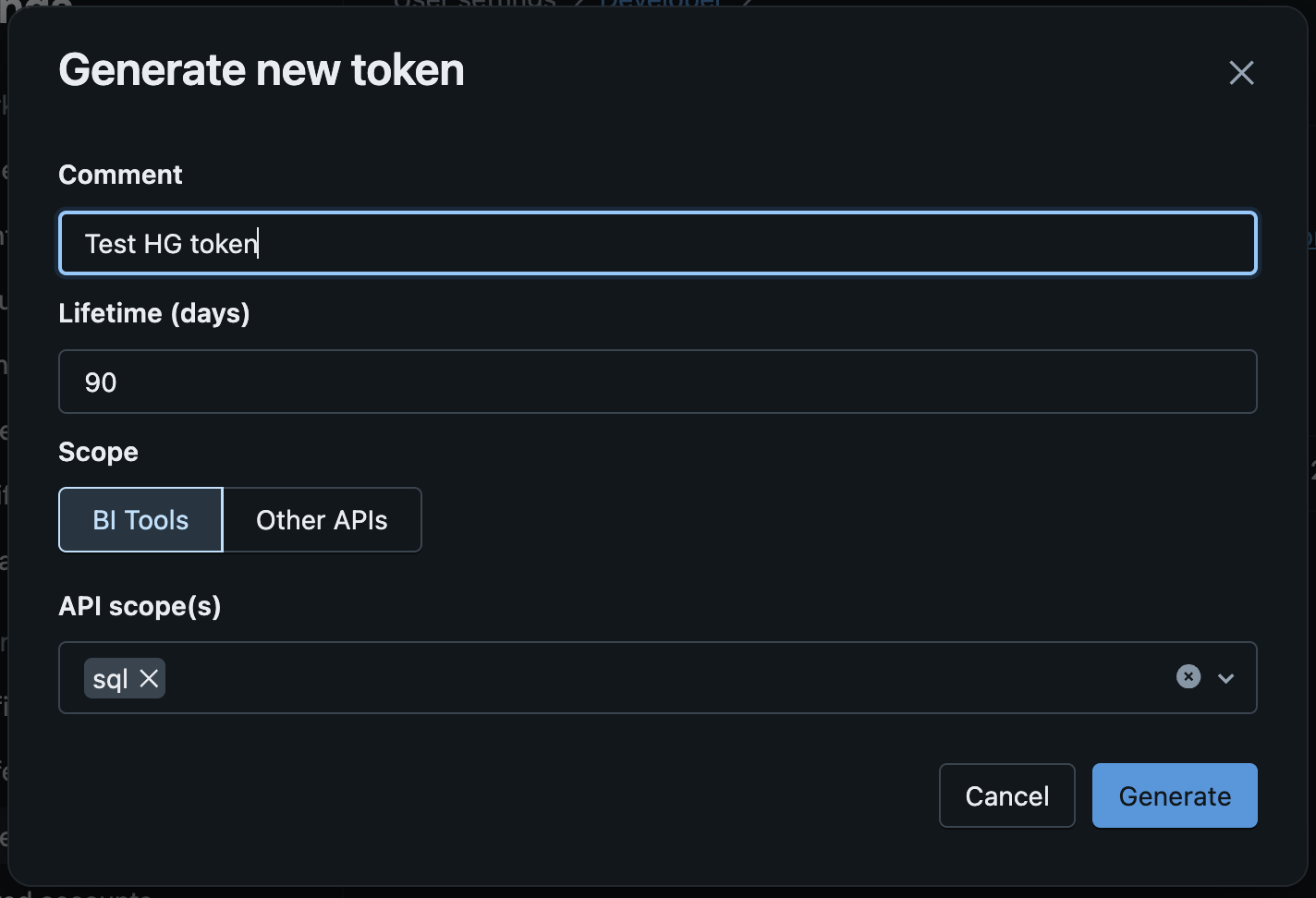
Then click on `Generate new Token`\
Add a `Comment` for this token, set a life time and under API Scopes select `sql`

<img src="https://mintcdn.com/hotglue/E7a9dZNwew8vk0d_/connectors/images/databricks/new-pat-modal.png?fit=max&auto=format&n=E7a9dZNwew8vk0d_&q=85&s=94622a9b7826973420cc0323fdfa762b" alt="New PAT Modal" width="500px" data-path="connectors/images/databricks/new-pat-modal.png" />

Click on `Generate`\
Copy the newly generated token and use it in the hotglue target configuration

## OAuth Configuration

Note: this authentication method is not avaible on Databricks free edition.

Follow the steps below to register the "OAuth App" you need to use the Databricks connector. This is a one-time process to create your OAuth app. Once you add your app credentials to hotglue, your client will just need to login to their Databricks account.

Go to the [Databricks Accounts Console](https://accounts.cloud.databricks.com/)\
On the left menu click on `Settings`\
Then click on the `App Connections` tab\
Click on `Add Connection`\
Enter an application name (example: `HG Test`)\
In Redirect URLs enter `https://hotglue.xyz/callback`\
In `Access Scopes` select `SQL`

<img src="https://mintcdn.com/hotglue/E7a9dZNwew8vk0d_/connectors/images/databricks/add-oauth-app.png?fit=max&auto=format&n=E7a9dZNwew8vk0d_&q=85&s=7e4e1e9f39726314d5d608ffd72ae31c" alt="New OAuth App settings" width="500px" data-path="connectors/images/databricks/add-oauth-app.png" />

Click `Add`\
You will be shown a modal with the Client ID and Client Secret. Copy both values, you'll use it in the hotglue target configuration

<img src="https://mintcdn.com/hotglue/E7a9dZNwew8vk0d_/connectors/images/databricks/add-oauth-app.png?fit=max&auto=format&n=E7a9dZNwew8vk0d_&q=85&s=7e4e1e9f39726314d5d608ffd72ae31c" alt="OAuth Client ID and Client Secret" width="500px" data-path="connectors/images/databricks/add-oauth-app.png" />
