> ## Documentation Index
> Fetch the complete documentation index at: https://docs.hotglue.com/llms.txt
> Use this file to discover all available pages before exploring further.
# HubSpot
# Connector Details
| Name | Value |
| :------------- | :---------------------------------------------------------------------------------------------------------------------------------------------------------------------------------------------------------------------------------------------------------------------------------------------------------------- |
| Platform | [HubSpot](https://hubspot.com) |
| Auth Type | OAuth |
| Direction | Bidirectional |
| Tap Repo | [https://github.com/hotgluexyz/tap-hubspot-beta](https://github.com/hotgluexyz/tap-hubspot-beta) |
| Target Repo | [https://gitlab.com/hotglue/target-hubspot-v2](https://gitlab.com/hotglue/target-hubspot-v2) |
| Tap Metrics |
Usage:
|
| Target Metrics |
Usage:
|
# Credentials Setup
Follow the steps below to get the credentials you need to use the HubSpot connector.
Follow the steps below to register the "OAuth App" you need to use the HubSpot connector. This is a one-time process to create your OAuth app. Once you add your app credentials to hotglue, your client will just need to login to their Hubspot account.
> 📘 The HubSpot developer account is **different** from a normal HubSpot account. Make sure to register for a Developer Account or you will not see the Manage App options.
To start, create a [free HubSpot developer account](https://app.hubspot.com/signup-hubspot/developers). This will give you access to create your app, alongside a Hubspot environment to use in your tests.
Once logged into the HubSpot developer portal, your home page should show an **APPS** tab on the top bar. Navigate to the **Apps** tab or click **Manage apps**.
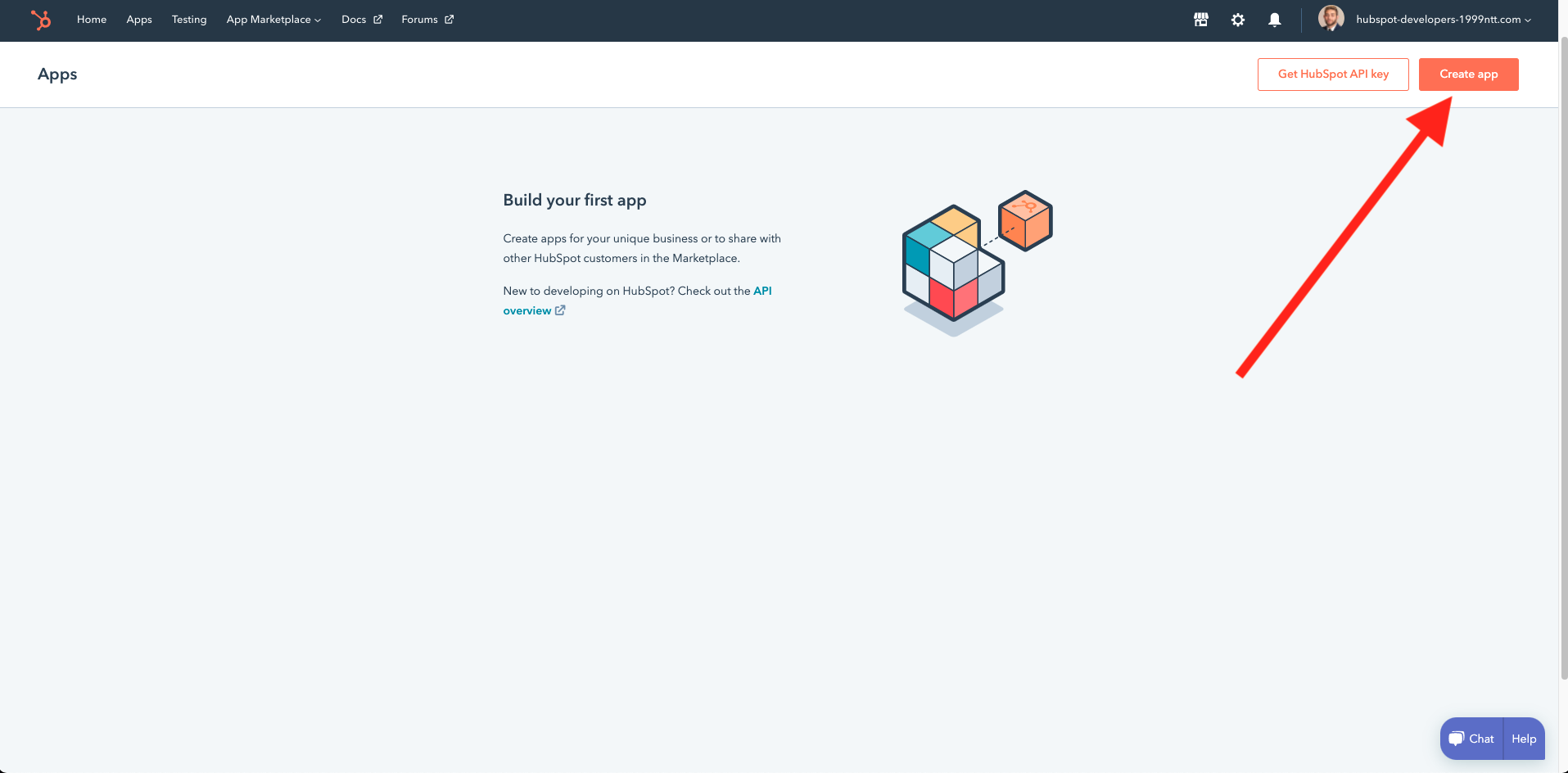
Once on your Apps page, can click **Create App** to begin setting up your app. Give your app a name, logo, and description.
Then, navigate to the Auth tab and add your **Redirect URL**. Unless you've configured a forked redirect URL in hotglue, this needs to be `https://hotglue.xyz/callback`. Click **Create App**.
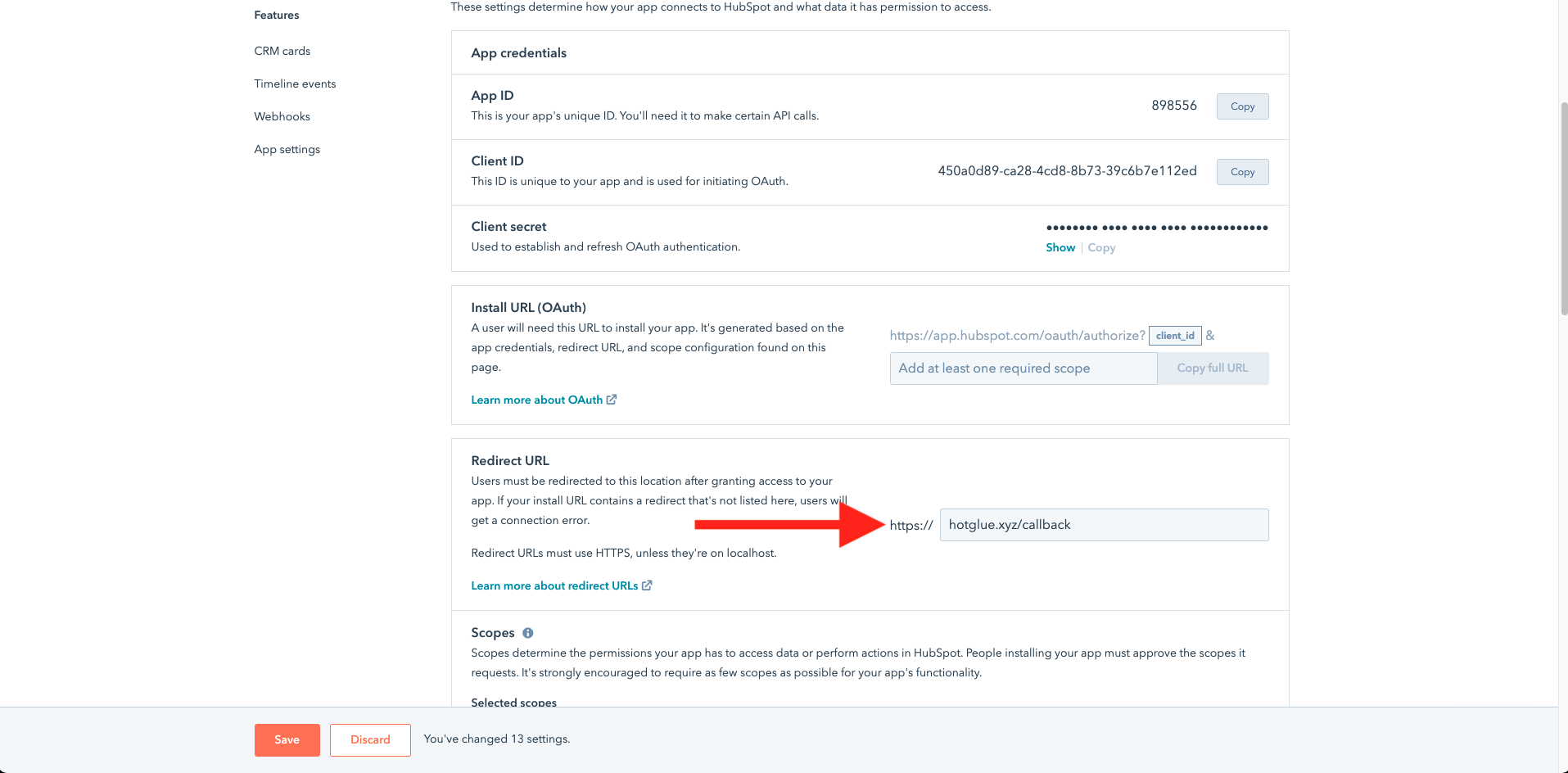
The last step is to add your scopes. These are the resources that your users will explicitly authorize you to access. There are two required scope categories:
* `oauth` is required for all integrations.
* All `crm.schemas` scopes are required for catalog discovery in hotglue.
The rest of your scopes will depend on which resources you want to work with in your integration. If you have questions about what your scopes should be, feel free to ask us!
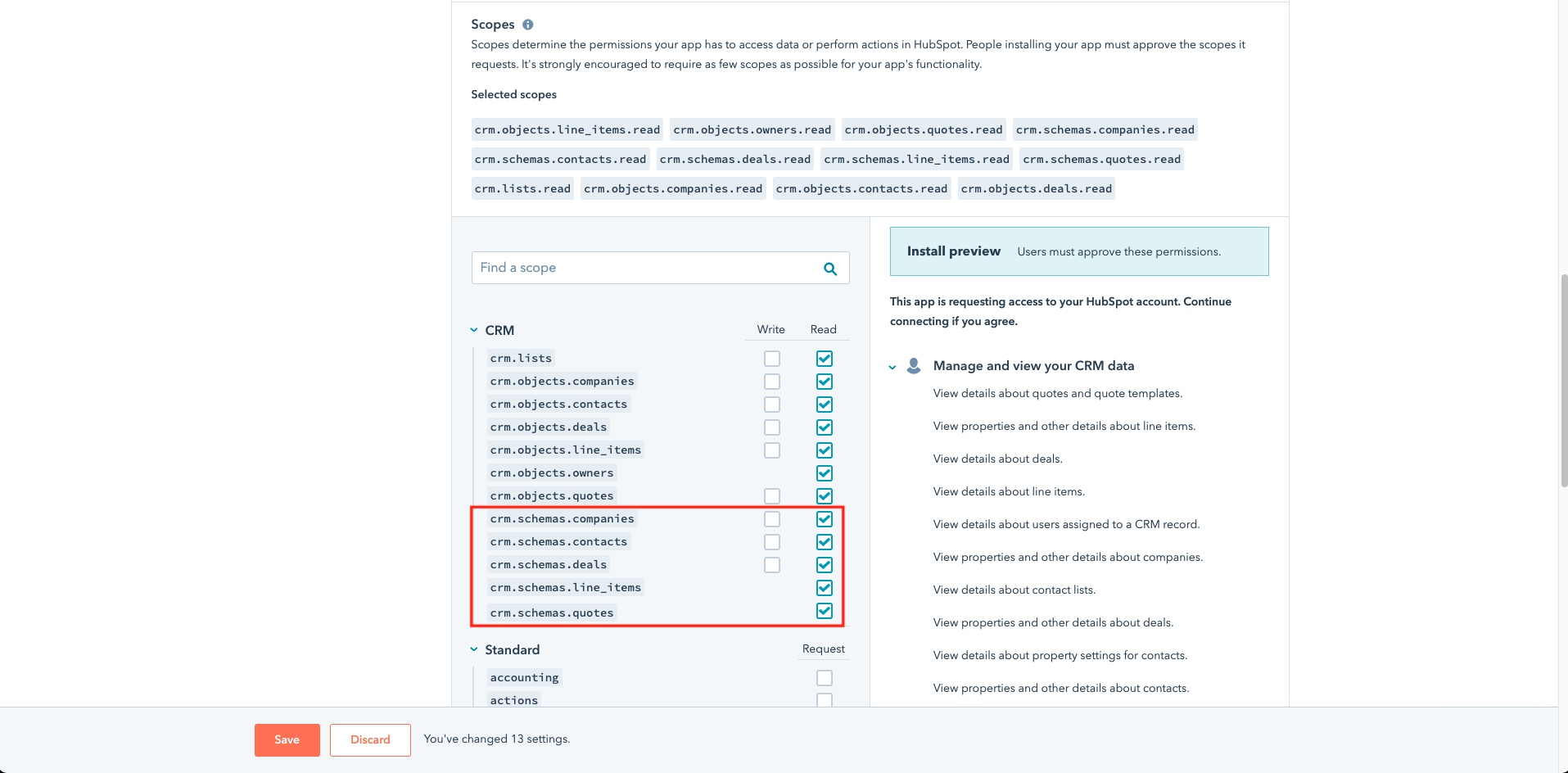
After you save your updated scopes, you can now copy the three required params to enable your app in hotglue:
* Client ID
* Client Secret
* Install URL
You can find all three near the top of the "Auth" section in your Hubspot app.
# Features
## Fetch associated records
### Introduction
HubSpot supports the concept of [associated records](https://knowledge.hubspot.com/records/associate-records), which enables you to relate a record like a `deal` to another, like a `contact`.
In some scenarios, it may be useful to fetch records associated with your selected streams, without fetching the entire associated table.
For example, let's say you are running an incremental sync on deals. You may want to fetch the contacts and activities associated with the deals in the each sync. You could do this by selecting `deals`, `contacts`, and `activity`-type streams in your field map. Every job would then fetch all incremental updates for all selected streams, and you could reference related records from within your database.
However, if you don't need to replicate each full stream, you can simplify your integration using `fetch_associations`. With `fetch_associations`, the tap only fetches relevant records from related tables that you define.
### The `fetch_associations` object
`fetch_associations` is an object set in the connector's config. You can set this via a PATCH to the [linkedSource](https://docs.hotglue.com/api-reference/v1/linked-sources/update-linked-sources) (v1) or [linkedConnector](https://docs.hotglue.com/api-reference/v2/linked-connectors/update) (v2) config.
The object contains one or more `` keys (a stream that must already be selected in the field map), each containing a list of one or more `` keys (a stream that may or may not be selected in the field map):
```json theme={null}
"fetch_associations":{
:[,]
}
```
### Example usage
Below is an example `fetch_associations` entry for deals. In this case, `deals` is the root table selected in our field map, and `contacts` and `tasks` are the related tables to deals that we want to retrieve:
```json theme={null}
"fetch_associations":{
"deals":[
"contacts",
"tasks"
]
}
```
The output from a job using the above will contain 5 tables:
* `deals`
* `associations_deals_contacts`
* `associations_deals_tasks`
* `contacts`
* `tasks`
`deals` contains an incremental sync of deals records. There is no change from normal behavior.
The `associations_` tables contain IDs of the `deals` from the stream sync, and the IDs of the related `contacts` and `tasks` records for those deals.
`contacts` and `tasks` tables contain the related records which are referenced in `associations_` tables, with an additional `isAssociated` (boolean) column.
### Supported tables
Supported `` keys are explicitly defined in the HubSpot connector:
```json theme={null}
[
"contacts",
"meetings",
"calls",
"communications",
"emails",
"notes",
"postal_mail",
"tasks",
"companies",
"tickets",
"products",
"quotes",
"deals"
]
```
`` keys can be any stream key available in Hubspot's V3 CRM API. This includes custom objects.
### Considerations
1. There may be more than one related record for a given root record. In the above example, your code would need to handle cases where multiple `contacts` and `tasks` are associated with the same root `deal`.
2. If the `` is not selected in the field map, neither that stream nor the related records will sync. This flag is not a replacement for selecting tables in the field map.
3. There are no enforced validations when passing a `fetch_associations` object to a config. You will need to ensure that the `` and `` keys are valid, and that your object is formatted as documented.
4. A PATCH to the connector config cannot be used to add additional keys to an existing `fetch_associations` object. Your PATCH must include the full `fetch_associations` object that you expect to sync.
# Tap Changelog
| Version | Notes |
| :-------------------------------------------------------------------------------------------------------------- | :------------------------------------------------------------------------------------------------------------------------------------------------------------------------------------------------------------------------------------------------------ |
| [v2.9.10](https://github.com/hotgluexyz/tap-hubspot/releases/tag/v2.9.10) | |
| [v2.9.9](https://github.com/hotgluexyz/tap-hubspot/releases/tag/v2.9.9) | |
| [v2.9.8](https://github.com/hotgluexyz/tap-hubspot/releases/tag/v2.9.8) | |
| [v2.9.7 - Fix discover for new scopes](https://github.com/hotgluexyz/tap-hubspot/releases/tag/v2.9.7) | - Updated discover to work if users aren't granted full schema access to all streams |
| [v2.9.6 - Add support for companies\_properties](https://github.com/hotgluexyz/tap-hubspot/releases/tag/v2.9.6) | Added support for new stream `companies_properties` based on following HubSpot endpoint: [https://legacydocs.hubspot.com/docs/methods/companies/get\_company\_properties](https://legacydocs.hubspot.com/docs/methods/companies/get_company_properties) |