> ## Documentation Index
> Fetch the complete documentation index at: https://docs.hotglue.com/llms.txt
> Use this file to discover all available pages before exploring further.

# Klaviyo

# Connector Details

| Name           | Value                                                                                                                                                                                                                                                                                                                                                                                                                                                                                                                                                                                                                                                                       |
| :------------- | :-------------------------------------------------------------------------------------------------------------------------------------------------------------------------------------------------------------------------------------------------------------------------------------------------------------------------------------------------------------------------------------------------------------------------------------------------------------------------------------------------------------------------------------------------------------------------------------------------------------------------------------------------------------------------- |
| Platform       | [Klaviyo](https://klaviyo.com)                                                                                                                                                                                                                                                                                                                                                                                                                                                                                                                                                                                                                                              |
| Auth Type      | API Keys                                                                                                                                                                                                                                                                                                                                                                                                                                                                                                                                                                                                                                                                    |
| Direction      | Bidirectional                                                                                                                                                                                                                                                                                                                                                                                                                                                                                                                                                                                                                                                               |
| Tap Repo       | [https://github.com/hotgluexyz/tap-klaviyo](https://github.com/hotgluexyz/tap-klaviyo)                                                                                                                                                                                                                                                                                                                                                                                                                                                                                                                                                                                      |
| Target Repo    | [https://gitlab.com/hotglue/target-klaviyo](https://gitlab.com/hotglue/target-klaviyo)                                                                                                                                                                                                                                                                                                                                                                                                                                                                                                                                                                                      |
| Tap Metrics    | <p>Usage: <Tooltip tip="high"><Icon icon="user" iconType="regular" color="#fff" size="14px" /><Icon icon="user" iconType="regular" color="#fff" size="14px" /><Icon icon="user" iconType="regular" color="#fff" size="14px" /><Icon icon="user" iconType="regular" color="#fff" size="14px" /></Tooltip><br />Success Rate: <Tooltip tip="high"><Icon icon="circle-check" iconType="regular" color="#fff" size="14px" /><Icon icon="circle-check" iconType="regular" color="#fff" size="14px" /><Icon icon="circle-check" iconType="regular" color="#fff" size="14px" /><Icon icon="circle-check" iconType="regular" color="#fff" size="14px" /></Tooltip></p>              |
| Target Metrics | <p>Usage: <Tooltip tip="low"><Icon icon="user" iconType="regular" color="#fff" size="14px" /><Icon icon="user" iconType="regular" color="#fff" size="14px" /><Icon icon="user" iconType="regular" color="#A9A9A9" size="14px" /><Icon icon="user" iconType="regular" color="#A9A9A9" size="14px" /></Tooltip><br />Success Rate: <Tooltip tip="medium"><Icon icon="circle-check" iconType="regular" color="#fff" size="14px" /><Icon icon="circle-check" iconType="regular" color="#fff" size="14px" /><Icon icon="circle-check" iconType="regular" color="#A9A9A9" size="14px" /><Icon icon="circle-check" iconType="regular" color="#A9A9A9" size="14px" /></Tooltip></p> |

# Credentials Setup

Follow the steps below to get the credentials you need to use the Klaviyo connector.

The first thing you will need to do get your Klaviyo credentials is make an Klaviyo account. You can [make a free account (or sign up for a paid account) at this link](https://www.klaviyo.com/pricing?emailListSize=0\&smsContacts=0). If you already have an account, you can [log in at this link](https://www.klaviyo.com/login).

## API Key

First, we are going to go through how to find your personal API key.
![](https://files.readme.io/d61b062-Screen_Shot_2021-11-23_at_3.56.15_PM.png "Screen Shot 2021-11-23 at 3.56.15 PM.png")

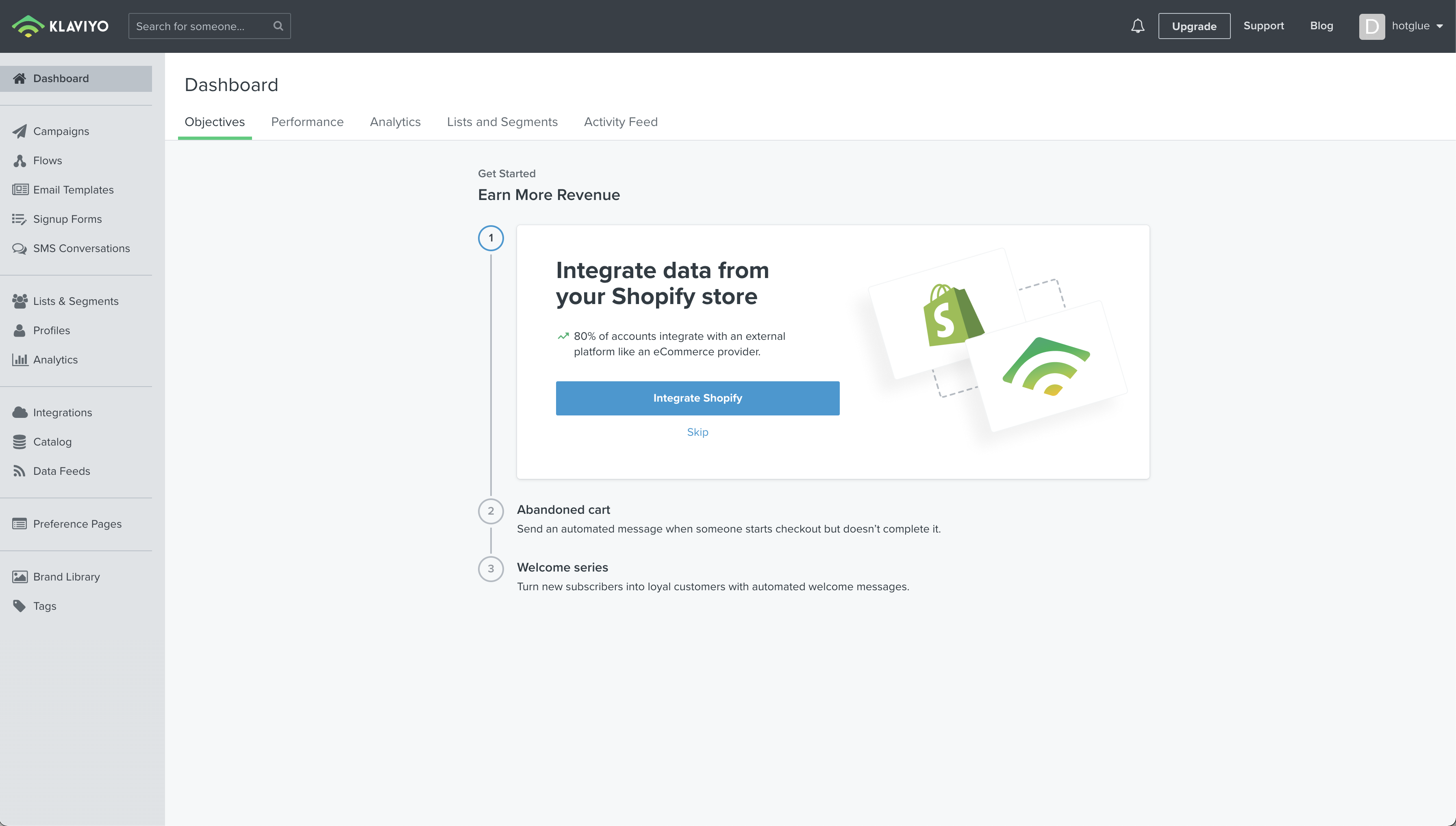
Once you have logged in to Klaviyo, you will be shown the home page of the Klaviyo platform. In the top right corner, there is an icon with your initial and company name. Go ahead and click that icon.
![](https://files.readme.io/c66bca3-Screen_Shot_2021-11-23_at_4.00.17_PM.png "Screen Shot 2021-11-23 at 4.00.17 PM.png")

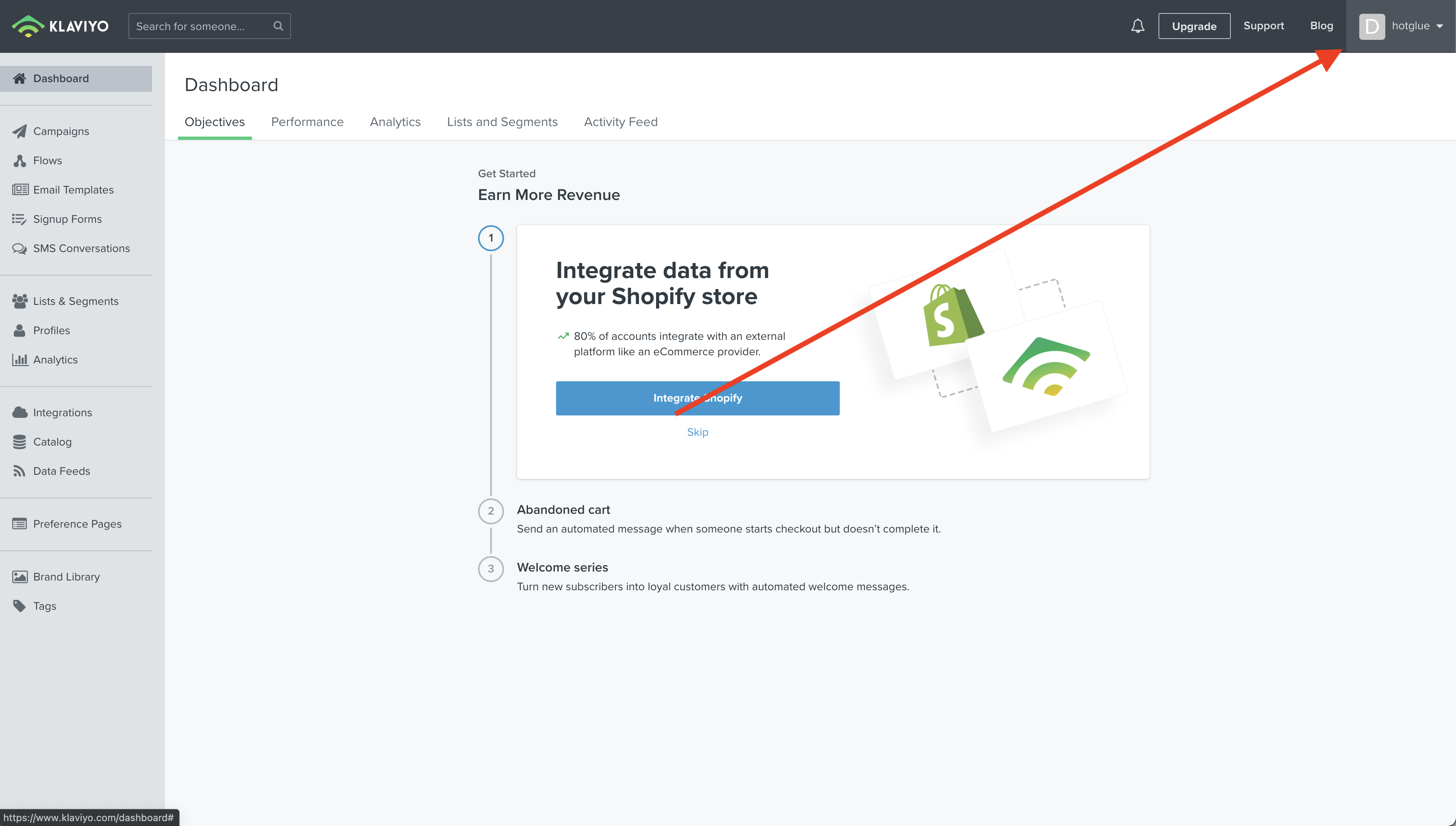
Now go ahead and click on the Account tab from the drop down.
![](https://files.readme.io/afcc4c4-Screen_Shot_2021-11-23_at_4.02.11_PM.png "Screen Shot 2021-11-23 at 4.02.11 PM.png")

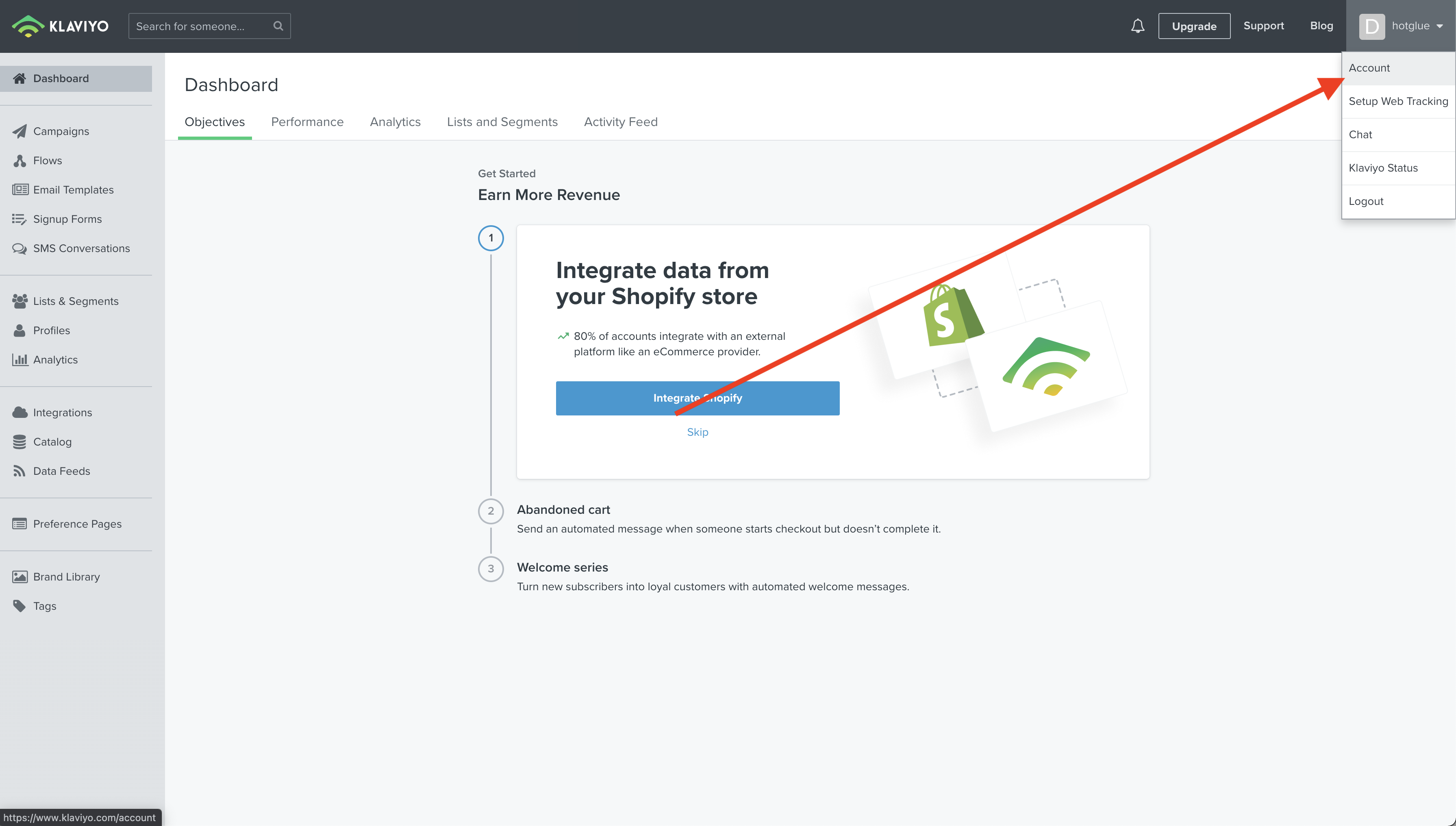
You will now be on your account page. Go ahead and click on the **Settings** tab in the upper right hand side of your screen.
![](https://files.readme.io/1df8edf-Screen_Shot_2021-11-23_at_4.03.07_PM.png "Screen Shot 2021-11-23 at 4.03.07 PM.png")

Go ahead and select **API Keys** from the resulting dropdown.
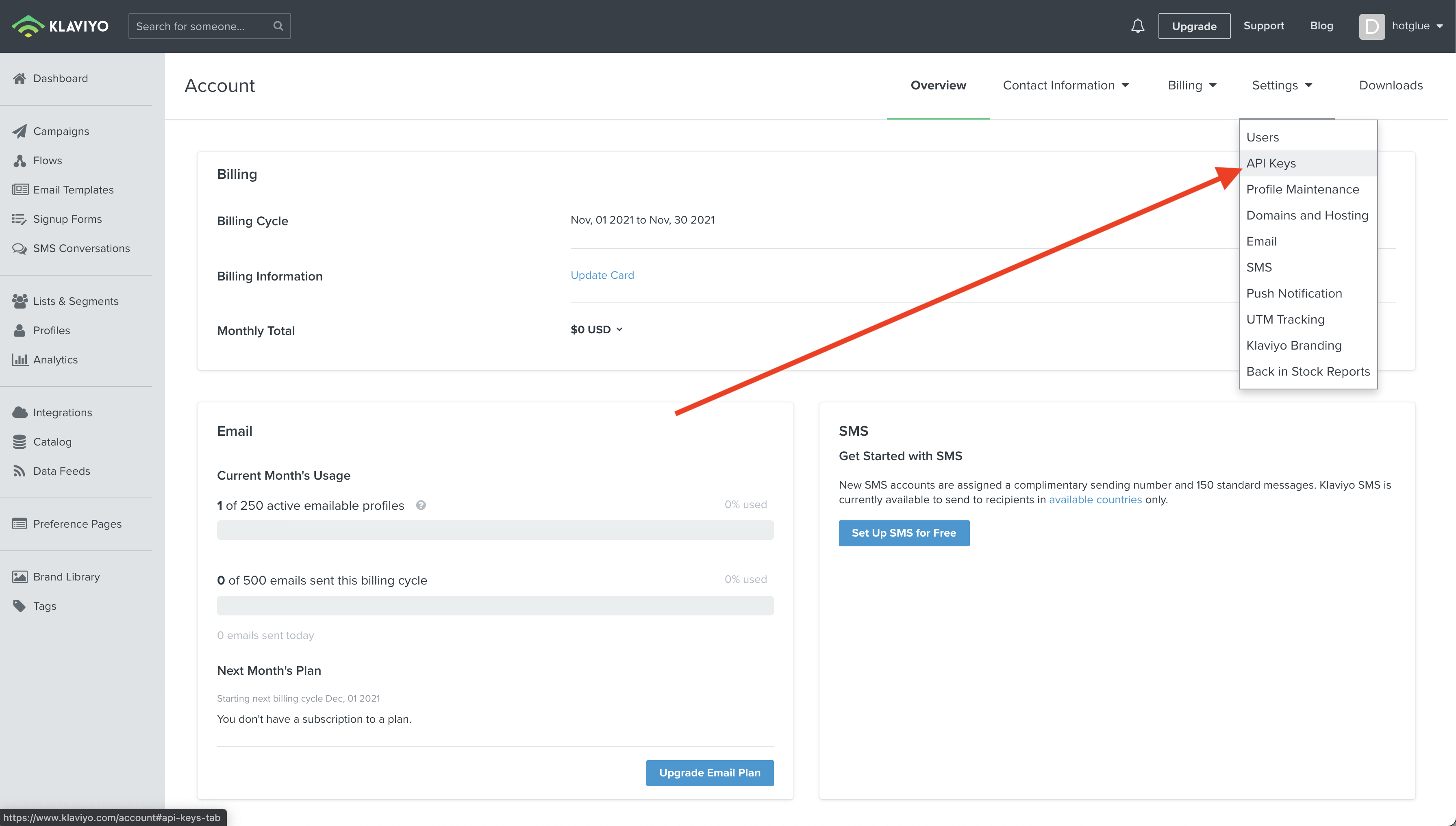
![](https://files.readme.io/584eb9b-Screen_Shot_2021-11-23_at_4.04.35_PM.png "Screen Shot 2021-11-23 at 4.04.35 PM.png")

Now you will be on a page where you can generate the API Key for hotglue.
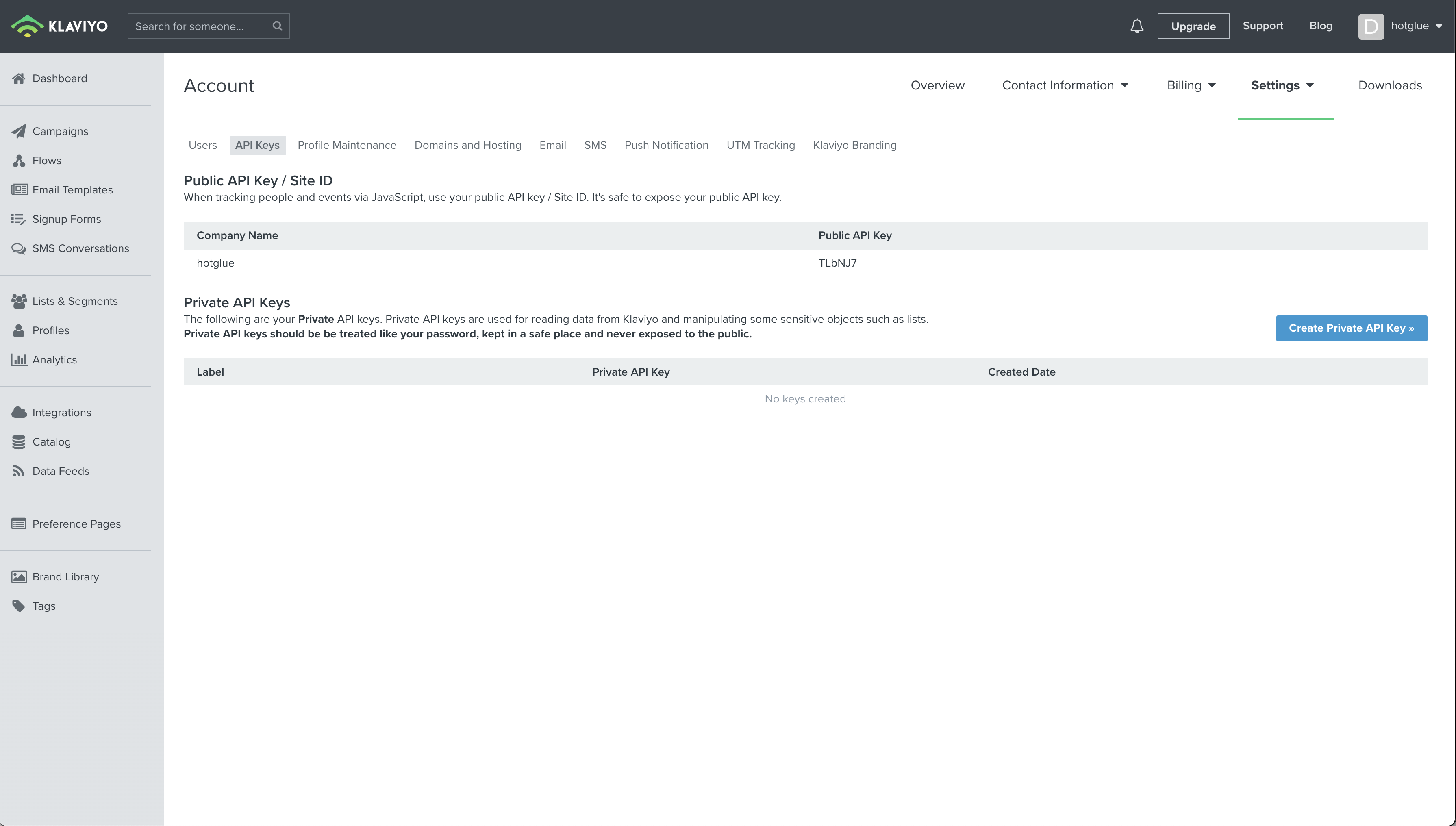
![](https://files.readme.io/0f01314-Screen_Shot_2021-11-23_at_4.23.05_PM.png "Screen Shot 2021-11-23 at 4.23.05 PM.png")

You should go ahead and click the **Create Private API Key** button.
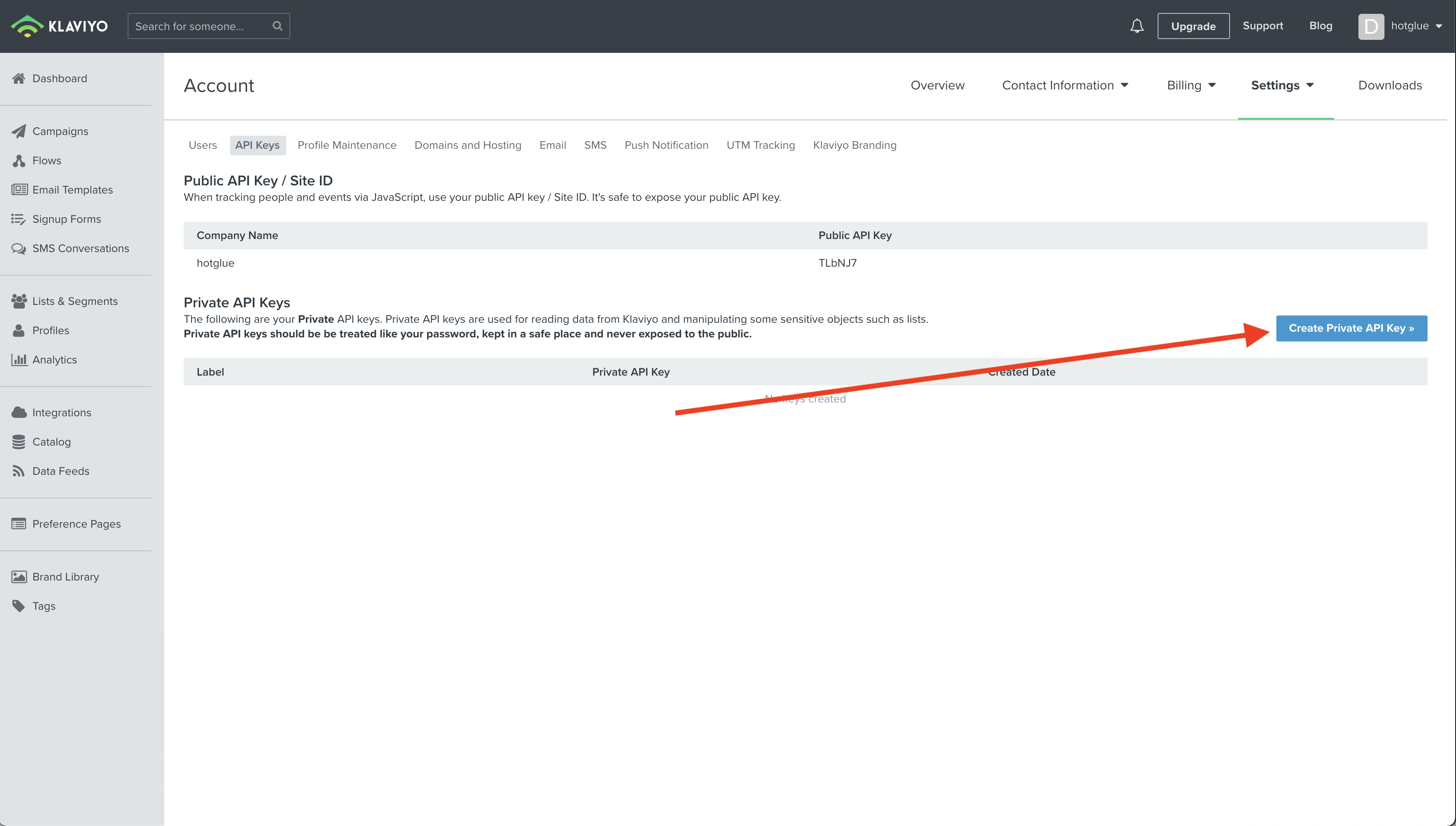
![](https://files.readme.io/b6932ba-Screen_Shot_2021-11-23_at_4.23.05_PM.png "Screen Shot 2021-11-23 at 4.23.05 PM.png")

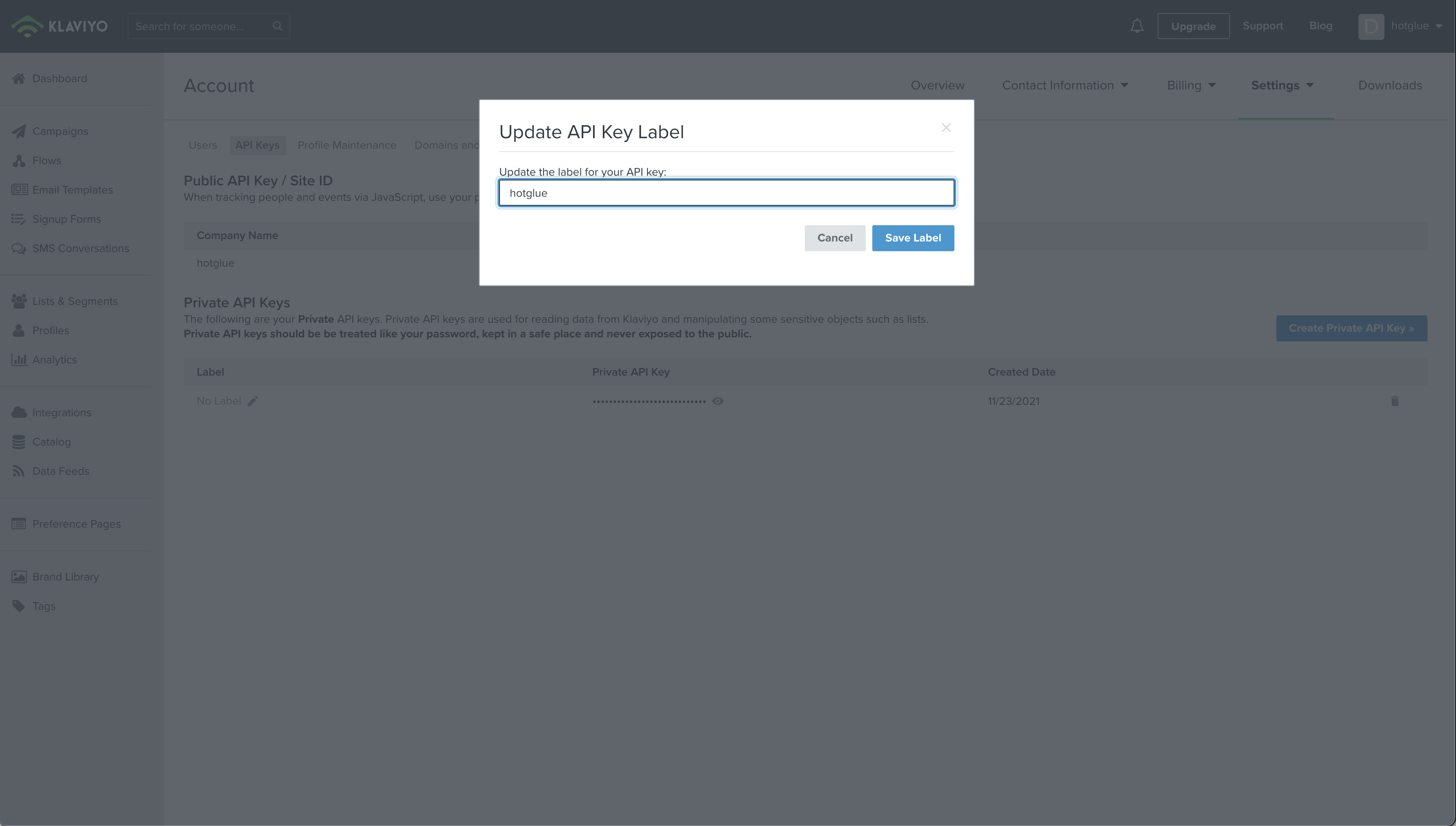
You should go ahead and name the API Key **hotglue**. Start this process by clicking the pencil icon under the label section.
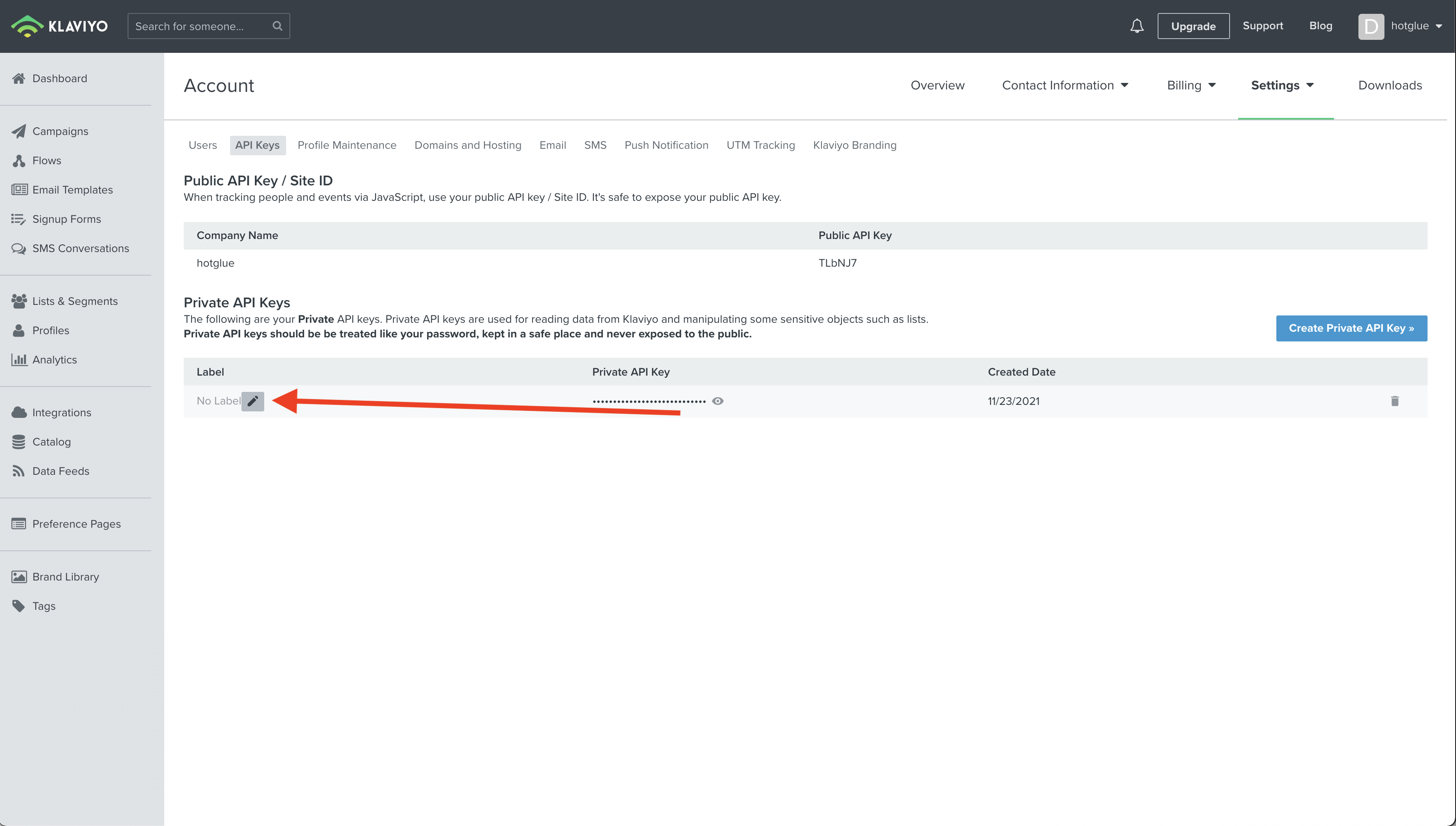
![](https://files.readme.io/9fdbe0f-Screen_Shot_2021-11-23_at_4.26.47_PM.png "Screen Shot 2021-11-23 at 4.26.47 PM.png")

Once you've typed in hotglue, click **Save Label**.
![](https://files.readme.io/50af10b-Screen_Shot_2021-11-23_at_4.28.44_PM.png "Screen Shot 2021-11-23 at 4.28.44 PM.png")

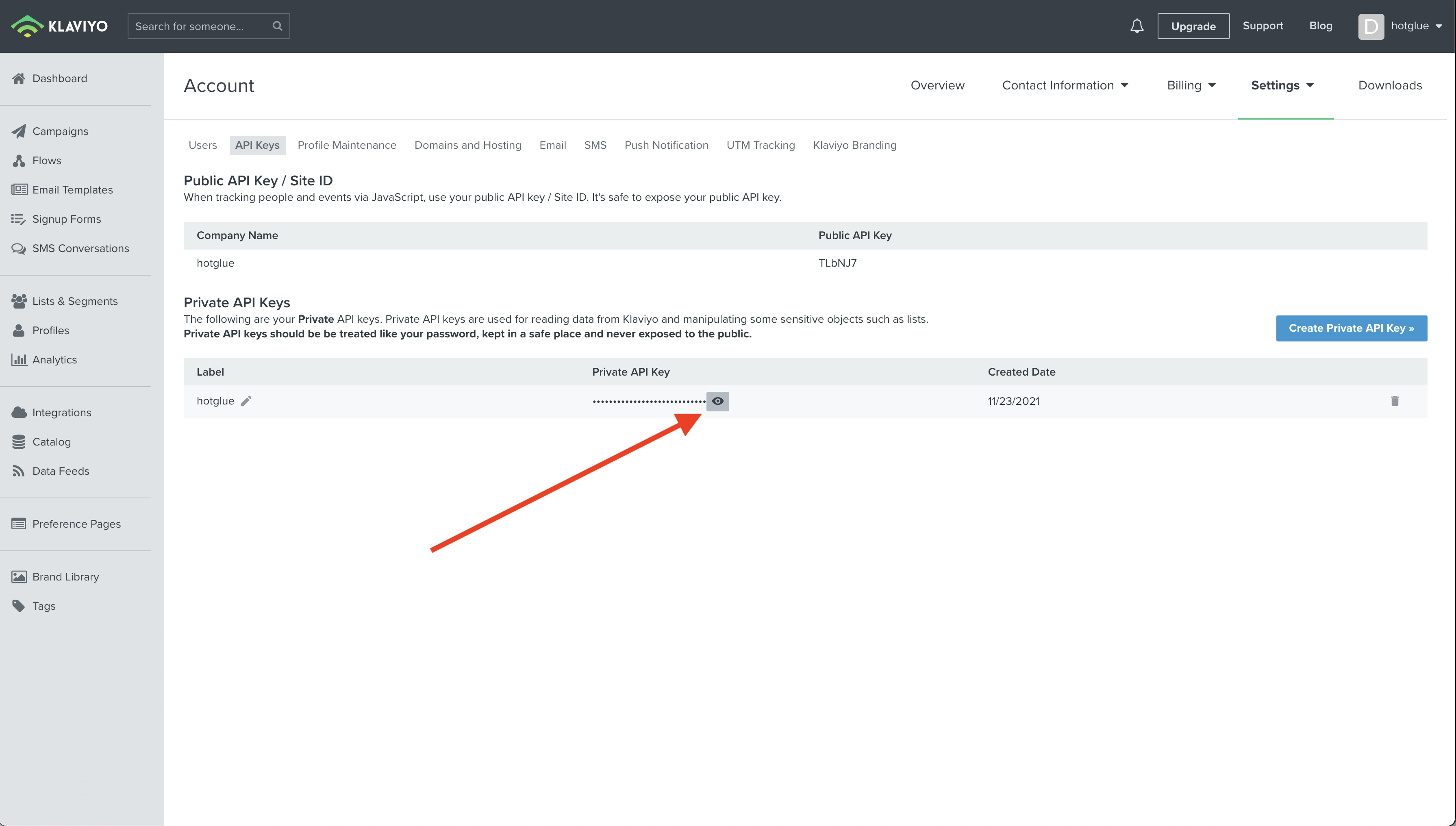
Now you should go ahead and copy your API Key. Do this by clicking the reveal button next to the API Key.
![](https://files.readme.io/ec2b645-Screen_Shot_2021-11-23_at_4.30.31_PM.png "Screen Shot 2021-11-23 at 4.30.31 PM.png")

Now go ahead and copy that API key and paste it into hotglue!

# Tap Changelog

<Accordion title="Tap Changelog">
  | Version                                                                                                        | Notes                                                                                                                                                                                    |
  | :------------------------------------------------------------------------------------------------------------- | :--------------------------------------------------------------------------------------------------------------------------------------------------------------------------------------- |
  | [v0.0.2 – Updated catalog to match Singer spec](https://github.com/hotgluexyz/tap-klaviyo/releases/tag/v0.0.2) | - Updated discover output to generate `metadata` according to Singer spec<br />- Updated sync logic to use `selected` value from `metadata` in `catalog` rather than from `schema` entry |
</Accordion>
