> ## Documentation Index
> Fetch the complete documentation index at: https://docs.hotglue.com/llms.txt
> Use this file to discover all available pages before exploring further.
# Azure Queue Storage
# Connector Details
| Name | Value |
| :------------- | :--------------------------------------------------------------------------------------------------------------------------------------------------------------------------------------------------------------------------------------------------------------------------------------------------------------------------------------------------------------------------------------------------------------------------------------------------------------------------------------------------------------------------------------------------------------------------------------------------------------------------------------------------------------------- |
| Platform | [Azure Queue Storage](https://learn.microsoft.com/en-us/azure/storage/queues/storage-queues-introduction) |
| Auth Type | API Keys |
| Direction | Write |
| Target Repo | [https://github.com/hotgluexyz/target-queue-storage](https://github.com/hotgluexyz/target-queue-storage) |
| Target Metrics | Usage:
Success Rate:
|
# Credentials Setup
#### Step 1: Find your Storage Account
First, you will need to go to the [Azure Portal](https://azure.microsoft.com/en-us/get-started/azure-portal).
Sign in to your Azure Portal.
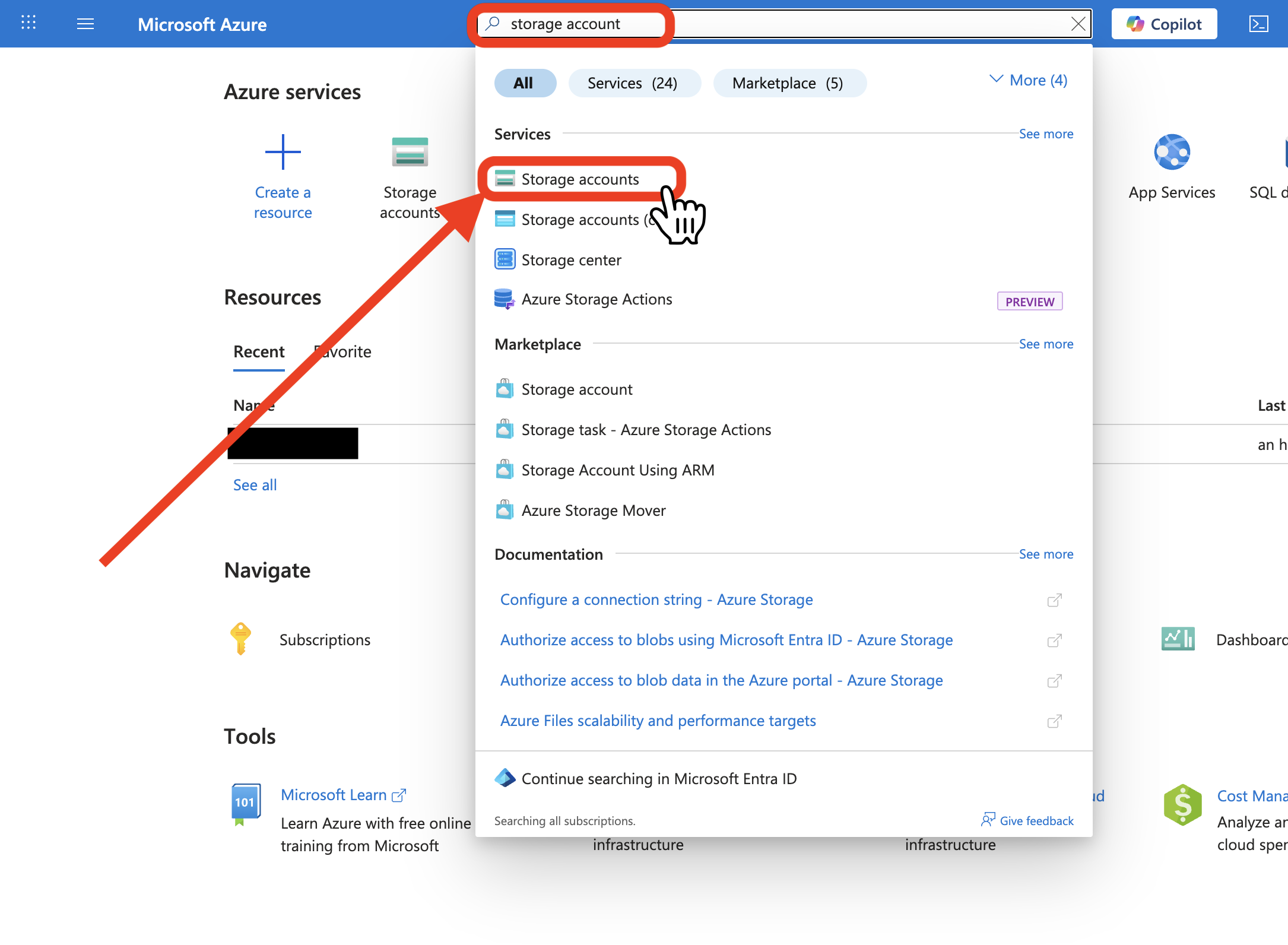
Use the search bar and search for `storage account`. Click on `Storage accounts`.
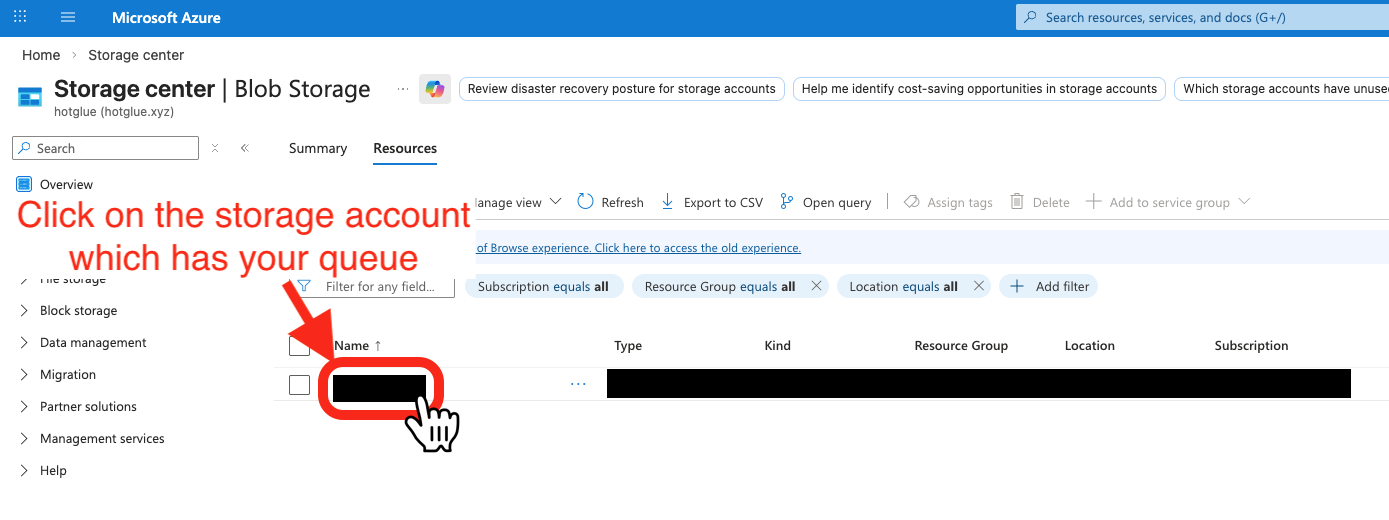
 Find the storage account that contains the Queue you want to connect to. Click on its name.
 #### Step 2: Create a Shared Access Signature and Connection String
Once you click on the name of the storage account, you will see a pop up with a sidebar.
In the sidebar, go to `Security + networking` and click on `Shared access signature`.
You must select the following options:
* `Allowed services` : `Queue`
* `Allowed resource types` : `Container`, `Object`
* `Allowed permissions` : `Read`, `Write`, `Delete`, `List`, `Add`, `Create`, `Update`, `Process`
#### Step 2: Create a Shared Access Signature and Connection String
Once you click on the name of the storage account, you will see a pop up with a sidebar.
In the sidebar, go to `Security + networking` and click on `Shared access signature`.
You must select the following options:
* `Allowed services` : `Queue`
* `Allowed resource types` : `Container`, `Object`
* `Allowed permissions` : `Read`, `Write`, `Delete`, `List`, `Add`, `Create`, `Update`, `Process`
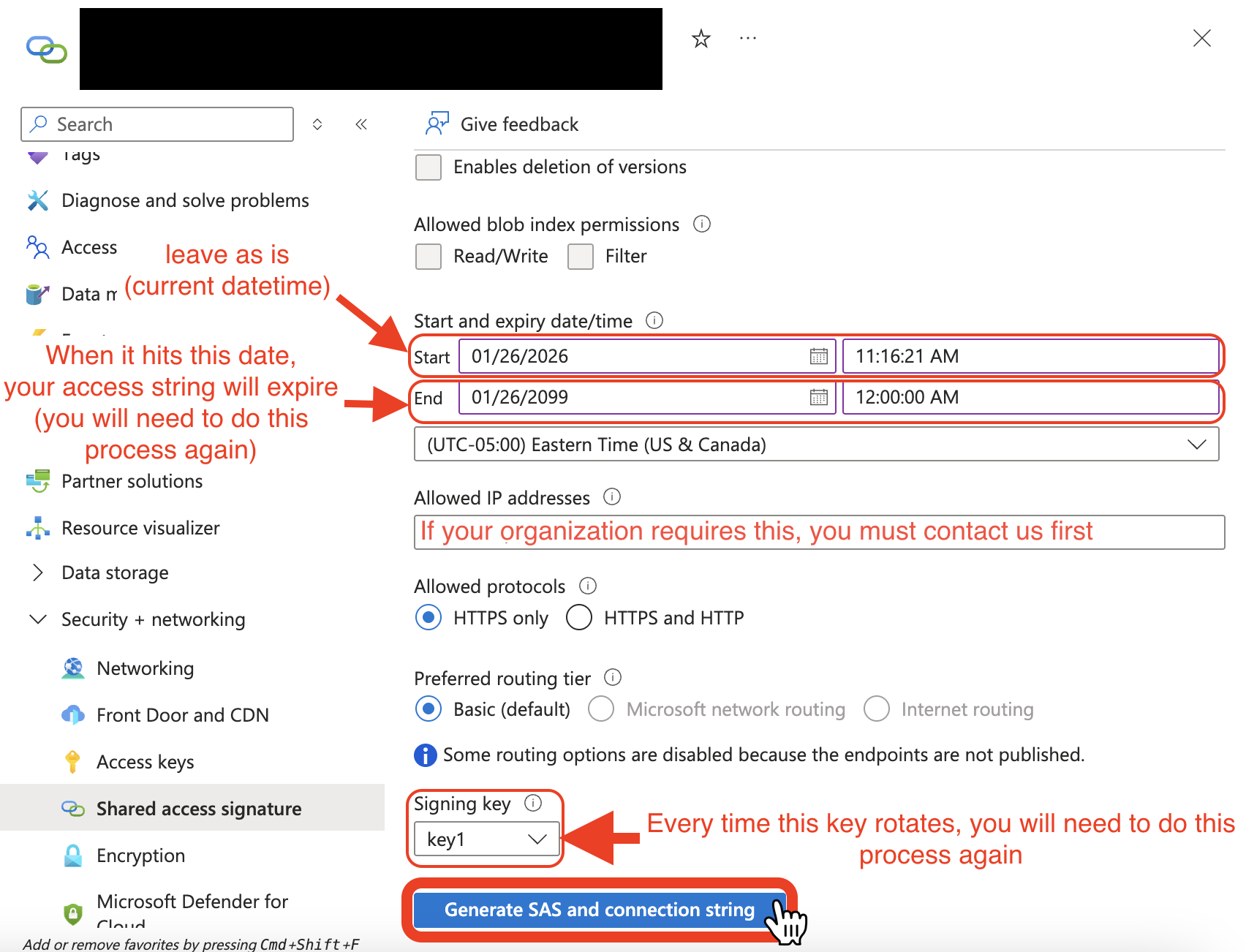
 For the `Start and expiry date/time` section, you should set the fields as follows:
* `Start`: Do not touch the start time, it should be the current datetime.
* `End`: This is when Hotglue's access to your queue storage will stop. You will have to get new credentials (repeat this entire process) each time you hit this end date.
For the `Allowed IP addresses`, leave the section blank. If your organization requires otherwise, you should contact us directly.
You must read the following about `Signing keys`, as it may affect how long the connection string credentials will be valid.
Choose your `Signing key` with the following considerations:
* Every time your `Signing key` (`Access key`) is rotated/regenerated, you will have to get new credentials (repeat this entire process) again.
* If you need more information, we recommend looking at [Microsoft's Docs](https://learn.microsoft.com/en-us/azure/storage/common/storage-account-keys-manage?tabs=azure-portal)
Click on `Generate SAS and connection string`.
For the `Start and expiry date/time` section, you should set the fields as follows:
* `Start`: Do not touch the start time, it should be the current datetime.
* `End`: This is when Hotglue's access to your queue storage will stop. You will have to get new credentials (repeat this entire process) each time you hit this end date.
For the `Allowed IP addresses`, leave the section blank. If your organization requires otherwise, you should contact us directly.
You must read the following about `Signing keys`, as it may affect how long the connection string credentials will be valid.
Choose your `Signing key` with the following considerations:
* Every time your `Signing key` (`Access key`) is rotated/regenerated, you will have to get new credentials (repeat this entire process) again.
* If you need more information, we recommend looking at [Microsoft's Docs](https://learn.microsoft.com/en-us/azure/storage/common/storage-account-keys-manage?tabs=azure-portal)
Click on `Generate SAS and connection string`.
 #### Step 3: Copy Credentials to Hotglue
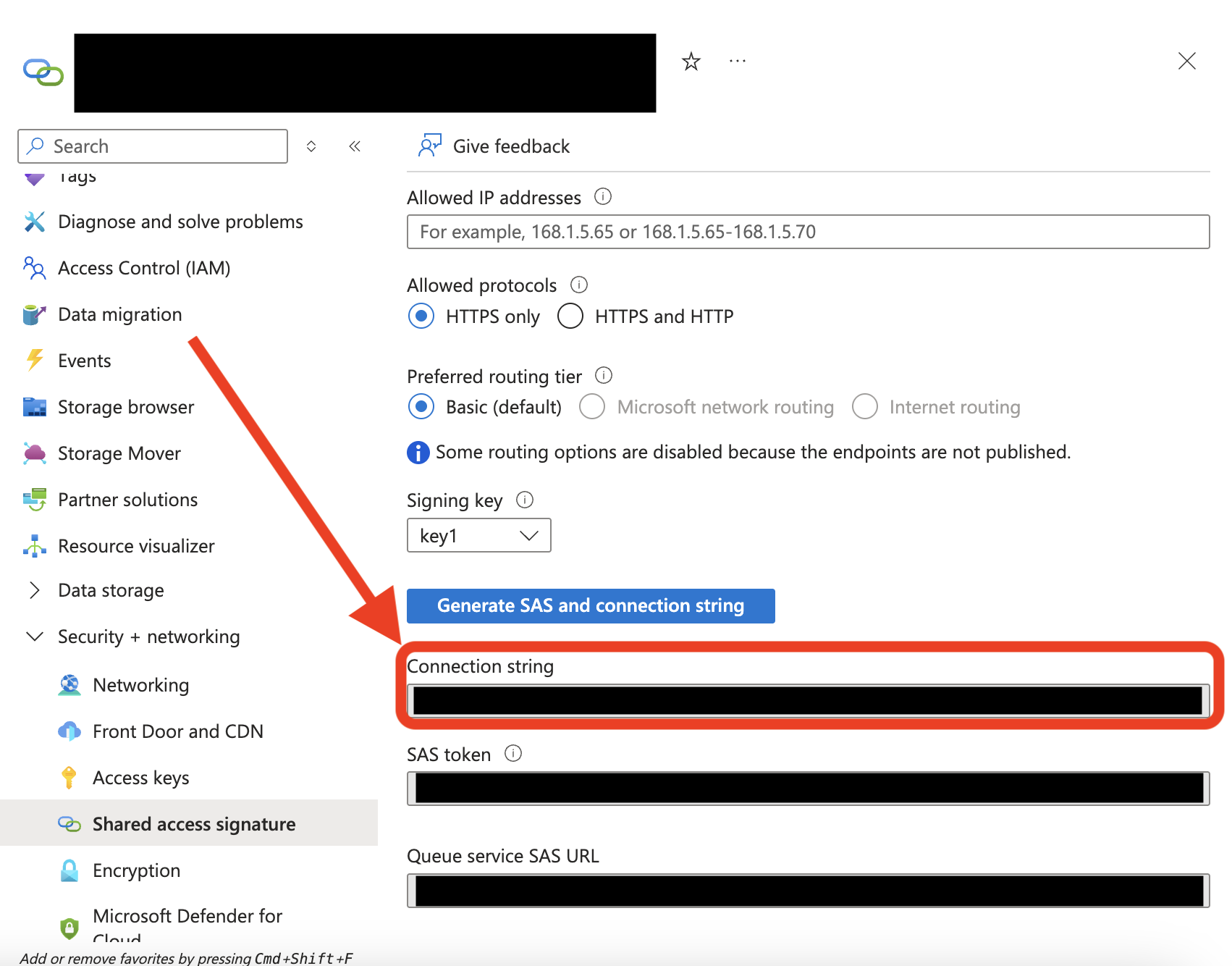
For this step, you will need to copy over the `Connection string` to Hotglue.
#### Step 3: Copy Credentials to Hotglue
For this step, you will need to copy over the `Connection string` to Hotglue.
 Your `Queue Name` is the name of your queue in Azure.
Your `Queue Key` is a label of your choice.
Save your credentials.
Congratulations! You have successfully connected your Queue Storage to Hotglue!
Your `Queue Name` is the name of your queue in Azure.
Your `Queue Key` is a label of your choice.
Save your credentials.
Congratulations! You have successfully connected your Queue Storage to Hotglue!