Usage:
Usage:
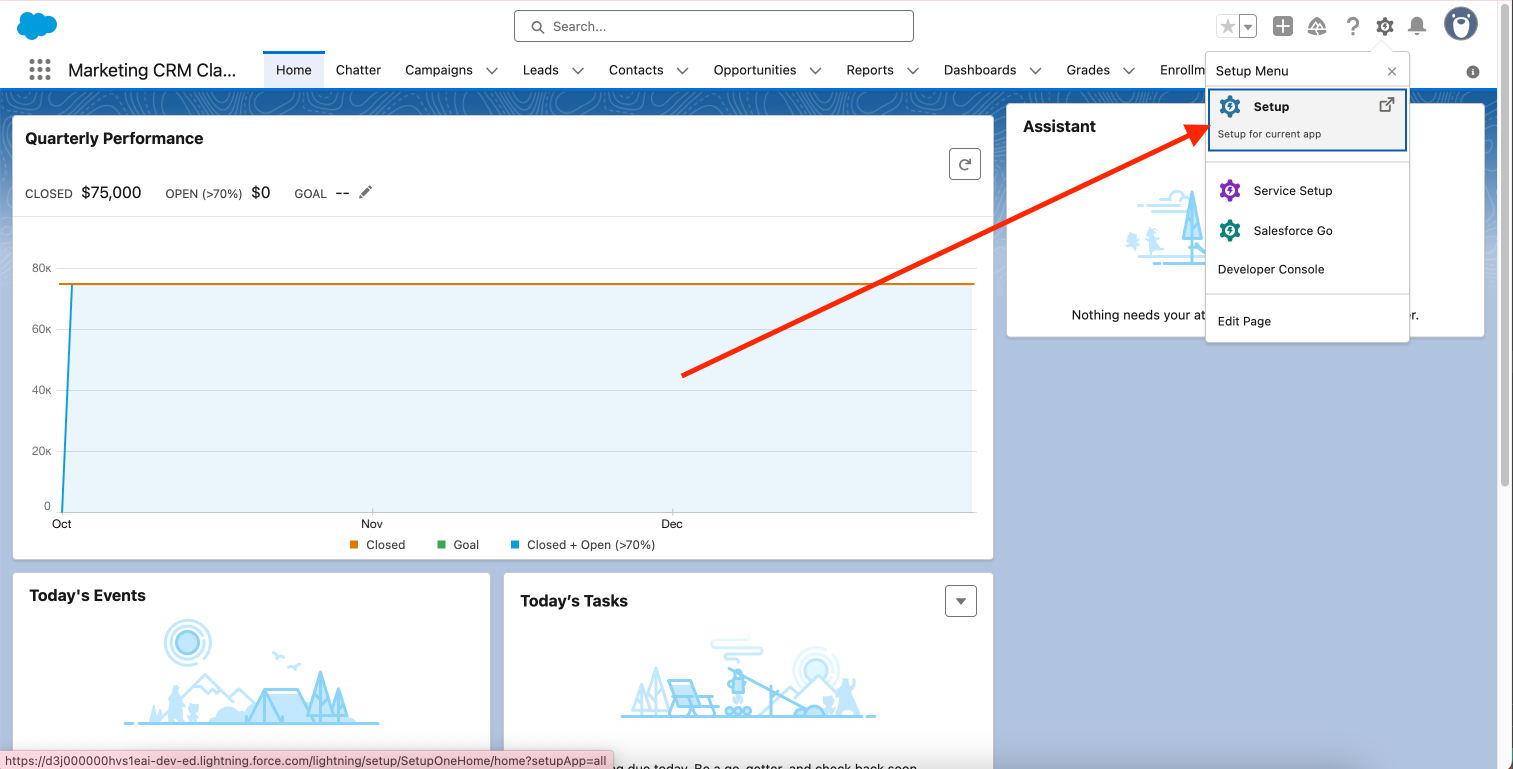 From your **Setup Menu** go to the left side of the page and select the Apps dropdown. Then, you should go ahead and click on the **Platform Tools** > **External Client Apps** > **Settings** section from the dropdown.
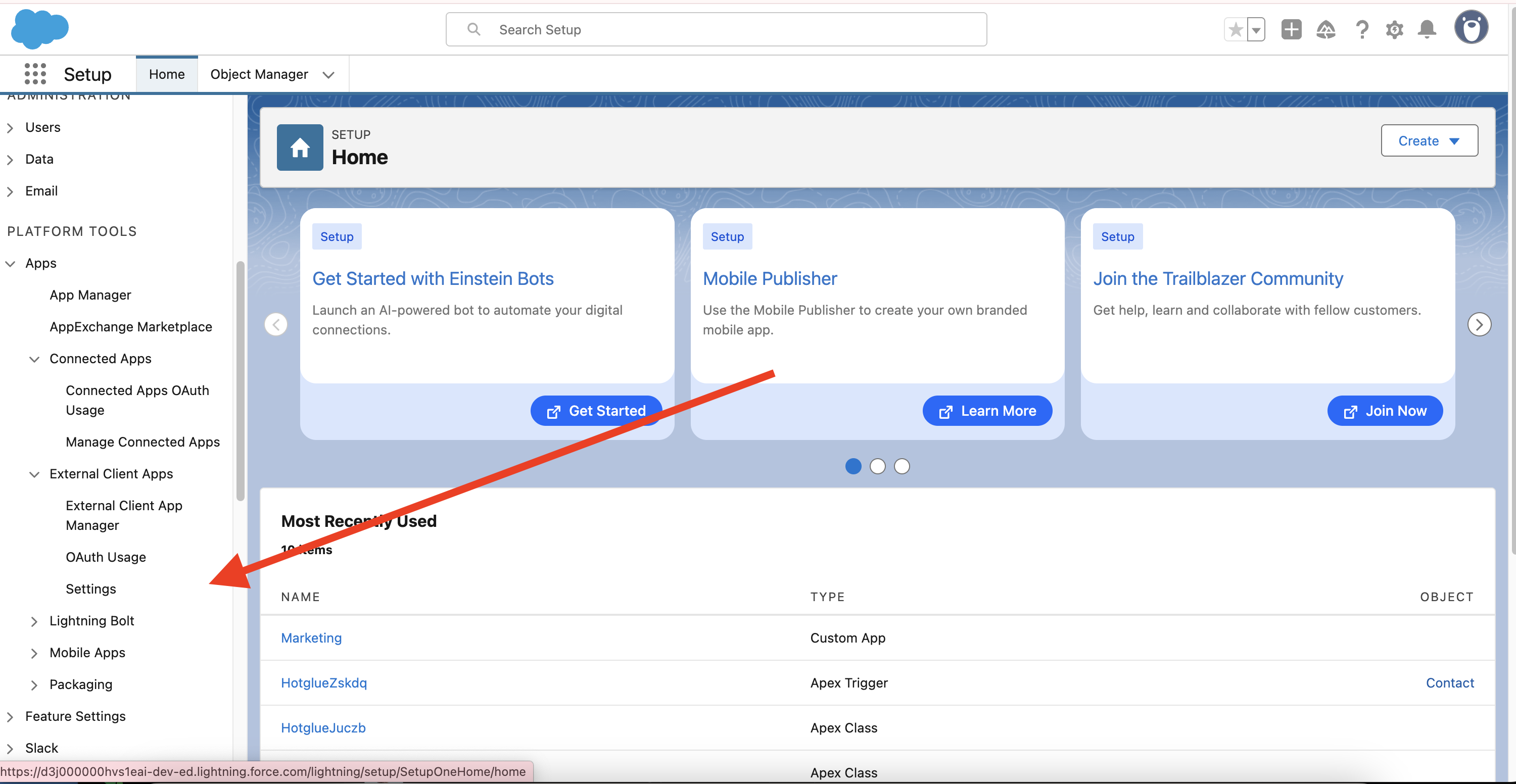 Now on this page, you should enable **Allow creation of connected apps** and click **New Connected App**:
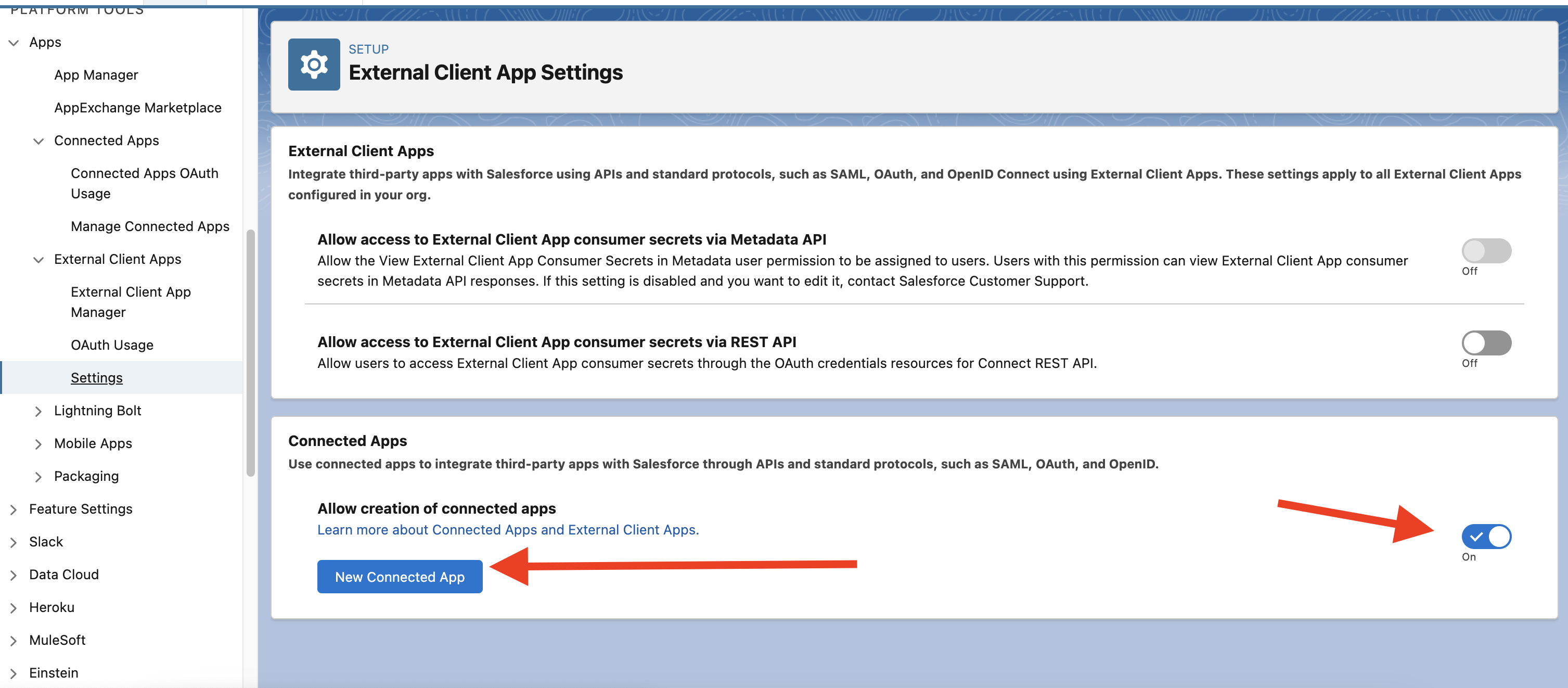 On this page, you should name your OAuth app, put your email as the contact email, and then check the box **Enable OAuth Settings**.
Now that you have enabled OAuth Settings, you should set the callback URL to
```text theme={null}
https://hotglue.xyz/callback
```
Under **Security**, disable `Require Proof Key for Code Exchange (PKCE) Extension for Supported Authorization Flows`.
You should also make sure that for the Selected OAuth Scopes, you have enabled the scopes for:
1. `Access and manage your data (api)`
2. `Perform request on your behalf at any time (refresh\\_token, offline\\_access)`
On this page, you should name your OAuth app, put your email as the contact email, and then check the box **Enable OAuth Settings**.
Now that you have enabled OAuth Settings, you should set the callback URL to
```text theme={null}
https://hotglue.xyz/callback
```
Under **Security**, disable `Require Proof Key for Code Exchange (PKCE) Extension for Supported Authorization Flows`.
You should also make sure that for the Selected OAuth Scopes, you have enabled the scopes for:
1. `Access and manage your data (api)`
2. `Perform request on your behalf at any time (refresh\\_token, offline\\_access)`
 Once you have finished configuring the app, you should go ahead and click Save.
Next, in **OAuth Settings** dropdown for your app, you'll find a button called **Manage Consumer Details**:
Once you have finished configuring the app, you should go ahead and click Save.
Next, in **OAuth Settings** dropdown for your app, you'll find a button called **Manage Consumer Details**:
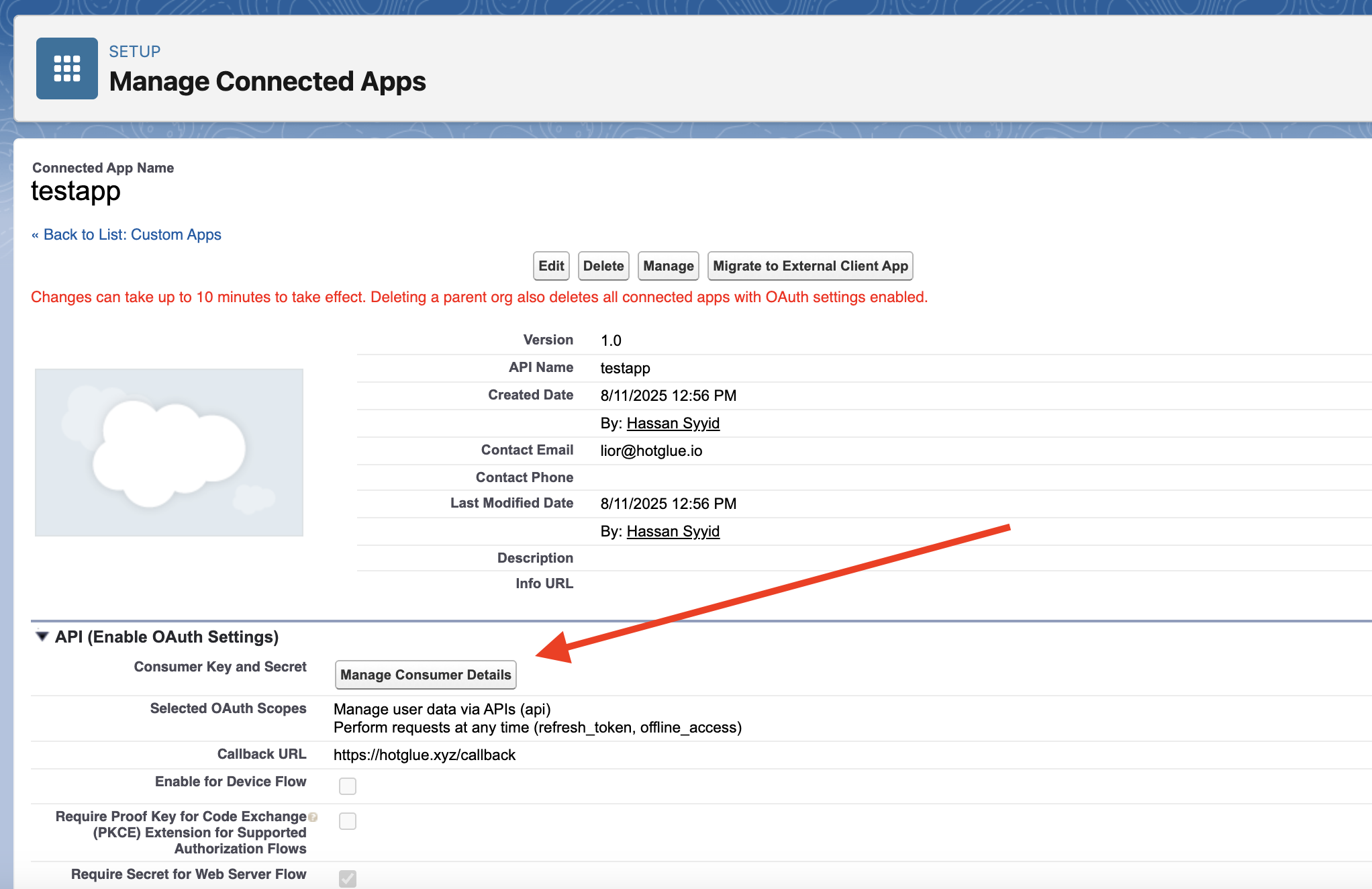 Now, you should copy these keys into hotglue, and you will be all good to go to start using the Salesforce source in hotglue.
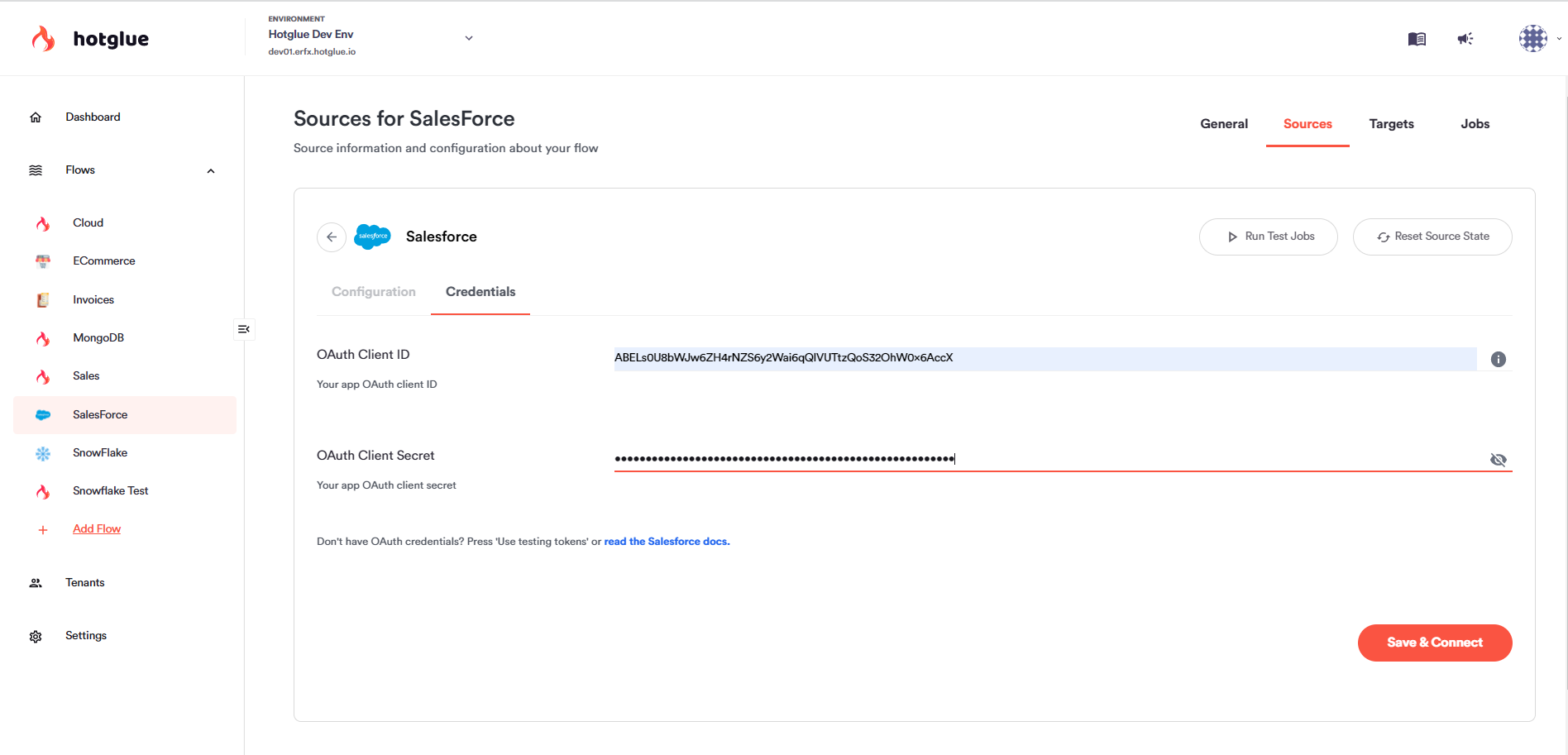
And that is it! You have now successfully linked to Salesforce!
# Required Tenant Permissions
The authenticated tenant must have the following System Permissions on their Salesforce Instance:
1. `API Enabled`
2. `View Setup and Configuration`
See the [Salesforce docs](https://help.salesforce.com/s/articleView?id=xcloud.branded_apps_commun_api_permset.htm\&type=5) for how to add these permissions to a permission set.
If you plan on [enabling Salesforce's Bulk API](/connectors/salesforce#salesforce-bulk-api), your tenant also needs the system permission named `Manage Data Integrations`.
# Allowing tenants to link Salesforce Sandbox Instances
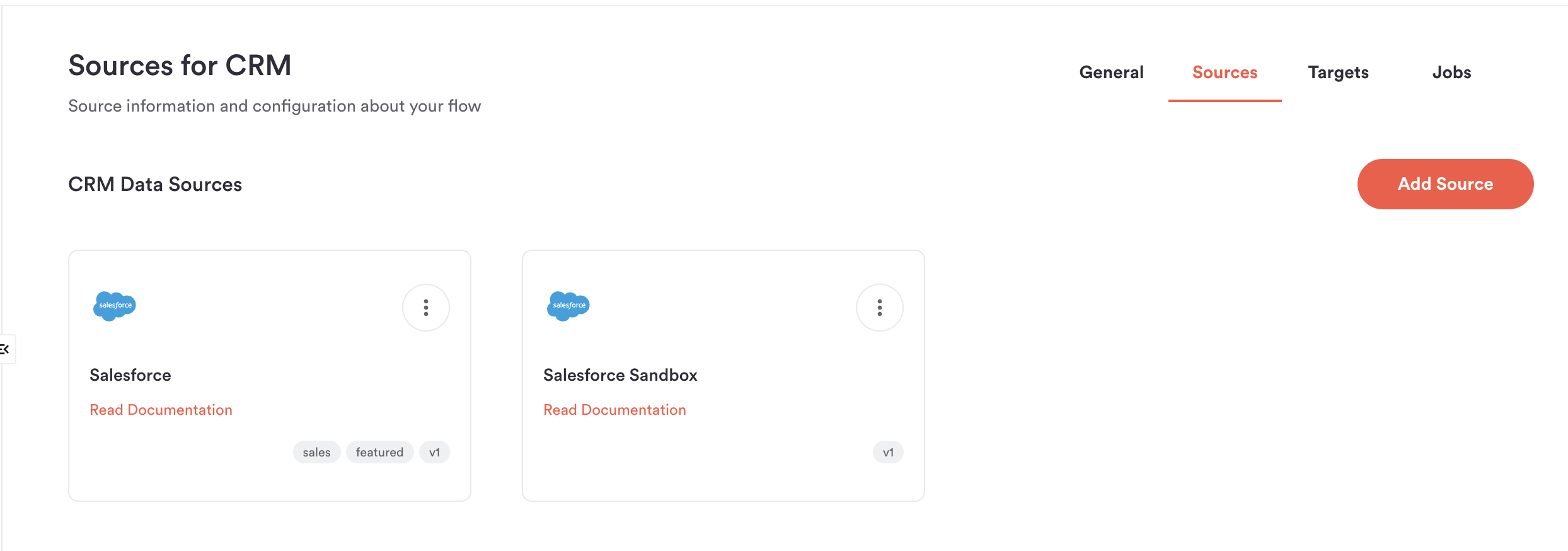
The OAuth Authentication flow for Salesforce Sandbox instances is slightly different from production Salesforce instances. As such, you'll need to add the `Salesforce:sandbox` connector as a supported source to your desired flows. **Tenants using sandbox Salesforce credentials must link to this source, not the normal Salesforce source.**
> Production Salesforce OAuth apps are compatible with sandbox credentials, so you can reuse the same client ID and secret for both supported sources.
Now, you should copy these keys into hotglue, and you will be all good to go to start using the Salesforce source in hotglue.

And that is it! You have now successfully linked to Salesforce!
# Required Tenant Permissions
The authenticated tenant must have the following System Permissions on their Salesforce Instance:
1. `API Enabled`
2. `View Setup and Configuration`
See the [Salesforce docs](https://help.salesforce.com/s/articleView?id=xcloud.branded_apps_commun_api_permset.htm\&type=5) for how to add these permissions to a permission set.
If you plan on [enabling Salesforce's Bulk API](/connectors/salesforce#salesforce-bulk-api), your tenant also needs the system permission named `Manage Data Integrations`.
# Allowing tenants to link Salesforce Sandbox Instances
The OAuth Authentication flow for Salesforce Sandbox instances is slightly different from production Salesforce instances. As such, you'll need to add the `Salesforce:sandbox` connector as a supported source to your desired flows. **Tenants using sandbox Salesforce credentials must link to this source, not the normal Salesforce source.**
> Production Salesforce OAuth apps are compatible with sandbox credentials, so you can reuse the same client ID and secret for both supported sources.
 # API Quota Management
Salesforce enforces strict daily API limits for every connected Salesforce instance. While the [specific request quota differs by Salesforce plan](https://developer.salesforce.com/docs/atlas.en-us.salesforce_app_limits_cheatsheet.meta/salesforce_app_limits_cheatsheet/salesforce_app_limits_platform_api.htm), hotglue's Salesforce connector works around these quotas to prevent eating up your tenants' allotments.
### How hotglue stops you from exceeding Salesforce quotas
By default, a single hotglue job (or discover) will never use up **more than 25% of a tenant's Salesforce API quota**. Additionally, hotglue jobs will never make a request on your tenant's Salesforce account **if making that request would bring the tenant to 80% of their daily quota**.
These thresholds can be customized by using the `quota_percent_per_run` and `quota_percent_total` config flags respectively on a tenant's linked Salesforce source.
### Salesforce Bulk API
To further minimize Salesforce requests, you can enable the Salesforce bulk API for a tenant using the `"api_type": "BULK"` config flag.
### Incremental Syncs
To prevent re-querying the same data, hotglue's Salesforce connector will only sync data that has been changed since the last successful hotglue job.
### Usage Logging
After making a request, hotglue's Salesforce connector will log how many remaining requests are in a tenant's daily allotment. You can check the usage logs on the hotglue dashboard's job page.
# Campaign, ListView, and Report Filtering
Your tenants may be interested in only syncing Contacts and Leads that belong to certain Campaigns, Listviews, or Reports.
If so, you can add any of the following `filters` to your Salesforce [available source](http://localhost:3000/key-concepts/connectors/v1-sources/overview#what-is-an-available-source):
```json theme={null}
"filters": [
{
"label": "Campaigns",
"description": "The campaigns to sync",
"type": "multiselect",
"key": "campaigns",
"sf_object": "Campaign",
"targetKey": "campaign_ids"
},
{
"label": "Lists",
"description": "The lists to sync",
"type": "multiselect",
"key": "lists",
"sf_object": "ListView",
"targetKey": "list_ids"
},
{
"label": "Reports",
"description": "The reports to sync",
"type": "multiselect",
"key": "reports",
"targetKey": "report_ids"
}
]
```
During the widget linking process, the tenant will be given dropdowns for the filters you specify. During the syncing process, hotglue will only fetch Contacts and Leads according to these filters.
# Tap Changelog
# API Quota Management
Salesforce enforces strict daily API limits for every connected Salesforce instance. While the [specific request quota differs by Salesforce plan](https://developer.salesforce.com/docs/atlas.en-us.salesforce_app_limits_cheatsheet.meta/salesforce_app_limits_cheatsheet/salesforce_app_limits_platform_api.htm), hotglue's Salesforce connector works around these quotas to prevent eating up your tenants' allotments.
### How hotglue stops you from exceeding Salesforce quotas
By default, a single hotglue job (or discover) will never use up **more than 25% of a tenant's Salesforce API quota**. Additionally, hotglue jobs will never make a request on your tenant's Salesforce account **if making that request would bring the tenant to 80% of their daily quota**.
These thresholds can be customized by using the `quota_percent_per_run` and `quota_percent_total` config flags respectively on a tenant's linked Salesforce source.
### Salesforce Bulk API
To further minimize Salesforce requests, you can enable the Salesforce bulk API for a tenant using the `"api_type": "BULK"` config flag.
### Incremental Syncs
To prevent re-querying the same data, hotglue's Salesforce connector will only sync data that has been changed since the last successful hotglue job.
### Usage Logging
After making a request, hotglue's Salesforce connector will log how many remaining requests are in a tenant's daily allotment. You can check the usage logs on the hotglue dashboard's job page.
# Campaign, ListView, and Report Filtering
Your tenants may be interested in only syncing Contacts and Leads that belong to certain Campaigns, Listviews, or Reports.
If so, you can add any of the following `filters` to your Salesforce [available source](http://localhost:3000/key-concepts/connectors/v1-sources/overview#what-is-an-available-source):
```json theme={null}
"filters": [
{
"label": "Campaigns",
"description": "The campaigns to sync",
"type": "multiselect",
"key": "campaigns",
"sf_object": "Campaign",
"targetKey": "campaign_ids"
},
{
"label": "Lists",
"description": "The lists to sync",
"type": "multiselect",
"key": "lists",
"sf_object": "ListView",
"targetKey": "list_ids"
},
{
"label": "Reports",
"description": "The reports to sync",
"type": "multiselect",
"key": "reports",
"targetKey": "report_ids"
}
]
```
During the widget linking process, the tenant will be given dropdowns for the filters you specify. During the syncing process, hotglue will only fetch Contacts and Leads according to these filters.
# Tap Changelog