> ## Documentation Index
> Fetch the complete documentation index at: https://docs.hotglue.com/llms.txt
> Use this file to discover all available pages before exploring further.
# Stripe
# Connector Details
| Name | Value |
| :---------- | :----------------------------------------------------------------------------------------------------------------------------------------------------------------------------------------------------------------------------------------------------------------------------------------------------------- |
| Platform | [Stripe](https://stripe.com) |
| Auth Type | API Keys |
| Direction | Read |
| Tap Repo | [https://github.com/hotgluexyz/tap-stripe](https://github.com/hotgluexyz/tap-stripe) |
| Tap Metrics | Usage:
|
# Credentials Setup
Follow the steps below to obtain the credentials required to connect your Stripe account with Hotglue.
Stripe uses **API Keys** for authentication. These keys allow Hotglue to securely access data from your Stripe account.
The first step is to log in to your [Stripe Dashboard](https://dashboard.stripe.com/).
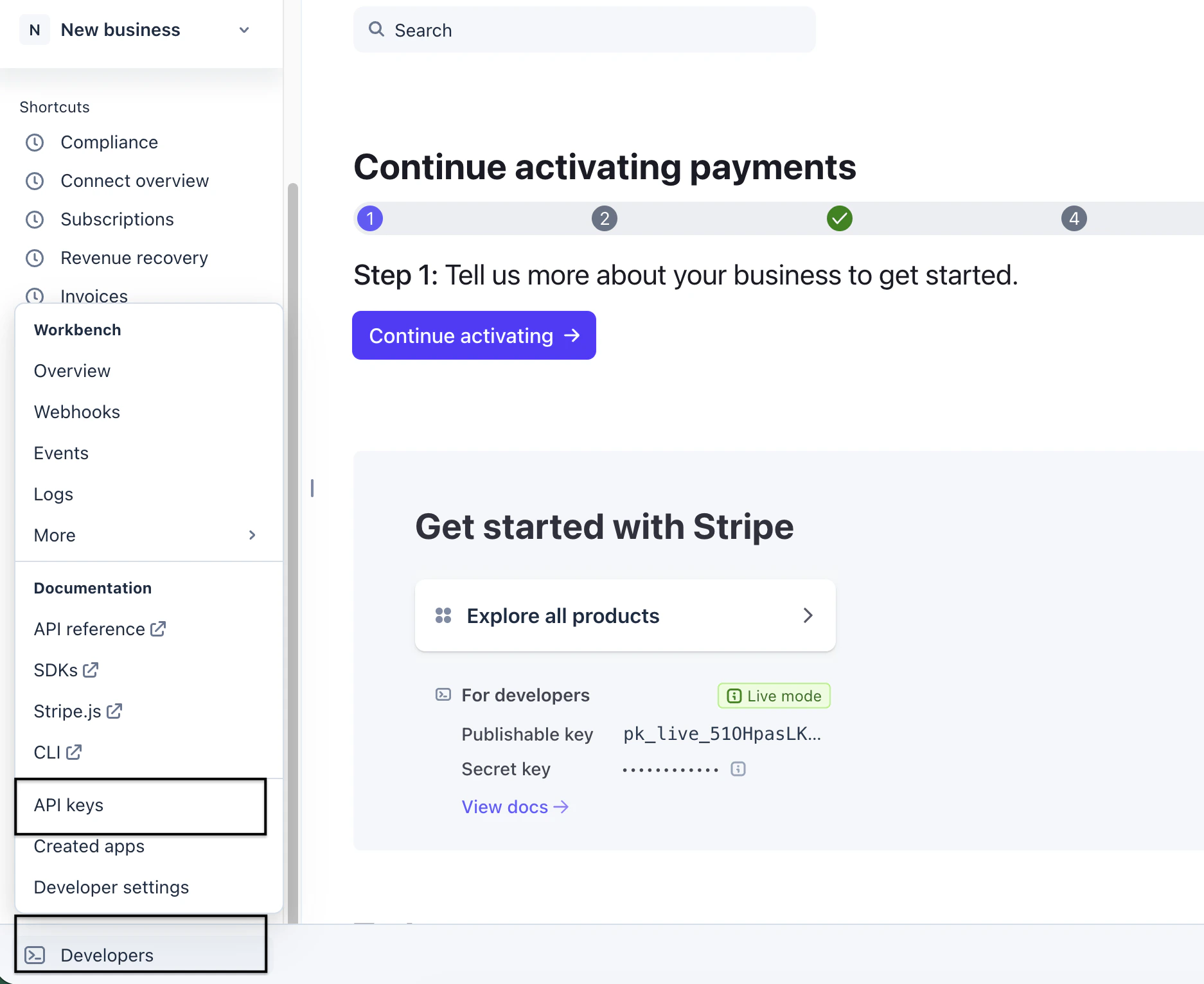
Once logged in, navigate to the **Developers** section in the left sidebar and click on **API Keys**.
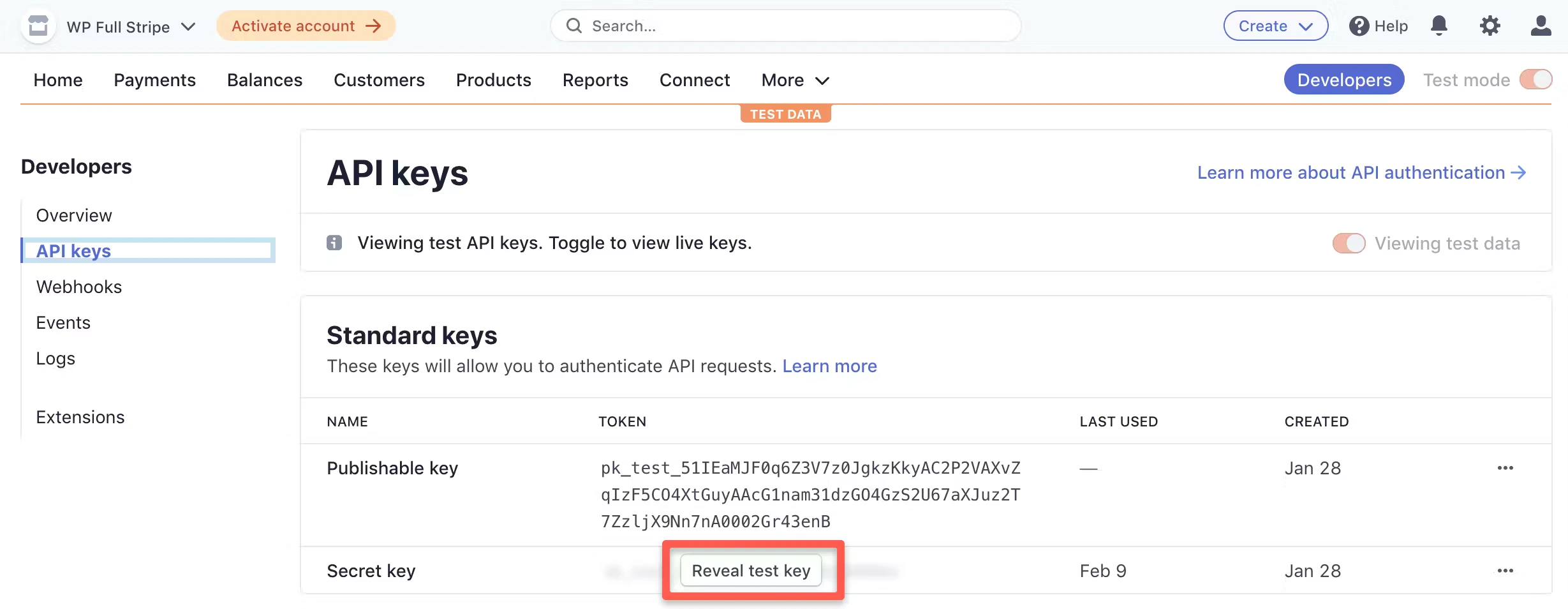
 On the API Keys page, you will see two types of keys:
* **Publishable Key**
* **Secret Key**
Hotglue requires the **Secret Key** in order to read data from your Stripe account.
> 📘 Tip
>
> Make sure you copy the **Secret Key** and not the Publishable Key. The Secret Key provides the permissions required to access Stripe data through the API.
Click **Reveal test key** or **Reveal live key**, depending on the environment you want to connect.
On the API Keys page, you will see two types of keys:
* **Publishable Key**
* **Secret Key**
Hotglue requires the **Secret Key** in order to read data from your Stripe account.
> 📘 Tip
>
> Make sure you copy the **Secret Key** and not the Publishable Key. The Secret Key provides the permissions required to access Stripe data through the API.
Click **Reveal test key** or **Reveal live key**, depending on the environment you want to connect.
 Example Secret Key
```text theme={null}
Stripe Secret key = sk_live_mk_1OHpc**********
Stripe Account ID = acct_1O******
```
After providing the API key & Account ID, Hotglue will authenticate with Stripe and begin syncing the available data objects.
## Supported Data Objects
The Stripe connector supports reading several commonly used Stripe resources including:
* Customers
* Charges
* Payment Intents
* Checkout Sessions
* Promotion Codes
* Subscriptions
* Balance Transactions
* Invoices
These objects can be used to power analytics pipelines, financial reporting, and customer insights workflows.
Using a standard Secret API Key from your Stripe dashboard is sufficient for most use cases.
📘 Tip
For testing environments, you can safely use the Test Secret Key provided by Stripe.
Tap Changelog
|Version|Notes| | :--- | :--- | |[v1.5.6](https://github.com/hotgluexyz/tap-stripe/releases/tag/v1.5.6)|| |[v1.5.5](https://github.com/hotgluexyz/tap-stripe/releases/tag/v1.5.5)|| |[v1.5.4](https://github.com/hotgluexyz/tap-stripe/releases/tag/v1.5.4)|| |[v1.5.3 - Add support for payment intents](https://github.com/hotgluexyz/tap-stripe/releases/tag/v1.5.3)|- Add support for `payment_intents`
Example Secret Key
```text theme={null}
Stripe Secret key = sk_live_mk_1OHpc**********
Stripe Account ID = acct_1O******
```
After providing the API key & Account ID, Hotglue will authenticate with Stripe and begin syncing the available data objects.
## Supported Data Objects
The Stripe connector supports reading several commonly used Stripe resources including:
* Customers
* Charges
* Payment Intents
* Checkout Sessions
* Promotion Codes
* Subscriptions
* Balance Transactions
* Invoices
These objects can be used to power analytics pipelines, financial reporting, and customer insights workflows.
Using a standard Secret API Key from your Stripe dashboard is sufficient for most use cases.
📘 Tip
For testing environments, you can safely use the Test Secret Key provided by Stripe.
Tap Changelog
|Version|Notes| | :--- | :--- | |[v1.5.6](https://github.com/hotgluexyz/tap-stripe/releases/tag/v1.5.6)|| |[v1.5.5](https://github.com/hotgluexyz/tap-stripe/releases/tag/v1.5.5)|| |[v1.5.4](https://github.com/hotgluexyz/tap-stripe/releases/tag/v1.5.4)|| |[v1.5.3 - Add support for payment intents](https://github.com/hotgluexyz/tap-stripe/releases/tag/v1.5.3)|- Add support for `payment_intents`
- Add `metadata` field to `checkout_session` object| |[v1.5.2](https://github.com/hotgluexyz/tap-stripe/releases/tag/v1.5.2)|- Add support for `promotion_codes` and `checkout_sessions`| \`\`\`