> ## Documentation Index
> Fetch the complete documentation index at: https://docs.hotglue.com/llms.txt
> Use this file to discover all available pages before exploring further.
# Connector Builder
> Learn how to create custom taps using the Connector Builder
## Getting Started
The Connector Builder is a great way to build taps without writing any code! We highly recommend starting with
the walkthrough below:
### Open the builder
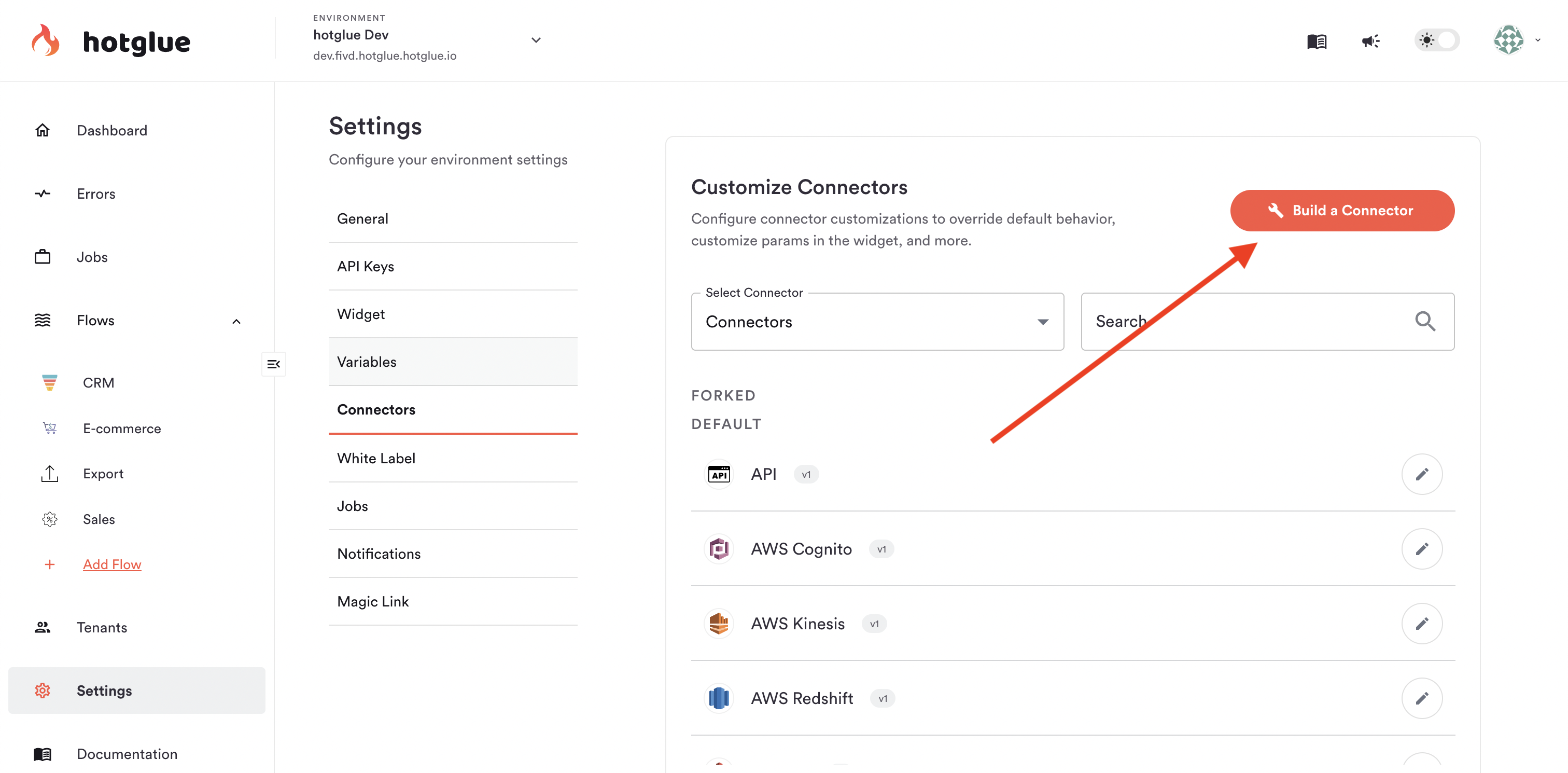
To open the Connector Builder, head to your Environment Settings -> Connectors -> Build a Connector, as shown below:
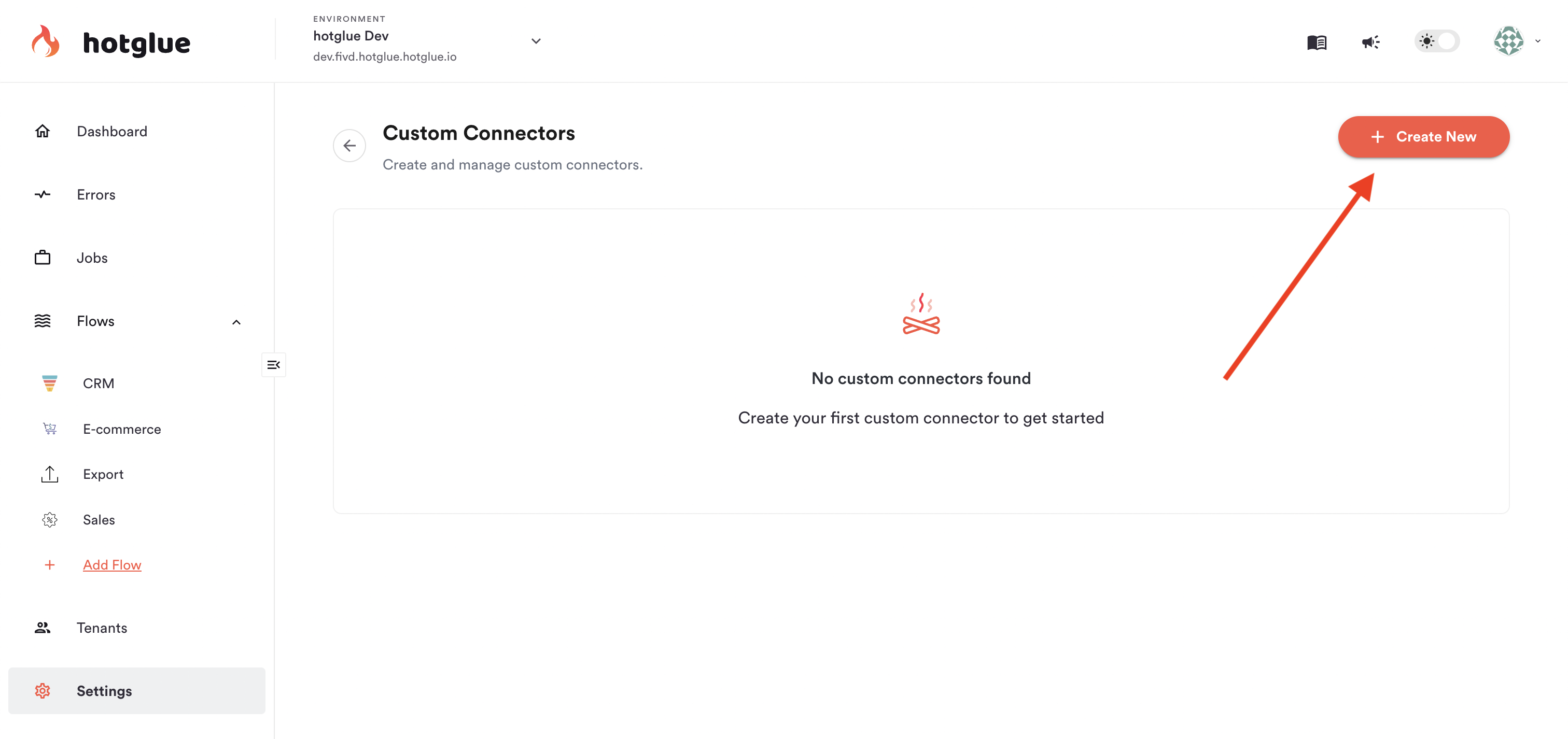
 From there, click Create New to start building a new tap.
 ### Define basic details
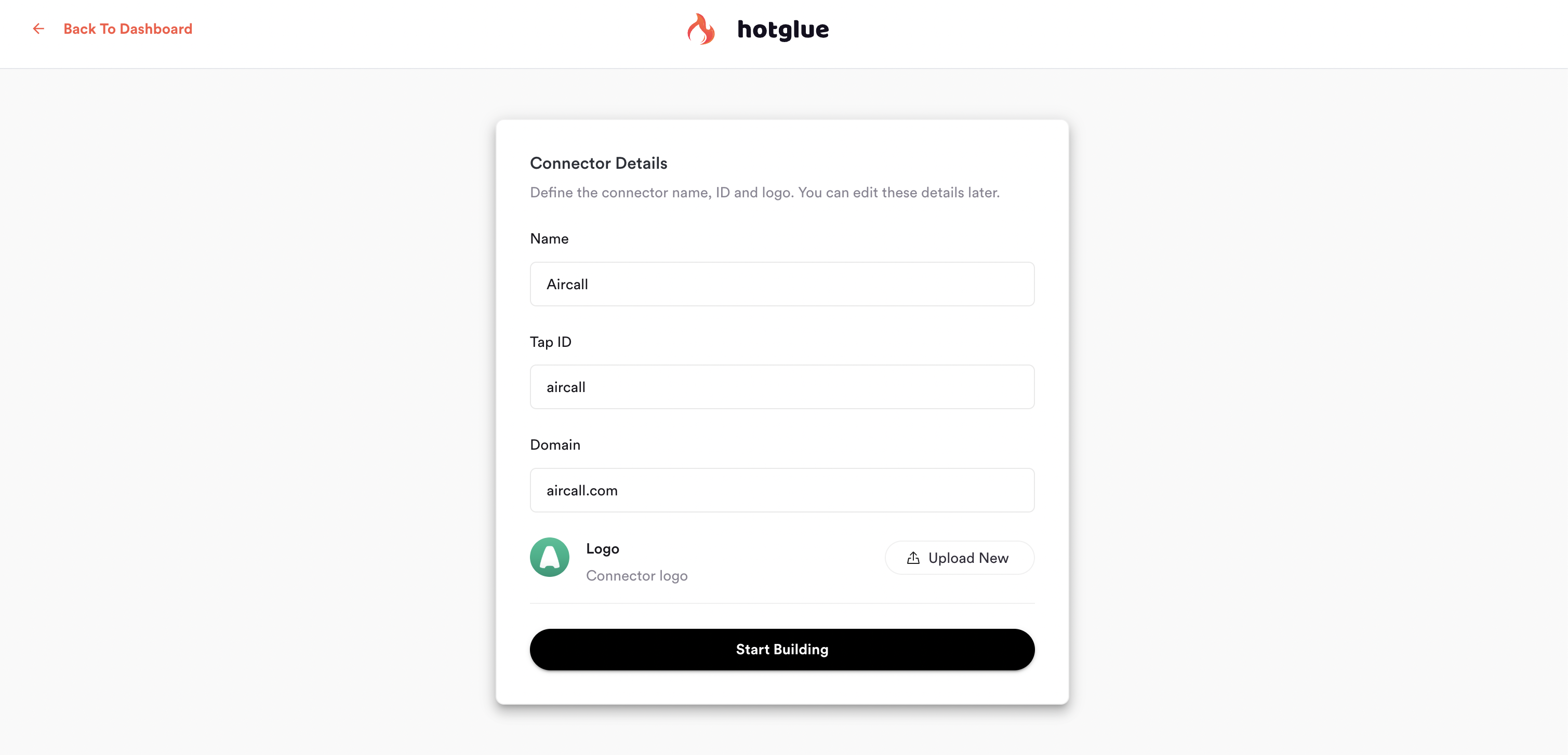
Now we can define our connector's basic details:
* **Name**: this is the name that will appear when a tenant goes to connect the connector
* **Tap ID**: this is the ID of the connector, will be used in API calls. It should be all lowercase, and hyphenated.
For example, `sage-intacct` or `chargebee`
* **Domain**: the domain of the product (`intacct.com`). This is only used to load a default logo
* **Logo**: logo for the connector. Will be shown in the hotglue admin panel and in widget.
### Define basic details
Now we can define our connector's basic details:
* **Name**: this is the name that will appear when a tenant goes to connect the connector
* **Tap ID**: this is the ID of the connector, will be used in API calls. It should be all lowercase, and hyphenated.
For example, `sage-intacct` or `chargebee`
* **Domain**: the domain of the product (`intacct.com`). This is only used to load a default logo
* **Logo**: logo for the connector. Will be shown in the hotglue admin panel and in widget.
 ## Authentication
### API Base URL
The first step of configuring authentication is to define the base API URL. This can include variables.
For example, for Shopify we could define the following, where `store_name` is a parameter the tenant will configure:
```
https://{config.store_name}.myshopify.com/admin/api/2025-04
```
In most cases, the base URL is a static string, such as:
```
https://api.aircall.io/v1
```
### Authentication Method
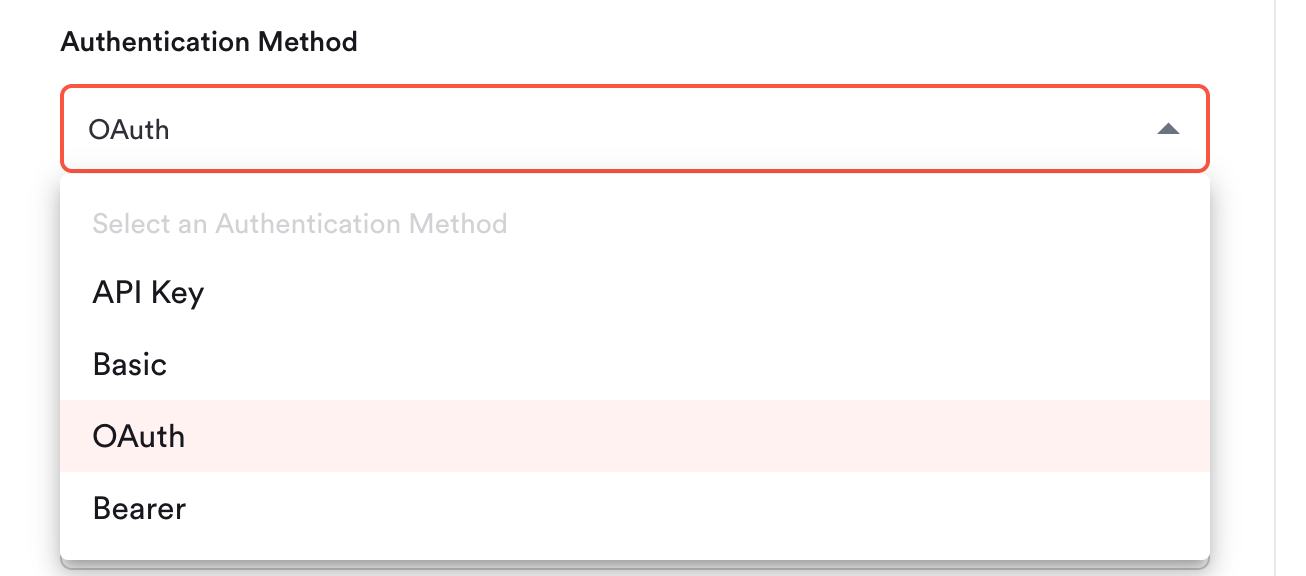
The Connector Builder currently supports the following authentication methods:
* API Key
* Basic
* OAuth
* Bearer
## Authentication
### API Base URL
The first step of configuring authentication is to define the base API URL. This can include variables.
For example, for Shopify we could define the following, where `store_name` is a parameter the tenant will configure:
```
https://{config.store_name}.myshopify.com/admin/api/2025-04
```
In most cases, the base URL is a static string, such as:
```
https://api.aircall.io/v1
```
### Authentication Method
The Connector Builder currently supports the following authentication methods:
* API Key
* Basic
* OAuth
* Bearer
 #### API Key
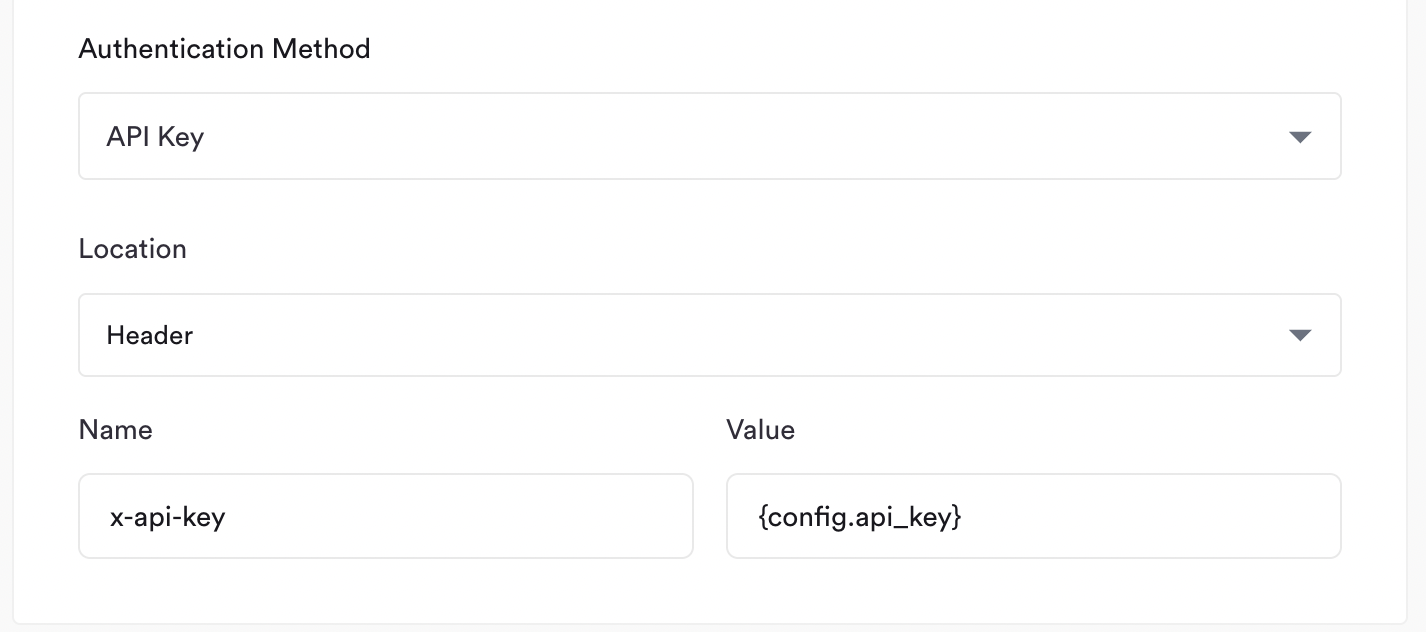
For API Key based authentication, you need to specify the following:
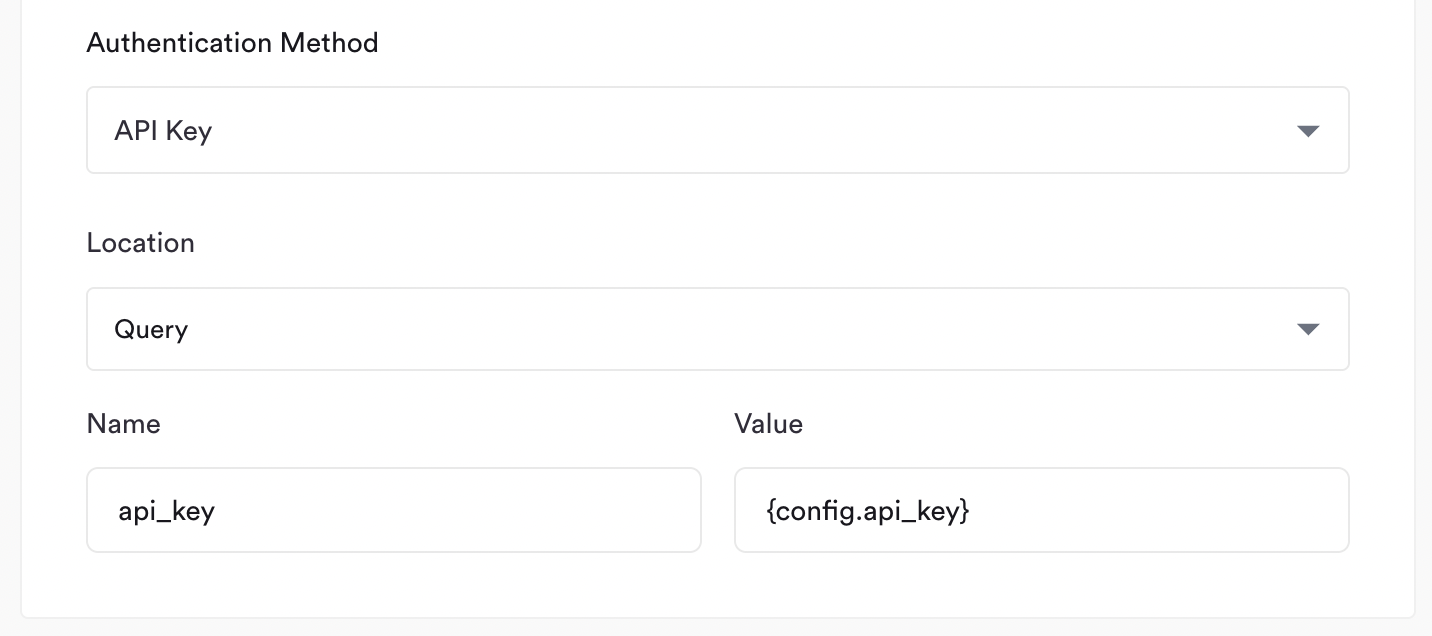
* **Location**: where should the API Key be injected in the request? Options are **Header** or **Query**
* **Name**: what is the name of the **Header** or **Query** paramter?
* **Value**: this is the API Key value. In most cases you should just point this to the config: `{config.api_key}`
For example, if I wanted to include my API Key in the `x-api-key` header, I'd define the following:
#### API Key
For API Key based authentication, you need to specify the following:
* **Location**: where should the API Key be injected in the request? Options are **Header** or **Query**
* **Name**: what is the name of the **Header** or **Query** paramter?
* **Value**: this is the API Key value. In most cases you should just point this to the config: `{config.api_key}`
For example, if I wanted to include my API Key in the `x-api-key` header, I'd define the following:
 Or, if I wanted to include my API Key in the `api_key` query parameter (meaning the request will have `?api_key={api_key}` in the URL), I'd define:
 #### Basic
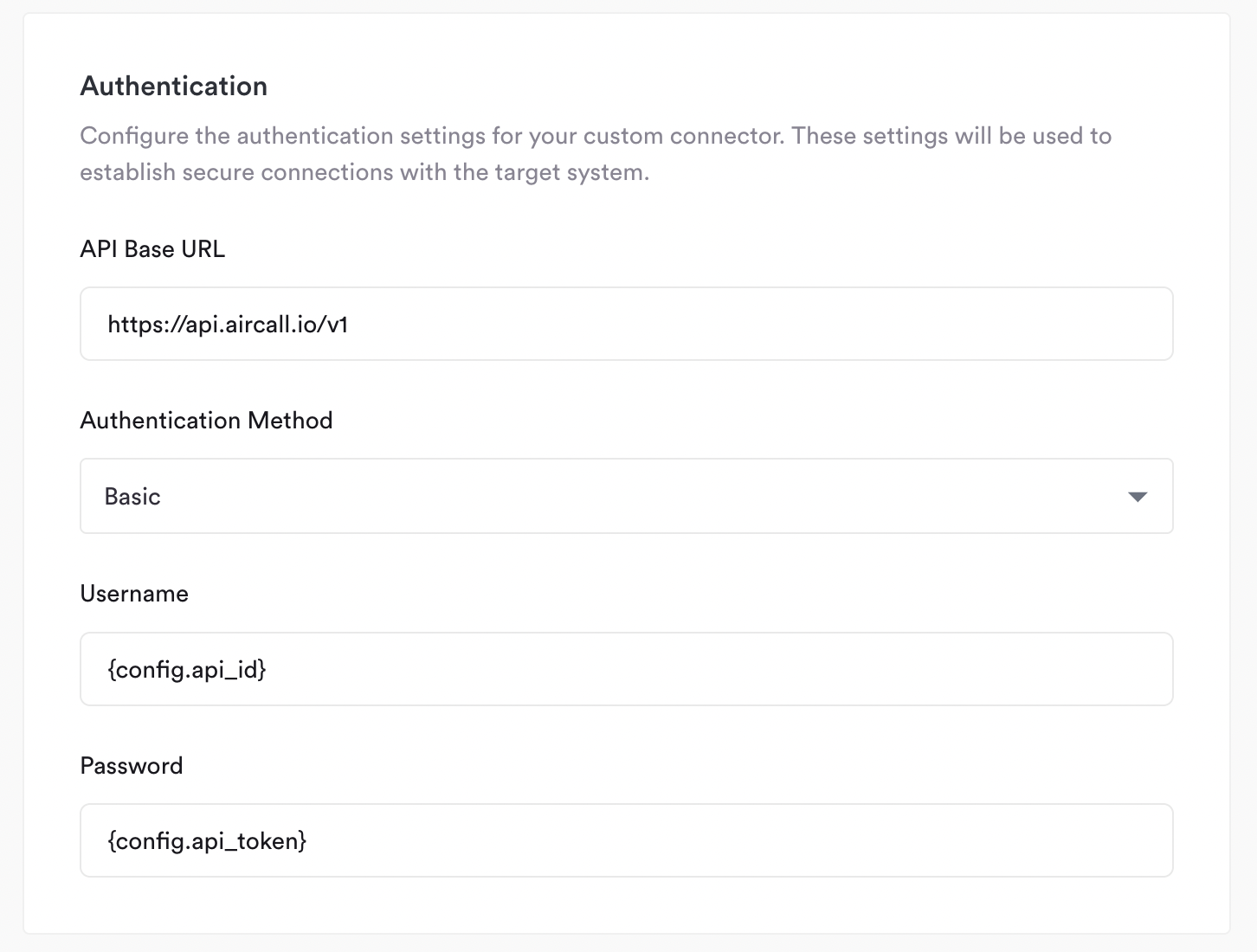
For Basic authentication, you need to define the **Username** and **Password**. Following standard Basic auth convention, these
will be concatenated with a colon `username:password` and then base64 encoded.
In many cases, **Password** will be an empty string, in which case you can leave Password blank. See example below:
#### Basic
For Basic authentication, you need to define the **Username** and **Password**. Following standard Basic auth convention, these
will be concatenated with a colon `username:password` and then base64 encoded.
In many cases, **Password** will be an empty string, in which case you can leave Password blank. See example below:
 #### OAuth
For OAuth authentication, select **OAuth** from the Authentication Method dropdown:
This reveals the following fields:
#### OAuth
For OAuth authentication, select **OAuth** from the Authentication Method dropdown:
This reveals the following fields:
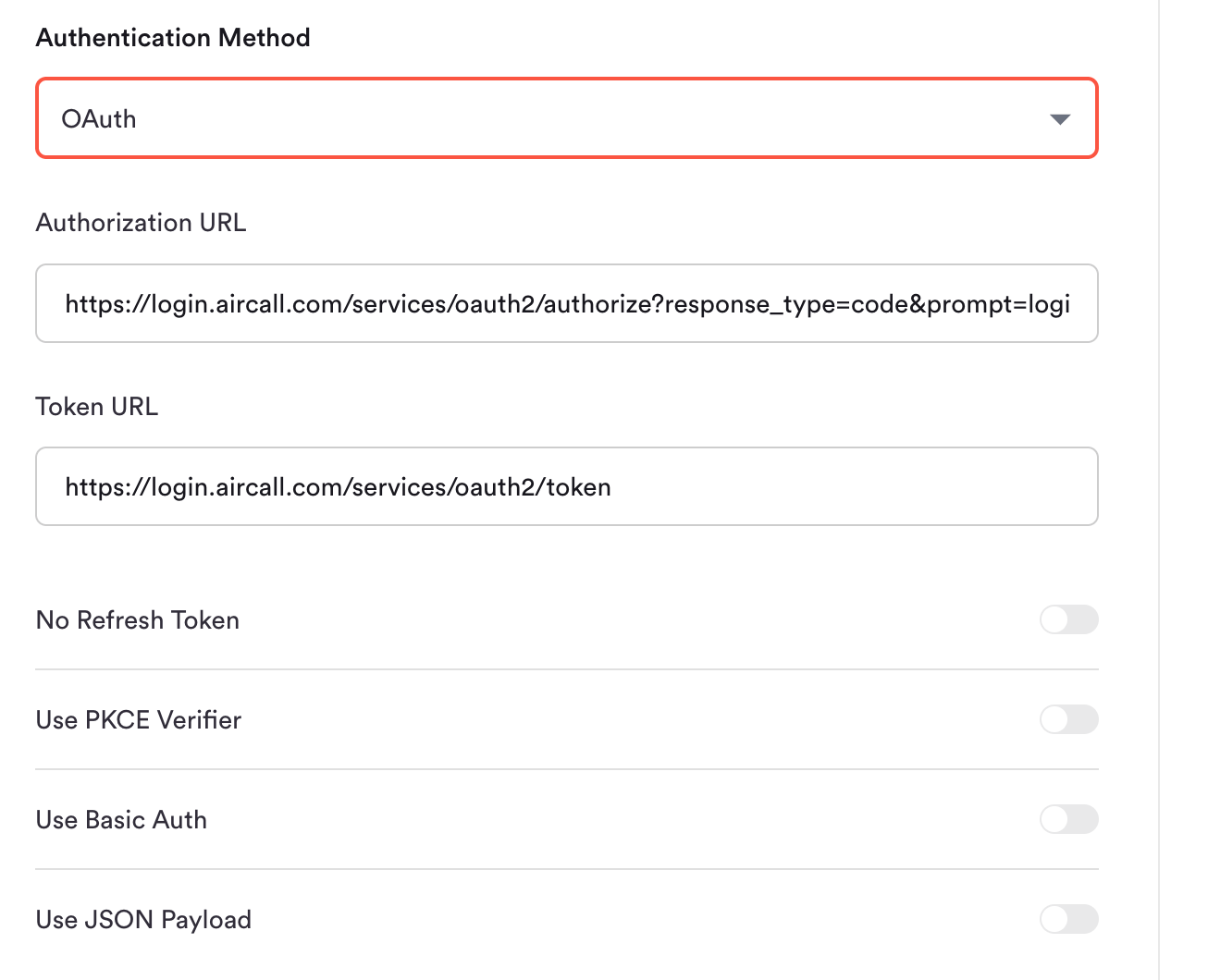 * **Authorization URL**: The URL tenants are redirected to in order to grant access. This maps to `tap_url` in the connector definition. Hotglue automatically appends `client_id`, `state`, and `redirect_uri` — do not include them manually.
* **Token URL**: The endpoint Hotglue calls to exchange the authorization code for an access token. This maps to `auth_url` in the connector definition.
* **No Refresh Token**: Enable if the provider does not issue a refresh token (the access token is long-lived or must be re-authorized manually).
* **Use PKCE Verifier**: Enable to add a PKCE `code_verifier` to the token exchange request.
* **Use Basic Auth**: Enable to send `client_id` and `client_secret` as an HTTP Basic Auth header on the token request. When enabled, set `Include Client Credentials in Body` to off if the provider rejects credentials in the request body (see below).
* **Use JSON Payload**: Enable to send the token request body as JSON instead of the default form-encoded format.
**Request Payload**
The Request Payload section shows the fields sent in the token refresh request body:
* **Authorization URL**: The URL tenants are redirected to in order to grant access. This maps to `tap_url` in the connector definition. Hotglue automatically appends `client_id`, `state`, and `redirect_uri` — do not include them manually.
* **Token URL**: The endpoint Hotglue calls to exchange the authorization code for an access token. This maps to `auth_url` in the connector definition.
* **No Refresh Token**: Enable if the provider does not issue a refresh token (the access token is long-lived or must be re-authorized manually).
* **Use PKCE Verifier**: Enable to add a PKCE `code_verifier` to the token exchange request.
* **Use Basic Auth**: Enable to send `client_id` and `client_secret` as an HTTP Basic Auth header on the token request. When enabled, set `Include Client Credentials in Body` to off if the provider rejects credentials in the request body (see below).
* **Use JSON Payload**: Enable to send the token request body as JSON instead of the default form-encoded format.
**Request Payload**
The Request Payload section shows the fields sent in the token refresh request body:
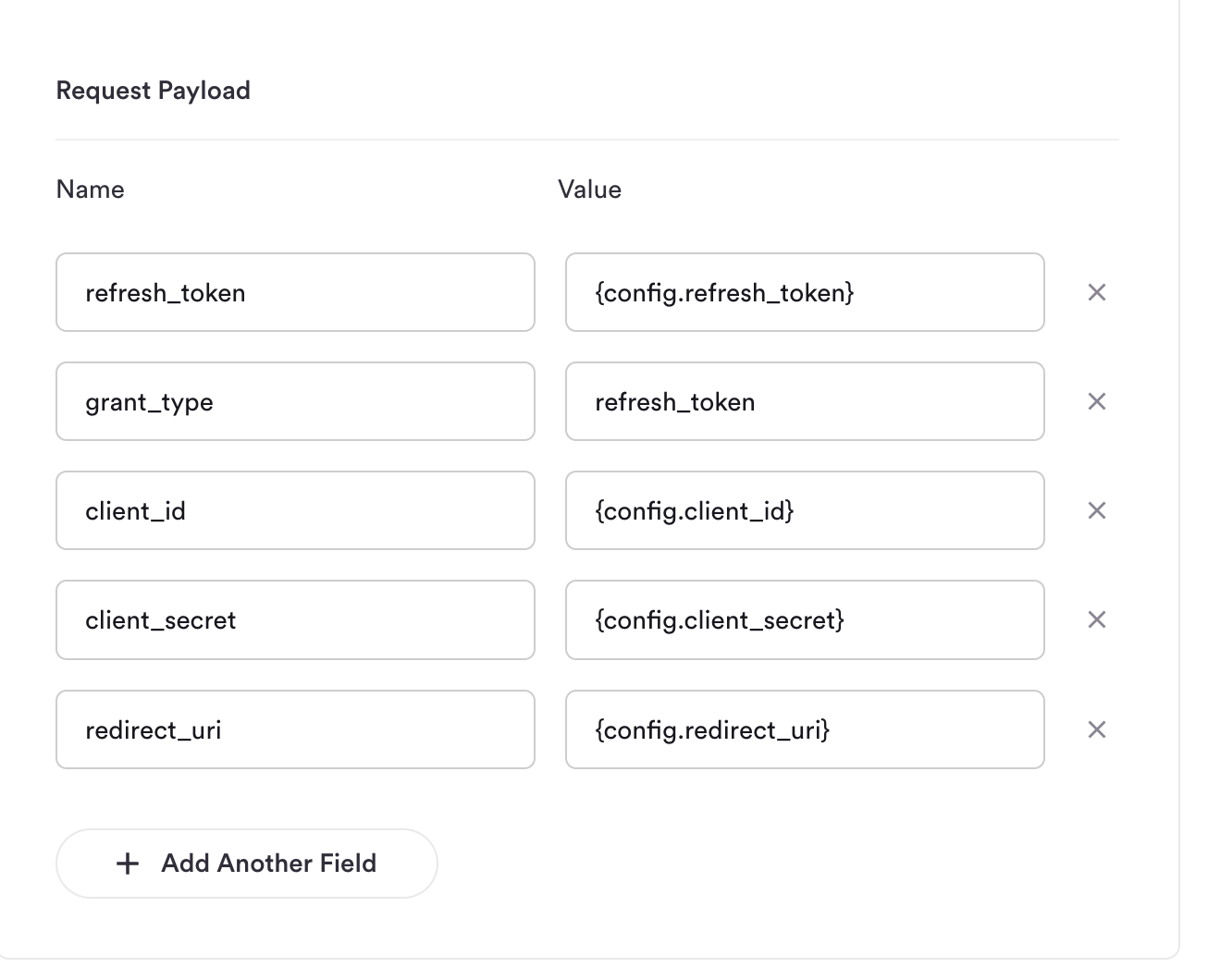 By default, this payload is automatically populated with `client_id`, `client_secret`, `redirect_uri`, `refresh_token`, and `grant_type` from the tenant's config. You can override these defaults by setting `authentication.refresh_request_body` in your tap definition.
## Parameters
In the parameters section, you can define the fields tenants will need to fill in when they link this connector.
Any of the parameters you define can be used in other sections (such as the Authentication step) by using the variable syntax. Such as:
```
{config.api_token}
```
For example, if I define the following:
By default, this payload is automatically populated with `client_id`, `client_secret`, `redirect_uri`, `refresh_token`, and `grant_type` from the tenant's config. You can override these defaults by setting `authentication.refresh_request_body` in your tap definition.
## Parameters
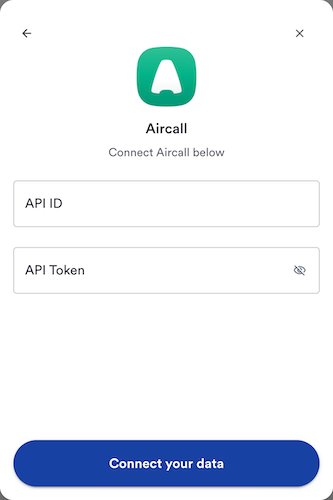
In the parameters section, you can define the fields tenants will need to fill in when they link this connector.
Any of the parameters you define can be used in other sections (such as the Authentication step) by using the variable syntax. Such as:
```
{config.api_token}
```
For example, if I define the following:
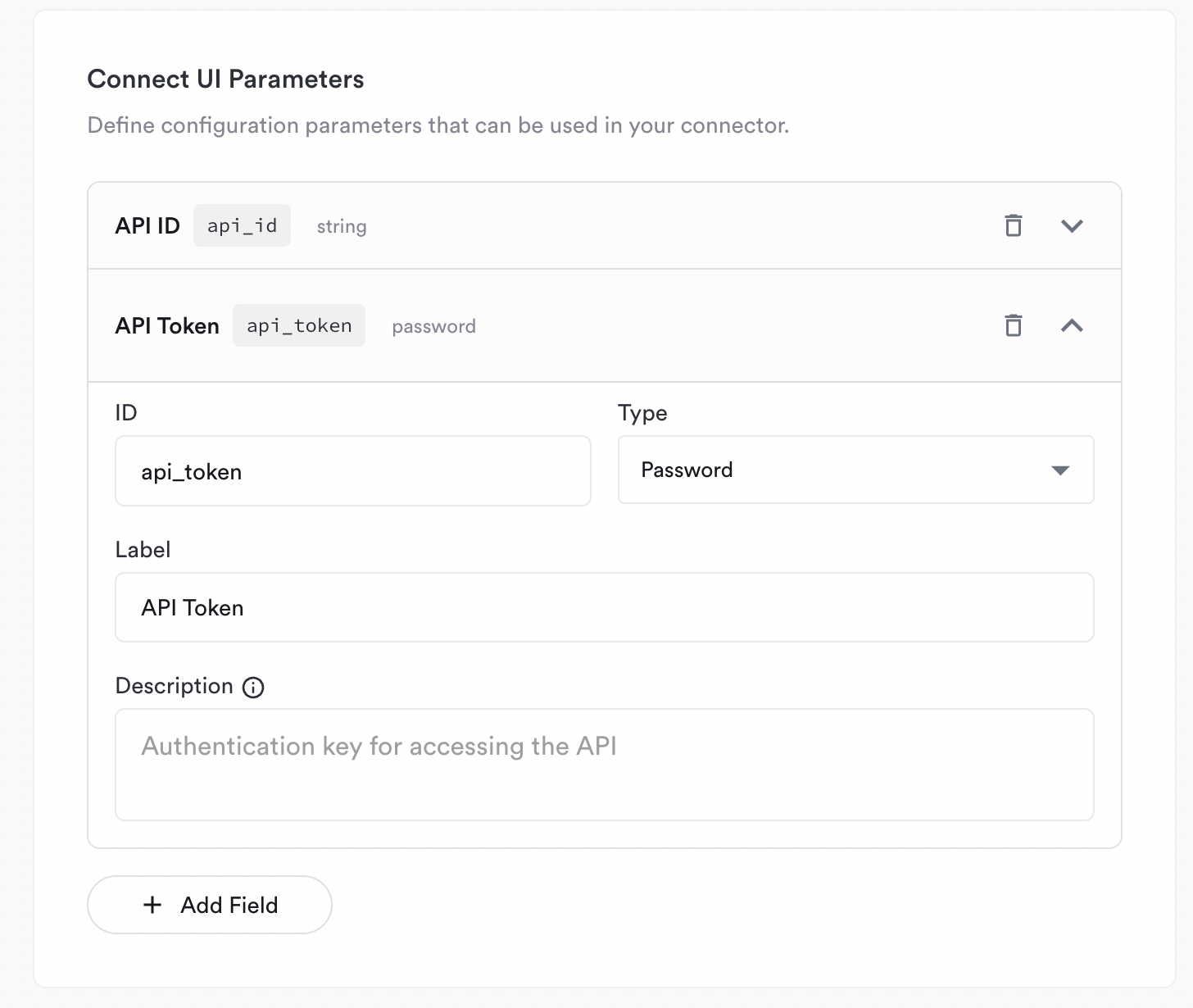 then in the widget tenants will see:
 ## Streams
The final thing to configure are the **Streams**. This is where you define the objects or tables this connector supports.
For my example (Aircall), the stream I'll be configuring is `Calls`.
### Details
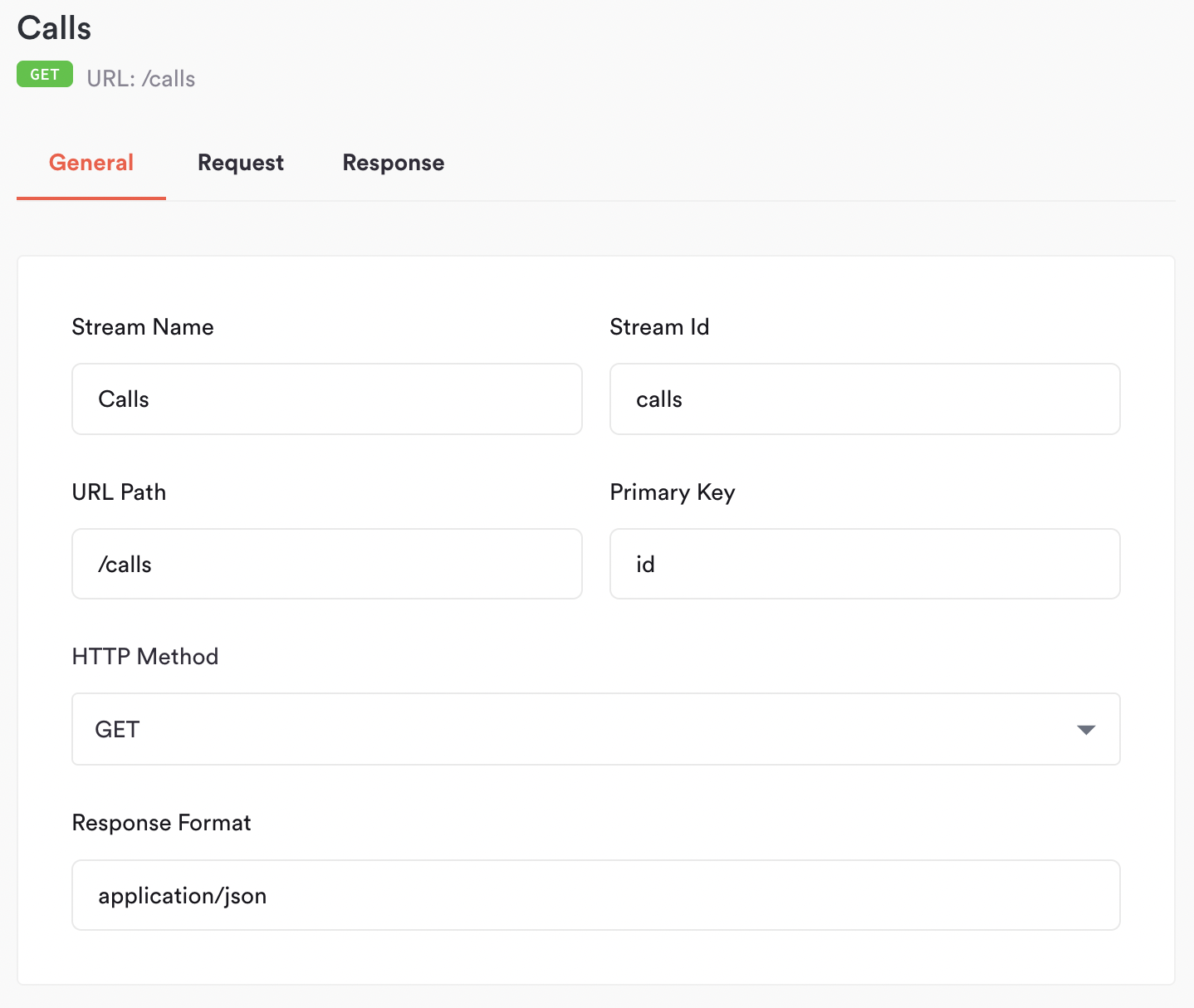
To start, we'll define the following:
* **Stream Name**: the name of the stream, this is only shown in the connector builder. For example, `Calls`
* **Stream Id**: the id of the stream, this will be used in the field map and catalog. We recommend this being snakecase, e.g. `calls`
* **URL Path**: the API endpoint to use, *without* the base URL. e.g. `/calls`
* **Primary Key**: the field to use as the primary key. If there is no primary key, leave it empty. e.g. `id`
* **HTTP Method**: either `GET` or `POST`. In almost all cases this will be `GET`
* **Response Format**: the MIME type of the API response. In almost all cases this should be `application/json`
## Streams
The final thing to configure are the **Streams**. This is where you define the objects or tables this connector supports.
For my example (Aircall), the stream I'll be configuring is `Calls`.
### Details
To start, we'll define the following:
* **Stream Name**: the name of the stream, this is only shown in the connector builder. For example, `Calls`
* **Stream Id**: the id of the stream, this will be used in the field map and catalog. We recommend this being snakecase, e.g. `calls`
* **URL Path**: the API endpoint to use, *without* the base URL. e.g. `/calls`
* **Primary Key**: the field to use as the primary key. If there is no primary key, leave it empty. e.g. `id`
* **HTTP Method**: either `GET` or `POST`. In almost all cases this will be `GET`
* **Response Format**: the MIME type of the API response. In almost all cases this should be `application/json`
 ### Request
#### Query Parameters
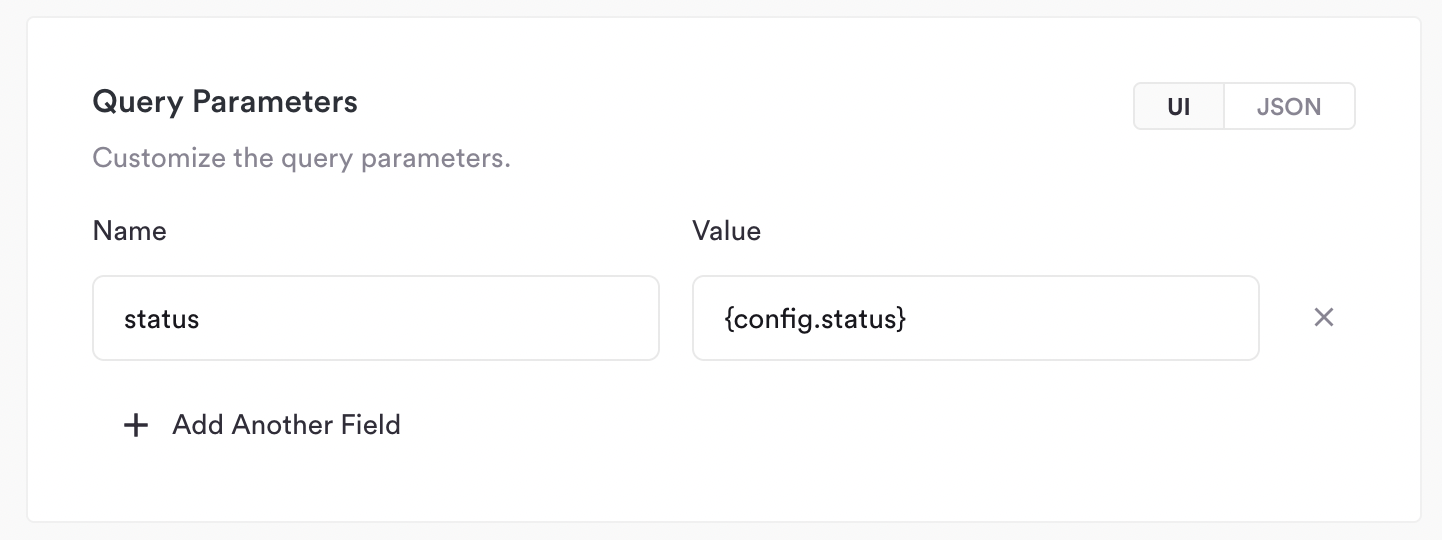
In the query parameters section, you can specify fields that should be added to the request URL. This is commonly used for filtering data.
For example, you may need to add a query parameter like `?status=Paid`. This can even reference config parameters if this behavior is configurable
by users:
### Request
#### Query Parameters
In the query parameters section, you can specify fields that should be added to the request URL. This is commonly used for filtering data.
For example, you may need to add a query parameter like `?status=Paid`. This can even reference config parameters if this behavior is configurable
by users:
 #### Pagination
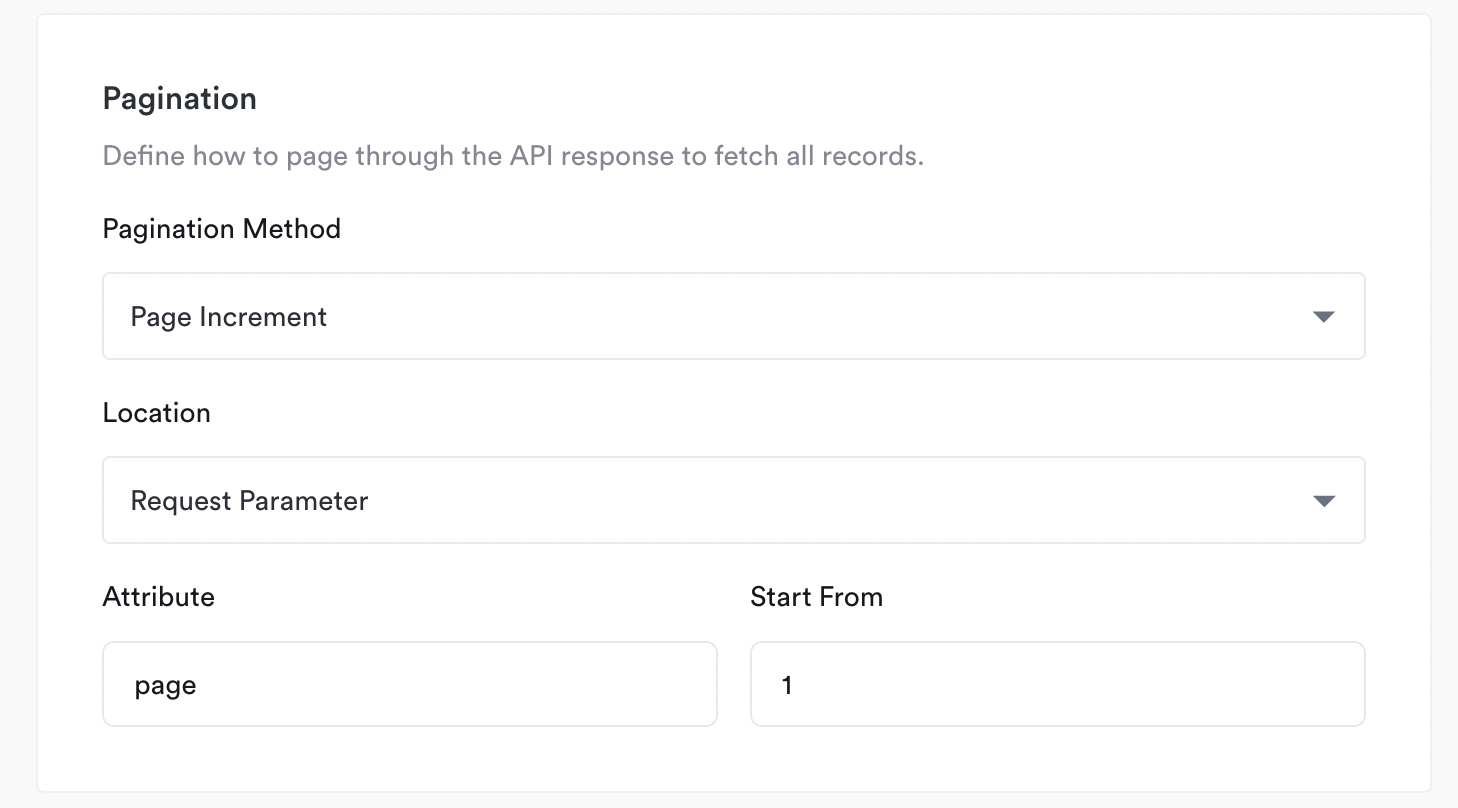
In the pagination section we define how to page through the API. We support two methods:
**Page Increment**
Page increment should be used if the API expects some sort of page parameter in the requests, typically in the URL.
To use this, you specify the following:
* **Location**: whether this should be a request parameter (in the URL) or in the headers
* **Attribute**: the name of the field to use (e.g. `page`)
* **Start From**: the first page (e.g. `1`)
In the example below we are defining a `page` URL parameter, so requests will start from `?page=1` and continue until there is no more data.
#### Pagination
In the pagination section we define how to page through the API. We support two methods:
**Page Increment**
Page increment should be used if the API expects some sort of page parameter in the requests, typically in the URL.
To use this, you specify the following:
* **Location**: whether this should be a request parameter (in the URL) or in the headers
* **Attribute**: the name of the field to use (e.g. `page`)
* **Start From**: the first page (e.g. `1`)
In the example below we are defining a `page` URL parameter, so requests will start from `?page=1` and continue until there is no more data.
 **Offset**
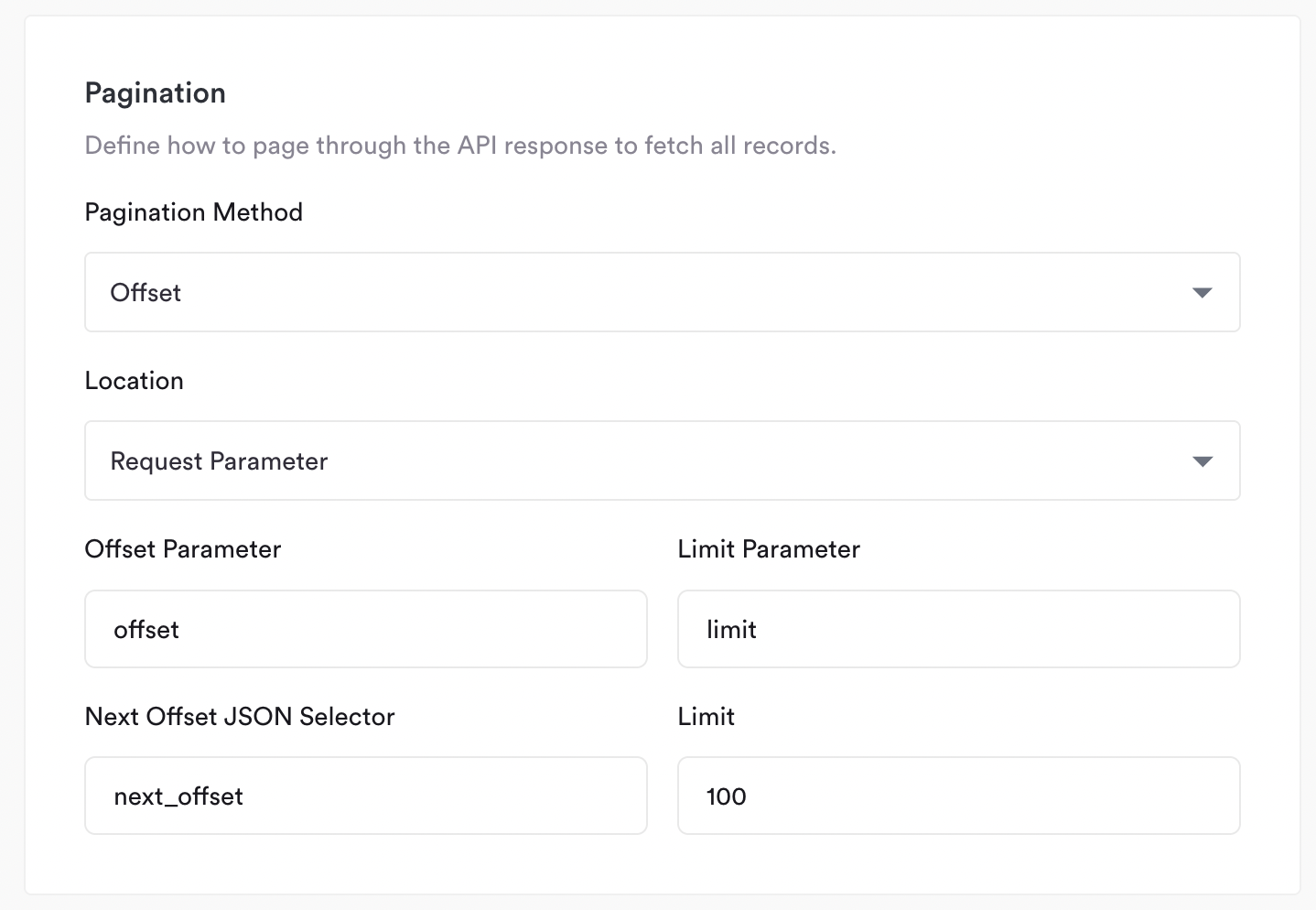
With offset pagination, we expect the API to specify some parameter which we can use to get the next page of data.
To use this, you specify the following:
* **Location**: whether this should be a request parameter (in the URL) or in the headers
* **Offset Parameter**: the name of the field to use to specify the offset (e.g. `offset`)
* **Next Offset JSON Selector**: the JSON Path to where in the response the next offset will be (e.g. `next_offset`)
* **Limit Parameter**: the name of the field to use to specify the limit (e.g. `limit`)
* **Limit**: the number of records each page will have (e.g. `100`)
The below example implements a typical offset setup (it's actually the format Chargebee's API uses!)
**Offset**
With offset pagination, we expect the API to specify some parameter which we can use to get the next page of data.
To use this, you specify the following:
* **Location**: whether this should be a request parameter (in the URL) or in the headers
* **Offset Parameter**: the name of the field to use to specify the offset (e.g. `offset`)
* **Next Offset JSON Selector**: the JSON Path to where in the response the next offset will be (e.g. `next_offset`)
* **Limit Parameter**: the name of the field to use to specify the limit (e.g. `limit`)
* **Limit**: the number of records each page will have (e.g. `100`)
The below example implements a typical offset setup (it's actually the format Chargebee's API uses!)
 #### Incremental Sync
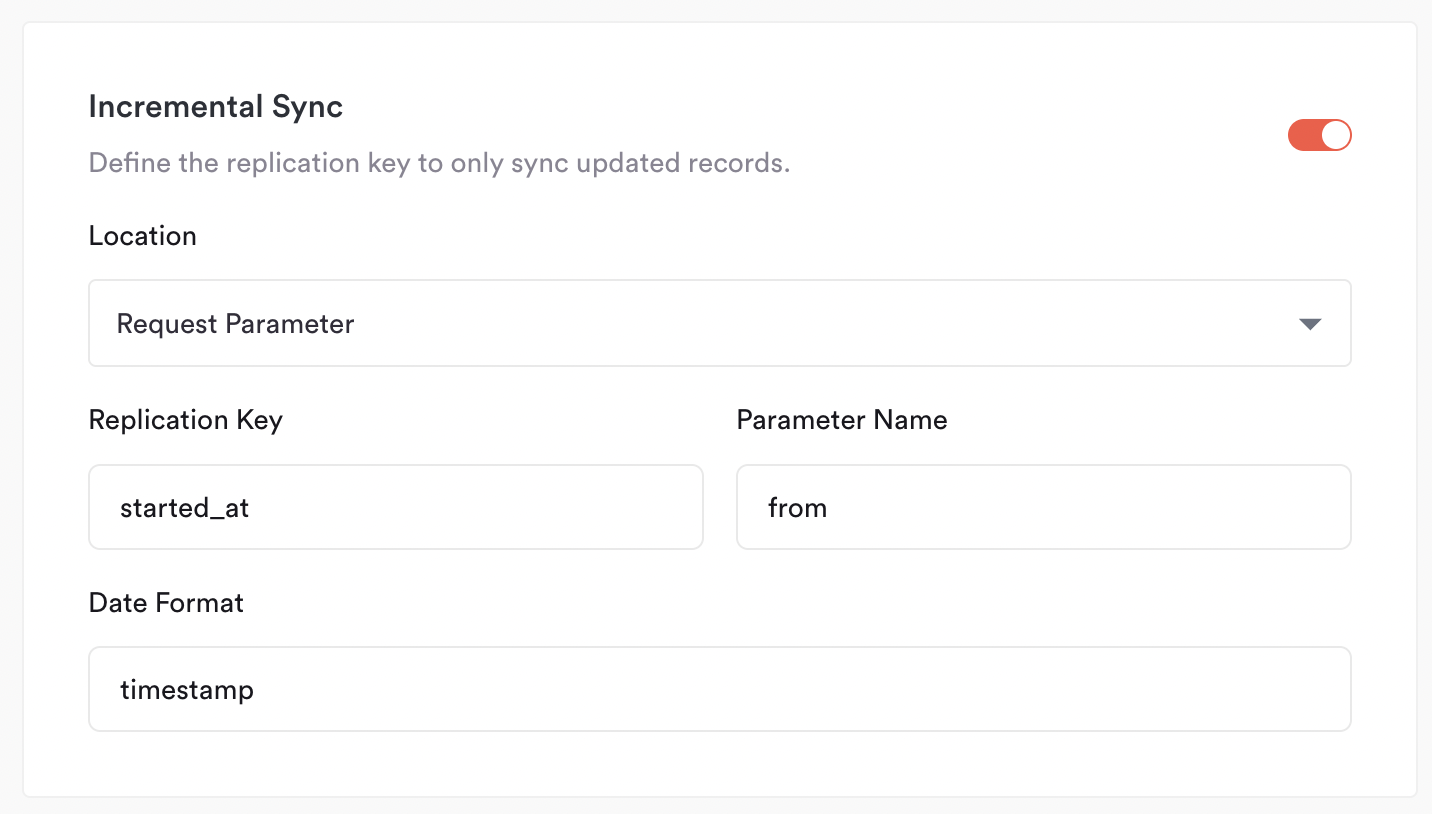
This section is optional, and is used to specify a **replication key** (a datetime field) that can be used as a filte rin the API request,
so we only sync new or updated data since the last job.
To use this you will specify:
* **Location**: whether this should be a request parameter (in the URL) or in the headers
* **Replication Key**: the field in the response data we should use to filter (e.g. `updated_at`)
* **Parameter Name**: the filter parameter in the API (e.g. `updated_at[after]`)
* **Date Format**: the format the date will be in. Can be either `timestamp` for UNIX timestamps, or a standard date format like `%Y-%m-%d %H:%M:%S`
Here's an example for Aircall, which has a `started_at` timestamp in the response data, and expects a filter in the URL like: `&from=`
#### Incremental Sync
This section is optional, and is used to specify a **replication key** (a datetime field) that can be used as a filte rin the API request,
so we only sync new or updated data since the last job.
To use this you will specify:
* **Location**: whether this should be a request parameter (in the URL) or in the headers
* **Replication Key**: the field in the response data we should use to filter (e.g. `updated_at`)
* **Parameter Name**: the filter parameter in the API (e.g. `updated_at[after]`)
* **Date Format**: the format the date will be in. Can be either `timestamp` for UNIX timestamps, or a standard date format like `%Y-%m-%d %H:%M:%S`
Here's an example for Aircall, which has a `started_at` timestamp in the response data, and expects a filter in the URL like: `&from=`
 ### Response
#### JSON Selector
First we specify the JSON path to the records within the response. For example, if I have a response payload that looks like:
```json theme={null}
{
"meta": {
"count": 20,
"total": 2234,
"current_page": 1,
"per_page": 20,
"next_page_link": "https://api.aircall.io/v1/calls?order=asc&page=2&per_page=20",
"previous_page_link": null
},
"calls": [
{
"id": 812,
"sid": "CA1234567890",
"direct_link": "https://api.aircall.io/v1/calls/812",
"direction": "outbound",
"status": "done",
"started_at": 1584998199,
"answered_at": 1584998205,
"ended_at": 1584998210
},
{
"id": 813,
"direct_link": "https://api.aircall.io/v1/calls/813",
"direction": "inbound",
"status": "done",
"started_at": 1584998199,
"answered_at": "no_available_agent",
"ended_at": 1584998210
}
]
}
```
Then my JSON selector should be:
```
$.calls[*]
```
#### JSON Schema
Finally, we specify the JSON Schema of the records. You can do this using the infer schema tool within hotglue, or manually in JSON.
### Response
#### JSON Selector
First we specify the JSON path to the records within the response. For example, if I have a response payload that looks like:
```json theme={null}
{
"meta": {
"count": 20,
"total": 2234,
"current_page": 1,
"per_page": 20,
"next_page_link": "https://api.aircall.io/v1/calls?order=asc&page=2&per_page=20",
"previous_page_link": null
},
"calls": [
{
"id": 812,
"sid": "CA1234567890",
"direct_link": "https://api.aircall.io/v1/calls/812",
"direction": "outbound",
"status": "done",
"started_at": 1584998199,
"answered_at": 1584998205,
"ended_at": 1584998210
},
{
"id": 813,
"direct_link": "https://api.aircall.io/v1/calls/813",
"direction": "inbound",
"status": "done",
"started_at": 1584998199,
"answered_at": "no_available_agent",
"ended_at": 1584998210
}
]
}
```
Then my JSON selector should be:
```
$.calls[*]
```
#### JSON Schema
Finally, we specify the JSON Schema of the records. You can do this using the infer schema tool within hotglue, or manually in JSON.
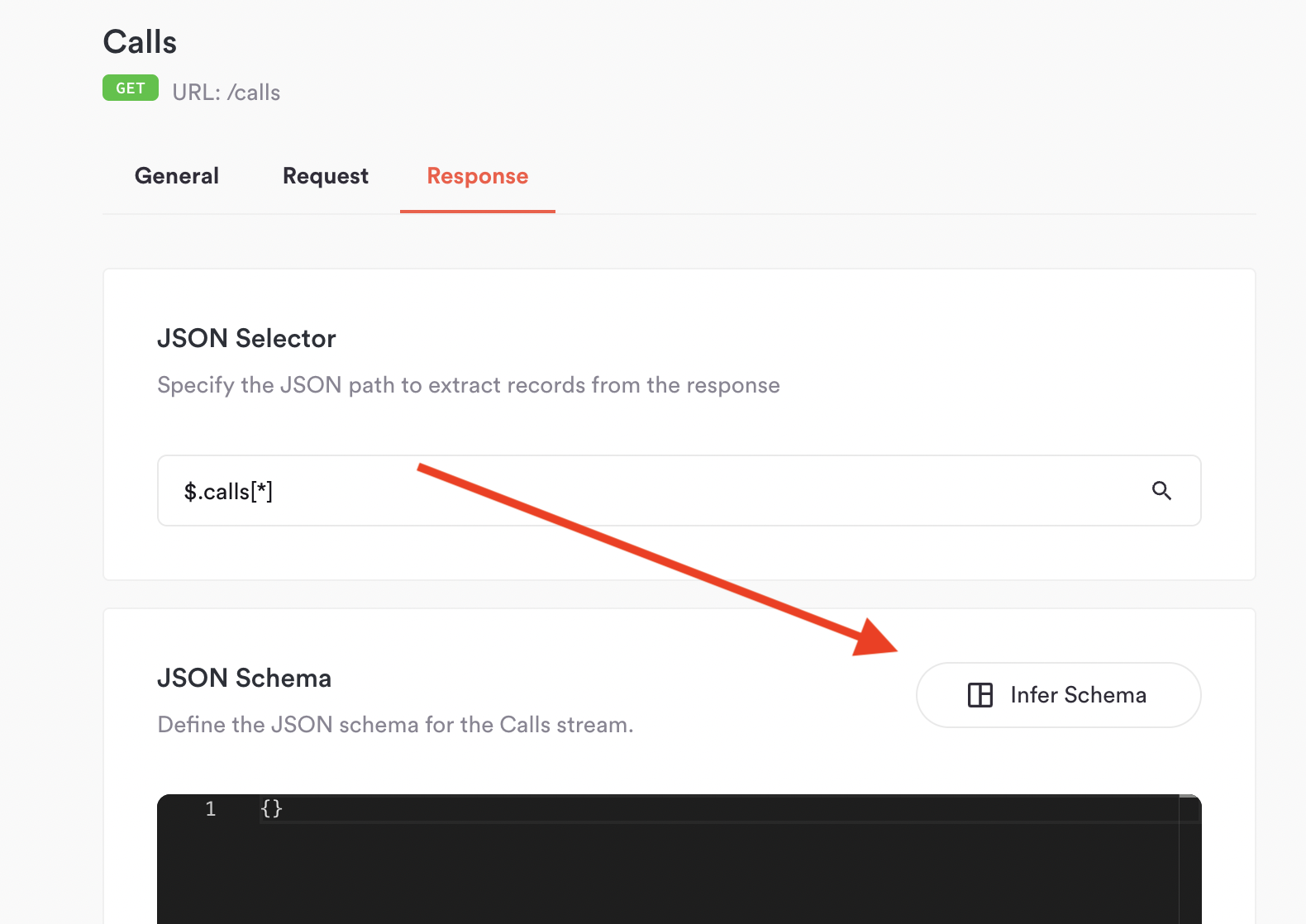 To use the infer schema tool, you can simply paste a sample JSON record and click infer:
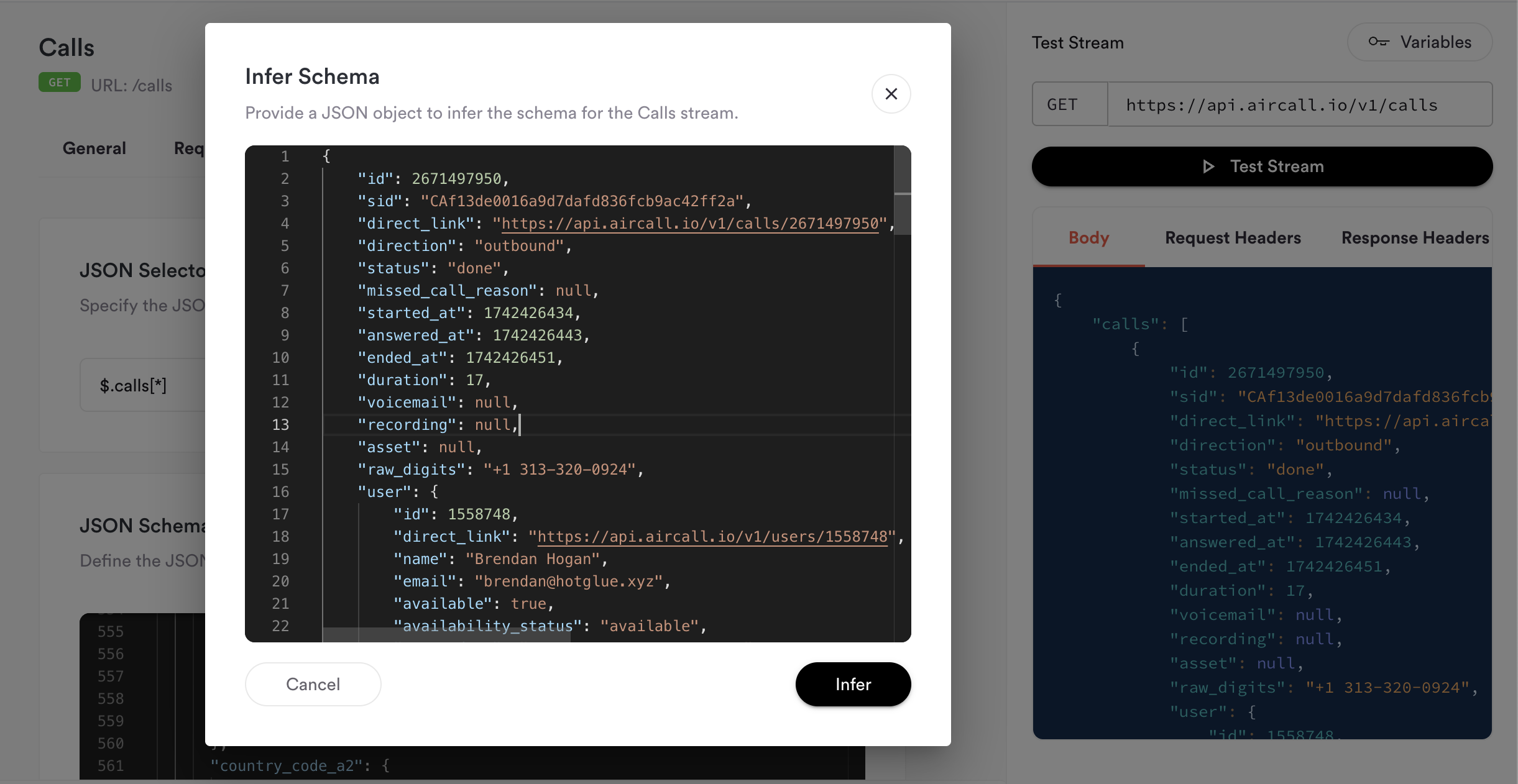 This generates the JSON Schema automatically, which you can then modify as needed. For example, I modified the `started_at` field in my
schema to be formatted as a `date-time` beause I am using it as the **Replication Key**:
```json theme={null}
{
"type": "object",
"properties": {
"id": {
"type": [
"integer",
"null"
]
},
"sid": {
"type": [
"string",
"null"
]
},
"direct_link": {
"type": [
"string",
"null"
],
"format": "uri"
},
"direction": {
"type": [
"string",
"null"
]
},
"status": {
"type": [
"string",
"null"
]
},
"missed_call_reason": {
"type": [
"null",
"null"
]
},
"started_at": {
"type": [
"string",
"null"
],
"format": "date-time"
},
"answered_at": {
"type": [
"string",
"null"
],
"format": "date-time"
},
"ended_at": {
"type": [
"string",
"null"
],
"format": "date-time"
},
"duration": {
"type": [
"integer",
"null"
]
},
"voicemail": {
"type": [
"null",
"null"
]
},
"recording": {
"type": [
"null",
"null"
]
},
"asset": {
"type": [
"null",
"null"
]
},
"raw_digits": {
"type": [
"string",
"null"
]
},
"user": {
"type": [
"object",
"null"
],
"properties": {
"id": {
"type": [
"integer",
"null"
]
},
"direct_link": {
"type": [
"string",
"null"
],
"format": "uri"
},
"name": {
"type": [
"string",
"null"
]
},
"email": {
"type": [
"string",
"null"
],
"format": "email"
},
"available": {
"type": [
"boolean",
"null"
]
},
"availability_status": {
"type": [
"string",
"null"
]
},
"created_at": {
"type": [
"string",
"null"
],
"format": "date-time"
},
"time_zone": {
"type": [
"string",
"null"
]
},
"language": {
"type": [
"string",
"null"
]
},
"state": {
"type": [
"string",
"null"
]
},
"wrap_up_time": {
"type": [
"integer",
"null"
]
}
}
},
"contact": {
"type": [
"null",
"null"
]
},
"archived": {
"type": [
"boolean",
"null"
]
},
"assigned_to": {
"type": [
"object",
"null"
],
"properties": {
"id": {
"type": [
"integer",
"null"
]
},
"direct_link": {
"type": [
"string",
"null"
],
"format": "uri"
},
"name": {
"type": [
"string",
"null"
]
},
"email": {
"type": [
"string",
"null"
],
"format": "email"
},
"available": {
"type": [
"boolean",
"null"
]
},
"availability_status": {
"type": [
"string",
"null"
]
},
"created_at": {
"type": [
"string",
"null"
],
"format": "date-time"
},
"time_zone": {
"type": [
"string",
"null"
]
},
"language": {
"type": [
"string",
"null"
]
},
"state": {
"type": [
"string",
"null"
]
},
"wrap_up_time": {
"type": [
"integer",
"null"
]
}
}
},
"tags": {
"type": [
"array",
"null"
],
"items": {
"type": [
"object",
"string",
"null"
]
}
},
"transferred_by": {
"type": [
"null",
"null"
]
},
"transferred_to": {
"type": [
"null",
"null"
]
},
"teams": {
"type": [
"array",
"null"
],
"items": {
"type": [
"object",
"string",
"null"
]
}
},
"number": {
"type": [
"object",
"null"
],
"properties": {
"id": {
"type": [
"integer",
"null"
]
},
"direct_link": {
"type": [
"string",
"null"
],
"format": "uri"
},
"name": {
"type": [
"string",
"null"
]
},
"digits": {
"type": [
"string",
"null"
]
},
"country": {
"type": [
"string",
"null"
]
},
"time_zone": {
"type": [
"string",
"null"
]
},
"open": {
"type": [
"boolean",
"null"
]
},
"availability_status": {
"type": [
"string",
"null"
]
},
"is_ivr": {
"type": [
"boolean",
"null"
]
},
"live_recording_activated": {
"type": [
"boolean",
"null"
]
},
"priority": {
"type": [
"null",
"null"
]
},
"messages": {
"type": [
"object",
"null"
],
"properties": {
"welcome": {
"type": [
"string",
"null"
],
"format": "uri"
},
"waiting": {
"type": [
"string",
"null"
],
"format": "uri"
},
"ivr": {
"type": [
"string",
"null"
],
"format": "uri"
},
"voicemail": {
"type": [
"string",
"null"
],
"format": "uri"
},
"closed": {
"type": [
"string",
"null"
],
"format": "uri"
},
"callback_later": {
"type": [
"string",
"null"
],
"format": "uri"
},
"unanswered_call": {
"type": [
"string",
"null"
],
"format": "uri"
},
"after_hours": {
"type": [
"string",
"null"
],
"format": "uri"
},
"ringing_tone": {
"type": [
"string",
"null"
],
"format": "uri"
}
}
},
"created_at": {
"type": [
"string",
"null"
],
"format": "date-time"
}
}
},
"comments": {
"type": [
"array",
"null"
],
"items": {
"type": "object",
"properties": {
"id": {
"type": [
"integer",
"null"
]
},
"content": {
"type": [
"string",
"null"
]
},
"posted_by": {
"type": [
"object",
"null"
],
"properties": {
"id": {
"type": [
"integer",
"null"
]
},
"direct_link": {
"type": [
"string",
"null"
],
"format": "uri"
},
"name": {
"type": [
"string",
"null"
]
},
"email": {
"type": [
"string",
"null"
],
"format": "email"
},
"available": {
"type": [
"boolean",
"null"
]
},
"availability_status": {
"type": [
"string",
"null"
]
},
"created_at": {
"type": [
"string",
"null"
],
"format": "date-time"
},
"time_zone": {
"type": [
"string",
"null"
]
},
"language": {
"type": [
"string",
"null"
]
},
"state": {
"type": [
"string",
"null"
]
},
"wrap_up_time": {
"type": [
"integer",
"null"
]
}
}
},
"posted_at": {
"type": [
"integer",
"null"
]
}
}
}
},
"cost": {
"type": [
"string",
"null"
]
},
"country_code_a2": {
"type": [
"string",
"null"
]
},
"pricing_type": {
"type": [
"string",
"null"
]
},
"recording_short_url": {
"type": [
"null",
"null"
]
},
"voicemail_short_url": {
"type": [
"null",
"null"
]
}
}
}
```
That's it! You've now configured a custom tap. From here you can add more streams, or click **Publish** to start adding it to flows and running jobs.
## Advanced Features
### Parent-Child Streams
In some cases streams are nested and require a parent-child relationship to work properly. For example, if you have the following streams:
* Clients `/clients`
* Medical Forms `/clients/{client_id}/medical-forms`
you will need to fetch the medical forms *for each* client. This is a great use case for parent-child streams.
In the parent stream, we need to define the `child_context` – essentially a list of parameters the child streams will have access to in order to make their requests.
```json theme={null}
"child_context": [
{
"name": "client_id",
"value": "$.details.id"
}
]
```
In the child stream, we simply need to define the `parent_stream`:
```json theme={null}
"parent_stream": "clients"
```
Watch the video below for a full walkthrough and demo of using parent-child streams:
This generates the JSON Schema automatically, which you can then modify as needed. For example, I modified the `started_at` field in my
schema to be formatted as a `date-time` beause I am using it as the **Replication Key**:
```json theme={null}
{
"type": "object",
"properties": {
"id": {
"type": [
"integer",
"null"
]
},
"sid": {
"type": [
"string",
"null"
]
},
"direct_link": {
"type": [
"string",
"null"
],
"format": "uri"
},
"direction": {
"type": [
"string",
"null"
]
},
"status": {
"type": [
"string",
"null"
]
},
"missed_call_reason": {
"type": [
"null",
"null"
]
},
"started_at": {
"type": [
"string",
"null"
],
"format": "date-time"
},
"answered_at": {
"type": [
"string",
"null"
],
"format": "date-time"
},
"ended_at": {
"type": [
"string",
"null"
],
"format": "date-time"
},
"duration": {
"type": [
"integer",
"null"
]
},
"voicemail": {
"type": [
"null",
"null"
]
},
"recording": {
"type": [
"null",
"null"
]
},
"asset": {
"type": [
"null",
"null"
]
},
"raw_digits": {
"type": [
"string",
"null"
]
},
"user": {
"type": [
"object",
"null"
],
"properties": {
"id": {
"type": [
"integer",
"null"
]
},
"direct_link": {
"type": [
"string",
"null"
],
"format": "uri"
},
"name": {
"type": [
"string",
"null"
]
},
"email": {
"type": [
"string",
"null"
],
"format": "email"
},
"available": {
"type": [
"boolean",
"null"
]
},
"availability_status": {
"type": [
"string",
"null"
]
},
"created_at": {
"type": [
"string",
"null"
],
"format": "date-time"
},
"time_zone": {
"type": [
"string",
"null"
]
},
"language": {
"type": [
"string",
"null"
]
},
"state": {
"type": [
"string",
"null"
]
},
"wrap_up_time": {
"type": [
"integer",
"null"
]
}
}
},
"contact": {
"type": [
"null",
"null"
]
},
"archived": {
"type": [
"boolean",
"null"
]
},
"assigned_to": {
"type": [
"object",
"null"
],
"properties": {
"id": {
"type": [
"integer",
"null"
]
},
"direct_link": {
"type": [
"string",
"null"
],
"format": "uri"
},
"name": {
"type": [
"string",
"null"
]
},
"email": {
"type": [
"string",
"null"
],
"format": "email"
},
"available": {
"type": [
"boolean",
"null"
]
},
"availability_status": {
"type": [
"string",
"null"
]
},
"created_at": {
"type": [
"string",
"null"
],
"format": "date-time"
},
"time_zone": {
"type": [
"string",
"null"
]
},
"language": {
"type": [
"string",
"null"
]
},
"state": {
"type": [
"string",
"null"
]
},
"wrap_up_time": {
"type": [
"integer",
"null"
]
}
}
},
"tags": {
"type": [
"array",
"null"
],
"items": {
"type": [
"object",
"string",
"null"
]
}
},
"transferred_by": {
"type": [
"null",
"null"
]
},
"transferred_to": {
"type": [
"null",
"null"
]
},
"teams": {
"type": [
"array",
"null"
],
"items": {
"type": [
"object",
"string",
"null"
]
}
},
"number": {
"type": [
"object",
"null"
],
"properties": {
"id": {
"type": [
"integer",
"null"
]
},
"direct_link": {
"type": [
"string",
"null"
],
"format": "uri"
},
"name": {
"type": [
"string",
"null"
]
},
"digits": {
"type": [
"string",
"null"
]
},
"country": {
"type": [
"string",
"null"
]
},
"time_zone": {
"type": [
"string",
"null"
]
},
"open": {
"type": [
"boolean",
"null"
]
},
"availability_status": {
"type": [
"string",
"null"
]
},
"is_ivr": {
"type": [
"boolean",
"null"
]
},
"live_recording_activated": {
"type": [
"boolean",
"null"
]
},
"priority": {
"type": [
"null",
"null"
]
},
"messages": {
"type": [
"object",
"null"
],
"properties": {
"welcome": {
"type": [
"string",
"null"
],
"format": "uri"
},
"waiting": {
"type": [
"string",
"null"
],
"format": "uri"
},
"ivr": {
"type": [
"string",
"null"
],
"format": "uri"
},
"voicemail": {
"type": [
"string",
"null"
],
"format": "uri"
},
"closed": {
"type": [
"string",
"null"
],
"format": "uri"
},
"callback_later": {
"type": [
"string",
"null"
],
"format": "uri"
},
"unanswered_call": {
"type": [
"string",
"null"
],
"format": "uri"
},
"after_hours": {
"type": [
"string",
"null"
],
"format": "uri"
},
"ringing_tone": {
"type": [
"string",
"null"
],
"format": "uri"
}
}
},
"created_at": {
"type": [
"string",
"null"
],
"format": "date-time"
}
}
},
"comments": {
"type": [
"array",
"null"
],
"items": {
"type": "object",
"properties": {
"id": {
"type": [
"integer",
"null"
]
},
"content": {
"type": [
"string",
"null"
]
},
"posted_by": {
"type": [
"object",
"null"
],
"properties": {
"id": {
"type": [
"integer",
"null"
]
},
"direct_link": {
"type": [
"string",
"null"
],
"format": "uri"
},
"name": {
"type": [
"string",
"null"
]
},
"email": {
"type": [
"string",
"null"
],
"format": "email"
},
"available": {
"type": [
"boolean",
"null"
]
},
"availability_status": {
"type": [
"string",
"null"
]
},
"created_at": {
"type": [
"string",
"null"
],
"format": "date-time"
},
"time_zone": {
"type": [
"string",
"null"
]
},
"language": {
"type": [
"string",
"null"
]
},
"state": {
"type": [
"string",
"null"
]
},
"wrap_up_time": {
"type": [
"integer",
"null"
]
}
}
},
"posted_at": {
"type": [
"integer",
"null"
]
}
}
}
},
"cost": {
"type": [
"string",
"null"
]
},
"country_code_a2": {
"type": [
"string",
"null"
]
},
"pricing_type": {
"type": [
"string",
"null"
]
},
"recording_short_url": {
"type": [
"null",
"null"
]
},
"voicemail_short_url": {
"type": [
"null",
"null"
]
}
}
}
```
That's it! You've now configured a custom tap. From here you can add more streams, or click **Publish** to start adding it to flows and running jobs.
## Advanced Features
### Parent-Child Streams
In some cases streams are nested and require a parent-child relationship to work properly. For example, if you have the following streams:
* Clients `/clients`
* Medical Forms `/clients/{client_id}/medical-forms`
you will need to fetch the medical forms *for each* client. This is a great use case for parent-child streams.
In the parent stream, we need to define the `child_context` – essentially a list of parameters the child streams will have access to in order to make their requests.
```json theme={null}
"child_context": [
{
"name": "client_id",
"value": "$.details.id"
}
]
```
In the child stream, we simply need to define the `parent_stream`:
```json theme={null}
"parent_stream": "clients"
```
Watch the video below for a full walkthrough and demo of using parent-child streams: