> ## Documentation Index
> Fetch the complete documentation index at: https://docs.hotglue.com/llms.txt
> Use this file to discover all available pages before exploring further.
# Source Settings
> Modifying Hotglue Source Settings
# What are Source Settings?
Source settings determine:
* How a Source appears to your tenants
* How you and your tenants authenticate to the Source
* How Hotglue will run this Source
## Example Source Settings
```json theme={null}
{
"tap": "facebook",
"tags": [
"ads"
],
"icon": "https://s3.amazonaws.com/cdn.hotglue.xyz/images/logos/facebook_ads.svg",
"domain": "facebook.com/business/ads",
"label": "Facebook Ads",
"validation_supported":true,
"tap_url": "https://www.facebook.com/v12.0/dialog/oauth?scope=ads_management%20ads_read",
"auth_url": "https://graph.facebook.com/v12.0/oauth/access_token",
"type": "oauth",
"connect_ui_params": {
"account_id": {
"label": "Account ID",
"description": "Your Facebook Ads account id."
}
},
"connector_props": {
"singer_sdk": true
}
}
```
## Understanding the Source Fields
### `tap`
The `tap` field is a unique identifier for the source. It is used internally to reference the source and should be unique across all sources.
### `label`
The `label` field is a human-readable name for the source. This is the name that will be displayed in the user interface.
### `icon`
The `icon` field is a URL to an image that represents the source. This icon will be displayed in the user interface alongside the source's label.
### `tags`
The `tags` field is an array of strings that categorize the source. These tags can be used to filter and search for sources.
### `domain`
The `domain` field specifies the primary domain associated with the source. This is typically the domain of the service the source integrates with.
### `type`
The `type` field specifies the authentication method used by the source. Accepted values are `oauth` and `api`
### `isForked`
The `isForked` field indicates whether this source has been modified from the default hotglue source settings.
### `validation_supported`
The `validation_supported` field (boolean) indicates whether the connector validates a tenant’s credentials during account linking.
### `install_uri`
The `install_uri` field can be used to overwrite the default git repo that the Tap will be installed from:
```
"install_uri": "git+https://github.com/your-org/tap-googleads.git@v1.2.4"
```
You can also override the `install_uri` for particular tenants by instead using:
```
"install_uri": {
"env": "git+..." // Default install URI,
"tenant": {
"TENANT_ID": "git+..." // Install URI for particular tenant
}
}
```
### `is_private_repo`
The `is_private_repo` field tells hotglue to use your configured [git access token](https://docs.hotglue.com/environment-settings/job-settings#private-repositories) when installing your Tap.
```json theme={null}
"install_uri": "git+https://github.com/your-org/tap-googleads.git@v1.2.4" // Private Repository
"is_private_repo": true
```
### `formattable_fields`
The `formattable_fields` flag allows you to set a list of config flags that can be used as variables for your auth URLs.
```json theme={null}
"formattable_fields": ["shop", "tenant_id"]
```
For example, if you set:
```json theme={null}
"auth_url": "https://{shop}.shopify.com/token"
```
And the tenant has config:
```json theme={null}
{
...
"shop": "usa",
...
}
```
then hotglue will use the following `auth_url` when completing the OAuth flow:
```
https://usa.shopify.com/token
```
All fields specified in the `connect_ui_params` are used as `formattable_fields` by default.
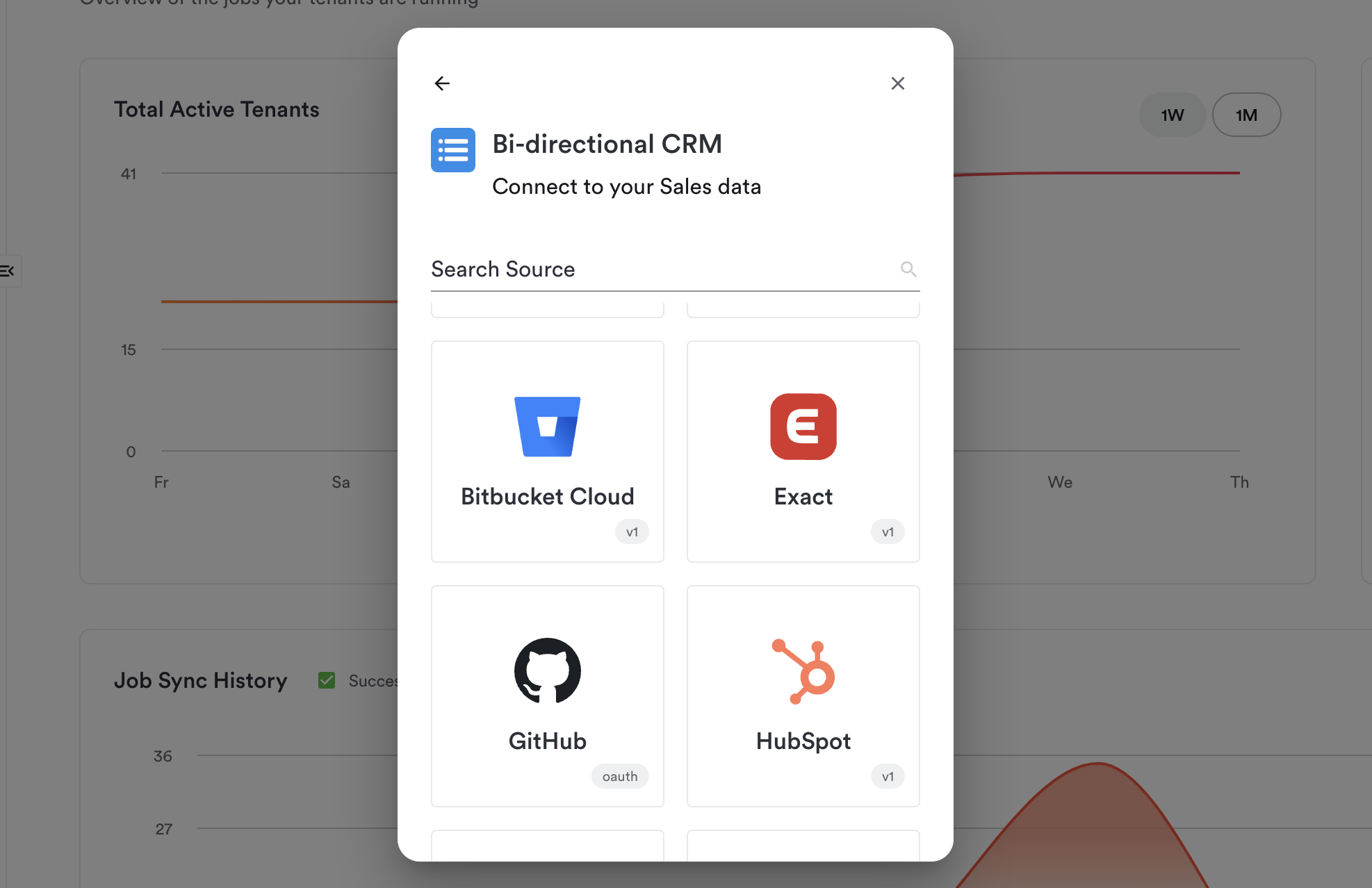
### `version`
The `version` field allows you to add a chip to the Widget UI that specifies the source version.
```json theme={null}
"version": "v2"
```
 ### `tap_url`
The `tap_url` field specifies the OAuth authorization URL used to initiate the authentication flow for this source. This is the URL the tenant is redirected to when connecting the source.
```json theme={null}
"tap_url": "https://app.example.com/oauth/authorize?response_type=code"
```
### `auth_url`
The `auth_url` field specifies the OAuth token exchange URL used to obtain access tokens after the tenant has authorized the source.
```json theme={null}
"auth_url": "https://app.example.com/oauth/token"
```
### `revoke_url`
The `revoke_url` field specifies the URL called to revoke OAuth tokens when a tenant disconnects the source.
```json theme={null}
"revoke_url": "https://app.example.com/oauth/revoke"
```
### `dynamic_urls`
The `dynamic_urls` field allows the source to construct URLs dynamically at runtime using tenant-specific config values. When set to `true`, placeholders in `tap_url` and `auth_url` are replaced with values from the tenant's config.
For example, Amazon Advertising uses a region-specific URL selected by the tenant:
```json theme={null}
"tap_url": "{uri}/ap/oa?response_type=code&scope=advertising::campaign_management",
"auth_url": "{uri}/auth/o2/token",
"dynamic_urls": true,
"connect_ui_params": {
"uri": {
"label": "Amazon Ads Region",
"description": "The region of the Amazon Ads account to connect",
"type": "select",
"options": [
{ "name": "North America (NA)", "value": "https://www.amazon.com" },
{ "name": "Europe (EU)", "value": "https://www.amazon.co.uk" }
]
}
}
```
When a tenant selects `EU`, hotglue replaces `{uri}` with `https://www.amazon.co.uk` in the tap and auth URLs automatically.
### `flowType`
The `flowType` field specifies how the source can be used across flows. When set to `all`, the source can be used in both tap and target flows.
```json theme={null}
"flowType": "all"
```
### `no_fieldmap`
The `no_fieldmap` field disables field mapping for this source.
```json theme={null}
"no_fieldmap": true
```
### `disabled`
The `disabled` field marks this source as disabled and unavailable for use.
```json theme={null}
"disabled": true
```
### `connector_repo`
The `connector_repo` field specifies the git repository URL for a hotglue-maintained tap. This field only works with hotglue-maintained repositories.
```json theme={null}
"connector_repo": "git+https://github.com/hotgluexyz/tap-example.git"
```
### `connector_tag`
The `connector_tag` field specifies the version tag of a hotglue-maintained tap repository to install. This field only works with hotglue-maintained repositories.
```json theme={null}
"connector_tag": "^v1.0.0"
```
### `connector_type`
The `connector_type` field specifies the tap runtime type.
```json theme={null}
"connector_type": "airbyte"
```
### `external_repo_url`
The `external_repo_url` field specifies the URL to the external repository for airbyte-sourced taps.
```json theme={null}
"external_repo_url": "https://github.com/airbytehq/airbyte/tree/master/airbyte-integrations/connectors/source-example"
```
### `unified_version`
The `unified_version` field specifies the unified schema version used by this source.
```json theme={null}
"unified_version": "v2"
```
### `basic_client_credentials`
The `basic_client_credentials` field uses HTTP Basic Auth for client credentials instead of standard OAuth.
```json theme={null}
"basic_client_credentials": true
```
### `oauth_settings`
The `oauth_settings` field contains advanced OAuth configuration for the source. The following sub-fields are supported:
| Field | Type | Description |
| ------------------- | ------- | ---------------------------------------------------------------------------- |
| `use_pkce_verifier` | boolean | Enables PKCE (Proof Key for Code Exchange) for enhanced OAuth security |
| `use_basic_auth` | boolean | Sends client credentials using HTTP Basic Auth during token exchange |
| `use_json_payload` | boolean | Sends the token request as a JSON payload instead of form-encoded data |
| `no_code_param` | boolean | Omits the code parameter from the token request for non-standard OAuth flows |
| `encode_state` | boolean | Encodes the OAuth state parameter before sending |
```json theme={null}
"oauth_settings": {
"use_pkce_verifier": true
}
```
### `connect_ui_params`
The `connect_ui_params` field defines the fields shown to tenants in the connection UI. Each field key maps to a parameter object that supports the following properties:
| Property | Type | Description |
| ----------------- | ------- | -------------------------------------------------------------------------------------------------------------------------------------------- |
| `label` | string | Human-readable label shown to the tenant for this field |
| `description` | string | Helper text displayed below the field to guide the tenant |
| `type` | string | Input type for the field. Accepted values: `password`, `boolean`, `select`, `number`, `list`, `multiline`. Defaults to text if not specified |
| `required` | boolean | Whether this field is required for the tenant to connect. Defaults to `true` if not specified |
| `adornment` | object | Adds prefix or suffix text around the input field |
| `adornment.start` | string | Text displayed before the input field (e.g. `https://`) |
| `adornment.end` | string | Text displayed after the input field (e.g. `.myshopify.com`) |
| `options` | array | Used when `type` is `select`. Defines the list of options the tenant can choose from |
| `options[].name` | string | Display name for the select option |
| `options[].value` | string | Value submitted when this option is selected |
| `params` | object | Used when `type` is `list`. Defines the sub-fields for each item in the list |
The following examples show fields using different property combinations:
```json theme={null}
"connect_ui_params": {
"shop": {
"label": "Shop",
"description": "Your shop name",
"adornment": {
"start": "https://",
"end": ".myshopify.com"
}
},
"region": {
"label": "Region",
"type": "select",
"options": [
{ "name": "North America", "value": "https://www.amazon.com" },
{ "name": "Europe", "value": "https://www.amazon.co.uk" }
]
},
"bulk": {
"label": "Bulk",
"type": "boolean",
"required": false
},
"api_key": {
"label": "API Key",
"description": "Your API Key",
"type": "password"
}
}
```
### `connector_props`
The `connector_props` field contains additional configuration properties for the tap. The following sub-fields are supported:
| Field | Type | Description |
| --------------------- | ------- | -------------------------------------------------------------------------------------------------------------------------- |
| `singer_sdk` | boolean | Indicates this tap is built using the Singer SDK |
| `static_data` | boolean | Indicates this tap handles arbitrary file-based data sources such as file storage, Google Drive, or blob storage |
| `validation_disabled` | boolean | Disables credential validation for this tap during account linking |
| `tap_driver_name` | string | Overrides the default driver name used to run the connector. Use this when the driver name differs from the connector `id` |
```json theme={null}
"connector_props": {
"singer_sdk": true,
"tap_driver_name": "example"
}
```
### `config`
The `config` block defines default configuration values that are automatically applied to every new tenant connecting to this source. Tenants inherit these values without needing to configure them manually.
The only universal config field supported across all sources is `start_date`. All other config fields are source-specific — refer to the individual source's documentation for the full list of supported fields.
| Field | Type | Description |
| ------------ | ------ | --------------------------------------------------- |
| `start_date` | string | Default start date for data sync in ISO 8601 format |
```json theme={null}
"config": {
"start_date": "2000-01-01T00:00:00.000Z"
}
```
### `tap_url`
The `tap_url` field specifies the OAuth authorization URL used to initiate the authentication flow for this source. This is the URL the tenant is redirected to when connecting the source.
```json theme={null}
"tap_url": "https://app.example.com/oauth/authorize?response_type=code"
```
### `auth_url`
The `auth_url` field specifies the OAuth token exchange URL used to obtain access tokens after the tenant has authorized the source.
```json theme={null}
"auth_url": "https://app.example.com/oauth/token"
```
### `revoke_url`
The `revoke_url` field specifies the URL called to revoke OAuth tokens when a tenant disconnects the source.
```json theme={null}
"revoke_url": "https://app.example.com/oauth/revoke"
```
### `dynamic_urls`
The `dynamic_urls` field allows the source to construct URLs dynamically at runtime using tenant-specific config values. When set to `true`, placeholders in `tap_url` and `auth_url` are replaced with values from the tenant's config.
For example, Amazon Advertising uses a region-specific URL selected by the tenant:
```json theme={null}
"tap_url": "{uri}/ap/oa?response_type=code&scope=advertising::campaign_management",
"auth_url": "{uri}/auth/o2/token",
"dynamic_urls": true,
"connect_ui_params": {
"uri": {
"label": "Amazon Ads Region",
"description": "The region of the Amazon Ads account to connect",
"type": "select",
"options": [
{ "name": "North America (NA)", "value": "https://www.amazon.com" },
{ "name": "Europe (EU)", "value": "https://www.amazon.co.uk" }
]
}
}
```
When a tenant selects `EU`, hotglue replaces `{uri}` with `https://www.amazon.co.uk` in the tap and auth URLs automatically.
### `flowType`
The `flowType` field specifies how the source can be used across flows. When set to `all`, the source can be used in both tap and target flows.
```json theme={null}
"flowType": "all"
```
### `no_fieldmap`
The `no_fieldmap` field disables field mapping for this source.
```json theme={null}
"no_fieldmap": true
```
### `disabled`
The `disabled` field marks this source as disabled and unavailable for use.
```json theme={null}
"disabled": true
```
### `connector_repo`
The `connector_repo` field specifies the git repository URL for a hotglue-maintained tap. This field only works with hotglue-maintained repositories.
```json theme={null}
"connector_repo": "git+https://github.com/hotgluexyz/tap-example.git"
```
### `connector_tag`
The `connector_tag` field specifies the version tag of a hotglue-maintained tap repository to install. This field only works with hotglue-maintained repositories.
```json theme={null}
"connector_tag": "^v1.0.0"
```
### `connector_type`
The `connector_type` field specifies the tap runtime type.
```json theme={null}
"connector_type": "airbyte"
```
### `external_repo_url`
The `external_repo_url` field specifies the URL to the external repository for airbyte-sourced taps.
```json theme={null}
"external_repo_url": "https://github.com/airbytehq/airbyte/tree/master/airbyte-integrations/connectors/source-example"
```
### `unified_version`
The `unified_version` field specifies the unified schema version used by this source.
```json theme={null}
"unified_version": "v2"
```
### `basic_client_credentials`
The `basic_client_credentials` field uses HTTP Basic Auth for client credentials instead of standard OAuth.
```json theme={null}
"basic_client_credentials": true
```
### `oauth_settings`
The `oauth_settings` field contains advanced OAuth configuration for the source. The following sub-fields are supported:
| Field | Type | Description |
| ------------------- | ------- | ---------------------------------------------------------------------------- |
| `use_pkce_verifier` | boolean | Enables PKCE (Proof Key for Code Exchange) for enhanced OAuth security |
| `use_basic_auth` | boolean | Sends client credentials using HTTP Basic Auth during token exchange |
| `use_json_payload` | boolean | Sends the token request as a JSON payload instead of form-encoded data |
| `no_code_param` | boolean | Omits the code parameter from the token request for non-standard OAuth flows |
| `encode_state` | boolean | Encodes the OAuth state parameter before sending |
```json theme={null}
"oauth_settings": {
"use_pkce_verifier": true
}
```
### `connect_ui_params`
The `connect_ui_params` field defines the fields shown to tenants in the connection UI. Each field key maps to a parameter object that supports the following properties:
| Property | Type | Description |
| ----------------- | ------- | -------------------------------------------------------------------------------------------------------------------------------------------- |
| `label` | string | Human-readable label shown to the tenant for this field |
| `description` | string | Helper text displayed below the field to guide the tenant |
| `type` | string | Input type for the field. Accepted values: `password`, `boolean`, `select`, `number`, `list`, `multiline`. Defaults to text if not specified |
| `required` | boolean | Whether this field is required for the tenant to connect. Defaults to `true` if not specified |
| `adornment` | object | Adds prefix or suffix text around the input field |
| `adornment.start` | string | Text displayed before the input field (e.g. `https://`) |
| `adornment.end` | string | Text displayed after the input field (e.g. `.myshopify.com`) |
| `options` | array | Used when `type` is `select`. Defines the list of options the tenant can choose from |
| `options[].name` | string | Display name for the select option |
| `options[].value` | string | Value submitted when this option is selected |
| `params` | object | Used when `type` is `list`. Defines the sub-fields for each item in the list |
The following examples show fields using different property combinations:
```json theme={null}
"connect_ui_params": {
"shop": {
"label": "Shop",
"description": "Your shop name",
"adornment": {
"start": "https://",
"end": ".myshopify.com"
}
},
"region": {
"label": "Region",
"type": "select",
"options": [
{ "name": "North America", "value": "https://www.amazon.com" },
{ "name": "Europe", "value": "https://www.amazon.co.uk" }
]
},
"bulk": {
"label": "Bulk",
"type": "boolean",
"required": false
},
"api_key": {
"label": "API Key",
"description": "Your API Key",
"type": "password"
}
}
```
### `connector_props`
The `connector_props` field contains additional configuration properties for the tap. The following sub-fields are supported:
| Field | Type | Description |
| --------------------- | ------- | -------------------------------------------------------------------------------------------------------------------------- |
| `singer_sdk` | boolean | Indicates this tap is built using the Singer SDK |
| `static_data` | boolean | Indicates this tap handles arbitrary file-based data sources such as file storage, Google Drive, or blob storage |
| `validation_disabled` | boolean | Disables credential validation for this tap during account linking |
| `tap_driver_name` | string | Overrides the default driver name used to run the connector. Use this when the driver name differs from the connector `id` |
```json theme={null}
"connector_props": {
"singer_sdk": true,
"tap_driver_name": "example"
}
```
### `config`
The `config` block defines default configuration values that are automatically applied to every new tenant connecting to this source. Tenants inherit these values without needing to configure them manually.
The only universal config field supported across all sources is `start_date`. All other config fields are source-specific — refer to the individual source's documentation for the full list of supported fields.
| Field | Type | Description |
| ------------ | ------ | --------------------------------------------------- |
| `start_date` | string | Default start date for data sync in ISO 8601 format |
```json theme={null}
"config": {
"start_date": "2000-01-01T00:00:00.000Z"
}
```