Connector Details
Name Value Platform Toast Auth Type API Keys Direction Read Tap Repo https://github.com/singer-io/tap-toast Tap Metrics Usage: Success Rate:
Integration methods
There are two supported ways to integrate with Toast:
using Toast APIs (there are restrictions here)
using SFTP exports
Using APIs
Toast has two types of API access:
integration partner access -> requires going through a lengthy partnership and approval process
standard API access -> only available on RMS Essentials plan or higher. Full requirements listed on the Toast docs
Standard API access is read only and is only available on the RMS Essentials plan or higher.
Configuration
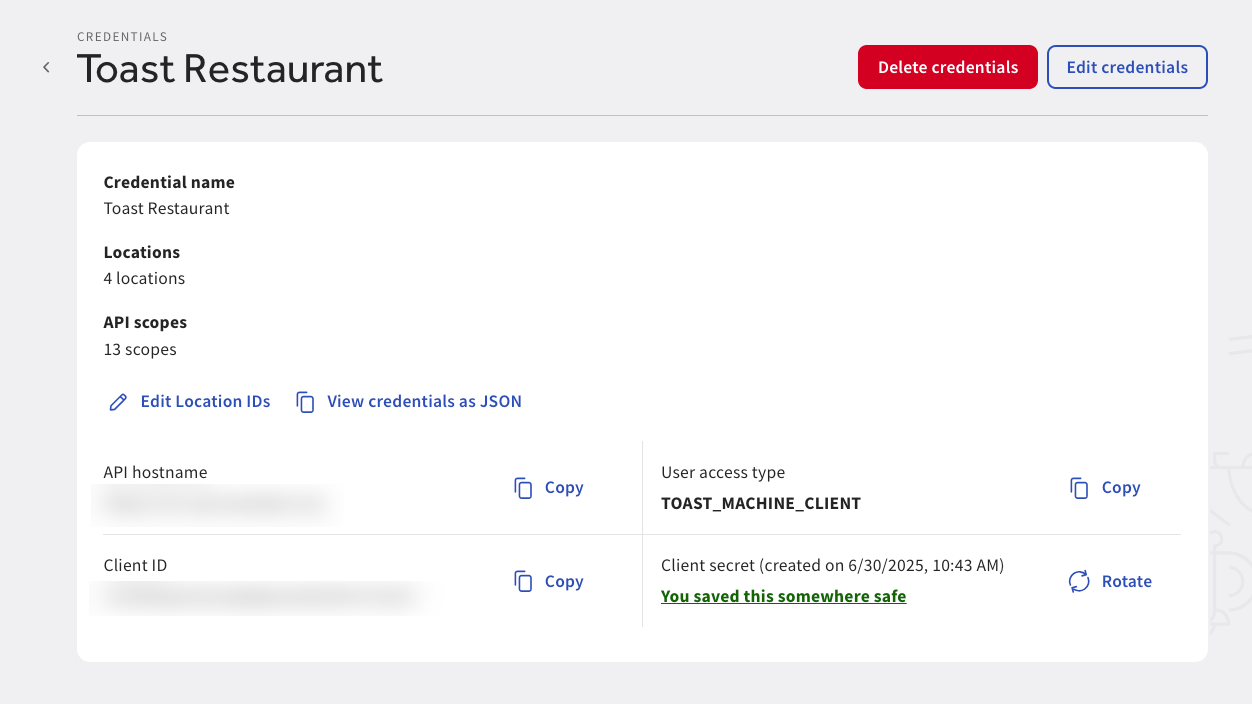
To generate standard API access credentials, you can follow the guide in the Toast docs .
You will be given the following:
API access URL
client id
client secret
Supported data
You can review Toast’s official Postman collection to review what their APIs support.
Our connector currently supports the following data:
Alternate Payment Types
Break Types
Cash Drawers
Cash Management Deposits
Cash Management Entries
Dining Options
Discounts
Employees
Menu Groups
Menu Items
Menu Option Groups
Menus
No Sale Reasons
Orders
Payments
Payout Reasons
Pre Modifier Groups
Pre Modifiers
Premodifier Groups
Premodifiers
Price Groups
Printers
Restaurant Services
Restaurants
Revenue Centers
Sales Categories
Service Areas
Tables
Tax Rates
Tip Withholding
Void Reasons
SFTP exports
Alternatively, Toast does offer the ability to create data exports and access them via SFTP.
Configuration
Configuring SFTP exports in Toast can be cumbersome on the user side. If possible to use the API approach (based on their subscription), that may be simpler.
Generally, the steps are as follows:
The Toast user will need to request SFTP access from Toast (it is typically not enabled by default)
Once Toast provisions the SFTP connection, the user can configure the data exports they want. This is the most tedious part of the configuration.
This is managed directly in the Toast UI under Reports -> Settings -> Data Exports .
Configure the SFTP credentials in Hotglue
From there, Toast will generate the files on a schedule and upload them to SFTP. From there, Hotglue will pick them up and process.
Supported data
Currently, our toast-sftp connector supports importing the following data from the data exports:
Stream Name File Name Format Description accounting_report AccountingReport.xlsExcel Accounting data export with revenue amounts for each GL code all_items_report AllItemsReport.csvCSV Information about all menu items cash_entries CashEntries.csvCSV Information about cash payments check_details CheckDetails.csvCSV Information about checks in orders house_account_export HouseAccountExport.csvCSV Information about house accounts item_selection_details ItemSelectionDetails.csvCSV Information about items ordered kitchen_timings KitchenTimings.csvCSV Information about kitchen tickets menu_export MenuExport_*.jsonJSON Information about menus menu_export_v2 MenuExportV2_*.jsonJSON Enhanced information about menus menu_menus MenuExport*.jsonJSON Toast menu objects (flat, one per menu) menu_groups MenuExport*.jsonJSON Toast menu group objects with parent menu context menu_items MenuExport*.jsonJSON Toast menu item objects with full parent context menu_option_groups MenuExport*.jsonJSON Toast menu option group objects with full parent context menu_option_items MenuExport*.jsonJSON Toast menu option item objects with full parent context menu_prices MenuExport*.jsonJSON Toast menu item price objects with full parent context modifiers_selection_details ModifiersSelectionDetails.csvCSV Information about modifiers applied to items order_details OrderDetails.csvCSV Information about orders payment_details PaymentDetails.csvCSV Information about payments time_entries TimeEntries.csvCSV Information about employee shifts